

Background Eraser: The Ultimate Photo Background Removal App
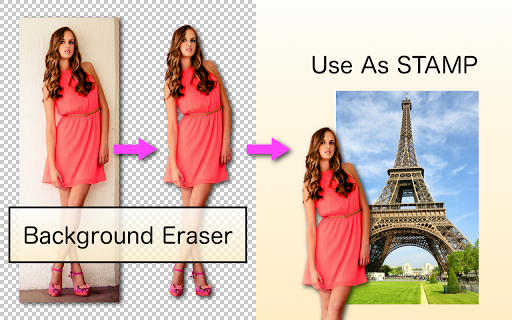
Are you tired of unappealing backgrounds ruining your perfect photos? Whether you're a social media enthusiast, a professional photographer, or someone who loves playing around with images, the Background Eraser app is designed to transform your pictures effortlessly. This powerful yet user-friendly application specializes in cutting out objects and creating transparent backgrounds, enabling you to craft stunning visuals for various creative projects. From making photo collages to designing stickers for messaging apps, Background Eraser offers an array of features to enhance your photo editing experience.
Key Features of Background Eraser
One of the standout features is the innovative "Magic" mode, which intelligently detects the edges of objects within an image to erase backgrounds with remarkable precision. By analyzing contrasts and contours, this mode simplifies the tedious task of manual cutting, saving you time and effort. Additionally, the app provides "Auto" and "Color" modes—both designed to automate the background removal process by identifying and erasing similar pixels automatically. This functionality is particularly vital when aiming for a seamless, transparent background, especially for superimposing images to create professional composite photos. With these tools, you can achieve cleaner, more accurate cutouts that look natural and polished.
User-Friendly Design and Performance
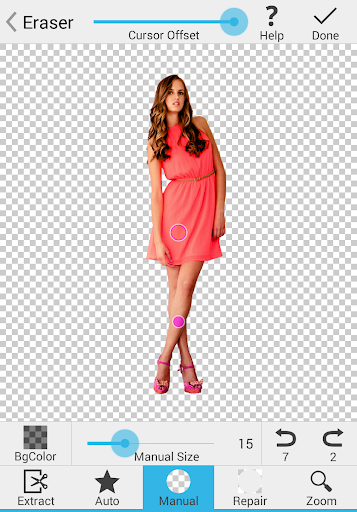
Getting started with Background Eraser is a breeze. The app is available on both Android and iOS platforms, and its intuitive interface ensures that even those new to photo editing can navigate effortlessly. Upon launching, users are welcomed by a clean dashboard where uploading images is straightforward. The auto mode leverages advanced AI technology to detect and erase backgrounds efficiently, while manual adjustments allow you to fine-tune the results if necessary. For instance, if the auto process over-erases areas, the restore tool lets you bring back parts of the image seamlessly. This combination of automation and manual control provides flexibility tailored to your editing style.
Performance and Practical Uses
Thanks to optimized processing algorithms, Background Eraser handles high-resolution images smoothly without long wait times. It offers real-time feedback during editing, making the process feel natural, akin to painting digitally with a brush. The app's ease of use makes it accessible for both beginners and experienced photo editors. While occasional advertisements may appear, a premium ad-free version is available for uninterrupted editing sessions. This app is especially valuable for creating engaging social media content, professional marketing materials, or personal creative projects. Whether you're aiming to craft a stylish collage, develop custom stickers, or showcase your products in a clean setting, Background Eraser provides the tools needed to elevate your visuals.
Conclusion
In today’s visual-driven world, the ability to quickly and accurately remove backgrounds can set your images apart. Background Eraser combines powerful functionality with ease of use, making it a must-have app for anyone looking to enhance their photo editing toolkit. Its intelligent modes—like "Magic", "Auto", and "Color"—allow for precise and effortless background removal, turning ordinary photos into extraordinary showcases. Whether you're creating social media posts, professional portfolios, or fun photo collages, this app helps you achieve stunning results with minimal effort. Discover the convenience and power of Background Eraser and give your images the professional touch they deserve.
Pros
- User-friendly with an intuitive interface
- Supports exporting images in high resolution
- Fast background removal process
- Offers a wide range of editing tools
- Compatible with various image formats
Cons
- Limited features available in the free version
- Advertisements can be disruptive
- Occasional bugs or glitches during editing
- Requires internet connection for certain functionalities
- Premium subscription is relatively costly











