

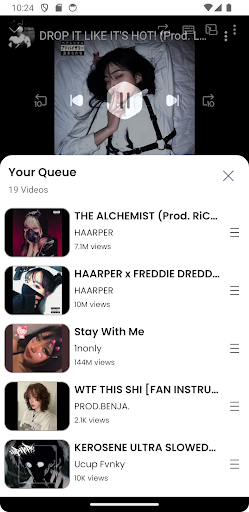
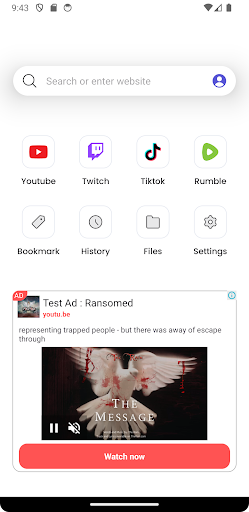
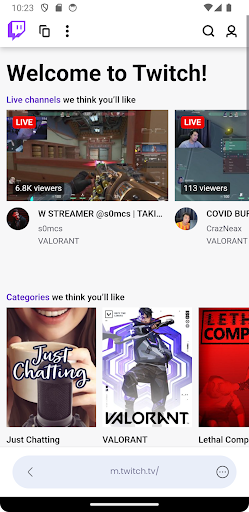
Discover the Ultimate Mobile Video Streaming with Video Lite
Are you searching for an app that delivers a smooth and uninterrupted video streaming experience on your smartphone? Look no further than Video Lite, your all-in-one video website browser designed to maximize performance while keeping your device lightweight. Whether you’re a casual viewer or a dedicated video enthusiast, this innovative application enhances how you enjoy content on the go.
Key Features of Video Lite
All-in-One Video Browser
Seamlessly access a diverse range of popular video websites through a unified platform. With Video Lite, browsing multiple sources becomes effortless, helping you discover new content without switching between different apps or browsers.
Smooth User Experience
The app boasts an intuitive interface that promotes an easy-to-navigate environment, ensuring your streaming sessions are hassle-free. Whether adjusting playback controls or exploring settings, everything is just a tap away, making it suitable for all users regardless of tech skills.
Picture in Picture (PiP) Mode
Stay productive or multitask with the PiP mode. This feature allows you to watch videos in a small, resizable window while using other applications, ensuring uninterrupted viewing even when multitasking on your device.
Sleep Timer
Protect your device’s battery life with the built-in sleep timer. Set the app to automatically close after a certain period, helping conserve energy and preventing excessive data usage during late-night viewing sessions.
Fast Loading & High Efficiency
Enjoy fast loading times and efficient streaming that minimize mobile data consumption. The app adjusts to your connection quality, providing a seamless experience whether you're on Wi-Fi or mobile data.
Personalized Settings
Customize your video viewing preferences, including quality, playback speed, and more, to tailor the experience to your liking. Video Lite adapts to your habits for a more enjoyable and personalized entertainment journey.
Why Choose Video Lite? An In-Depth Look
In today’s digital world, finding an app for streaming videos that combines convenience, efficiency, and affordability is essential. Video Lite stands out as a compact yet powerful solution, catering to those who desire excellent video quality without draining their data plans or device resources.
Enhanced User Experience
From the moment you launch Video Lite, its thoughtful design makes navigation straightforward. The controls are well-organized and easy to use, allowing you to tweak playback speed, switch between formats, or manage downloads with simplicity. This thoughtful interface design ensures a smooth voyage through your favorite content.
Data Saver Mode
The standout feature of Video Lite is its Data Saver Mode. This function intelligently adjusts video quality based on your connection, helping you reduce data usage while still enjoying quality visuals. It’s ideal when traveling, commuting, or in areas with limited internet bandwidth, making your viewing experience both economical and enjoyable.
Offline Viewing & Download Capabilities
Sometimes, internet access isn’t guaranteed. Video Lite accommodates this with its offline viewing feature, allowing users to download videos for later viewing. This flexibility provides entertainment during long commutes, flights, or in areas with poor connectivity, making it a versatile tool for on-the-go entertainment.
Ad-Free Entertainment
Say goodbye to interruptions. Video Lite offers an ad-free experience, enabling you to enjoy your favorite videos without pesky ads breaking your immersion. This enhancement elevates overall satisfaction, especially for those who prefer an ad-free environment.
Transform Your Video Streaming Experience Today
If you’re tired of sluggish apps that drain your data and interrupt your viewing, Video Lite is your perfect companion. Its lightweight design, comprehensive features, and smooth performance make it an indispensable tool for mobile video consumption. Whether you’re a frequent traveler, a busy professional, or simply a fan of streaming, this app ensures your entertainment is always at your fingertips. Download Video Lite now and unlock a world of endless, seamless video adventures!
Pros
- Fast and lightweight video player.
- Supports multiple video formats.
- Ad-free user experience.
- Offline video playback available.
- Customizable playback settings.
Cons
- Limited advanced features.
- No subtitle support.
- Requires frequent updates.
- No cloud sync option.
- Basic user interface design.











