

Discover the Benefits of Downloading Smart Clean Pro
Are you seeking an efficient way to optimize your Android device's performance? Smart Clean Pro is a versatile cleaning application designed to make your device run smoothly and clutter-free. With its comprehensive set of features, it helps you manage unnecessary files, improve privacy, and enhance your user experience. Whether you're looking to clear log files, remove outdated APKs, or free up storage with multimedia management, Smart Clean Pro offers a practical solution tailored to your needs.
Core Features of Smart Clean Pro
Log File Cleanup
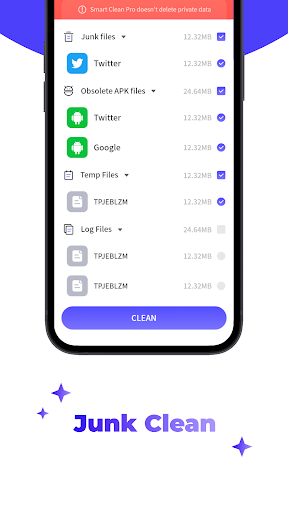
One of the main advantages of Smart Clean Pro is its ability to scan and effortlessly clean up log files stored on your Android device. These files can accumulate over time and might slow down your phone or consume unnecessary storage. The app provides a seamless way to remove these logs, helping your device maintain optimal performance.
Managing APK Files
The app also intelligently detects outdated APK files—the installation files for applications. It allows users to review and decide whether to clean or retain these files, ensuring that leftover installation packages do not take up valuable space.
Media File Control
With Smart Clean Pro, you can scan your device for audio and video files and manually select which ones to delete. This feature helps you organize your media library and only keep the content you truly want, thereby freeing up room for new files or apps.
Additional Useful Features
The app goes beyond simple cleaning by offering multiple practical functionalities:
- Image Compression: Reduces the size of images without compromising quality, saving space without sacrificing visual clarity.
- Notification Blocking: Blocks unnecessary notifications and messages, decluttering your device’s notification bar and enhancing focus.
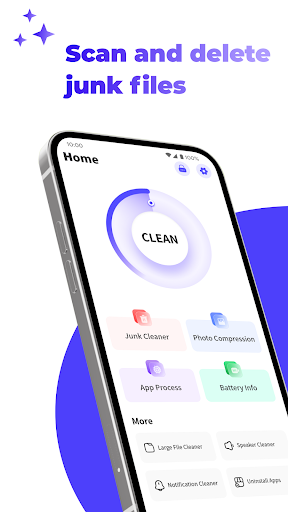
- Intuitive Interface: Boasts a visually appealing design combined with easy-to-understand operations, making decluttering straightforward for users of all levels.
Experience a More Efficient and Organized Device
Using Smart Clean Pro not only simplifies device maintenance but also empowers you to keep your Android phone clean, organized, and running efficiently. Its thoughtful features target common storage issues caused by cache, residual files, and unnecessary media, offering a comprehensive cleaning solution. By integrating various functionalities into one user-friendly app, Smart Clean Pro becomes an essential tool for anyone eager to optimize their mobile experience.
Pros
- User-friendly interface that is easy to navigate
- Wide selection of features available
- Regular updates and improvements
- Good customer support responsiveness
Cons
- Occasional bugs and glitches
- Limited customization options
- Requires a stable internet connection for optimal performance
- Free version has restricted features











