
Introduction to the Move to iOS App
Switching from an Android device to an iPhone has never been easier thanks to the Move to iOS app. Designed with user-friendliness in mind, this application streamlines the process of transferring your data quickly and securely. Whether you're migrating contacts, photos, or messages, Move to iOS offers a reliable solution that covers almost everything necessary for a smooth transition to the Apple ecosystem.
Main Features of the Move to iOS App
Easy and Secure Data Migration
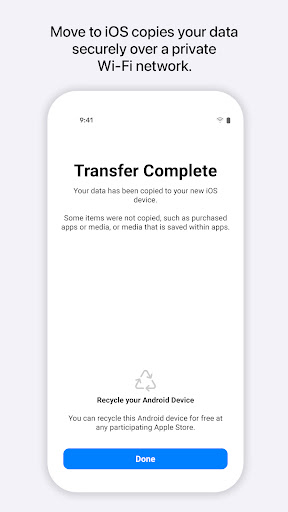
Everything about iOS is crafted to be intuitive, and simplifying the switch from Android is no exception. With just a few simple steps, you can securely migrate your content from your Android device to your new iPhone or iPad. The app creates a private Wi-Fi connection between the two devices, ensuring that all data transfer remains secure and private. You don’t need to pre-save your information elsewhere — the app handles it all seamlessly.
What Content Can You Transfer?
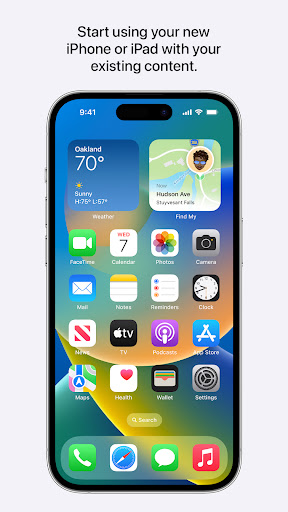
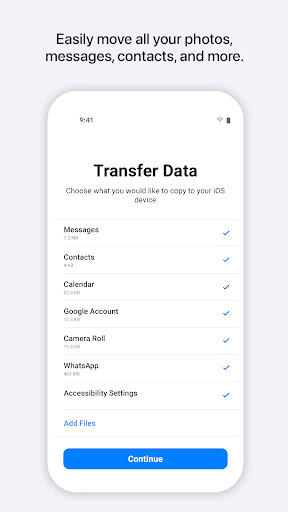
The Move to iOS app supports transferring a comprehensive range of data, making your new device feel familiar right from the start. It can transfer •Contacts, Message history, Camera photos and videos, Mail accounts, Calendars, and even WhatsApp content. Plus, your wallpapers are included, so your new device reflects your style immediately. While some elements like apps and music will need to be re-downloaded, most of your essential information makes the leap effortlessly, preserving your personal content and setup preferences.
User-Friendly Experience
Using Move to iOS is straightforward and does not require technical expertise. Once both devices are connected via a private Wi-Fi network, you'll be prompted to enter a •security code displayed on your Android device to authorize the transfer. The process is quick, and you can relax while the app does its work. After completion, you're encouraged to recycle your old Android phone, promoting environmental sustainability and giving your old device a new purpose.
Benefits of Using Move to iOS
Smooth Transition from Android to iOS
Switching phones can be a hassle, but Move to iOS simplifies the process considerably. Installing the app on your Android device is all it takes to initiate the transfer. The app establishes a secure, private Wi-Fi connection, ensuring your data moves safely between devices without hiccups or privacy concerns. Whether you're transferring contacts, message histories, or multimedia files, the app makes the entire experience less stressful and more manageable.
Time-Efficient and Reliable
The transfer speed varies depending on how much data you’re moving, but overall, the process tends to be quite swift. Plus, the app keeps you informed throughout and prompts you to give your old device a new purpose afterward, which is a thoughtful touch. Despite occasional connection issues that might require retries, the overall reliability of Move to iOS remains high, and many users find it a worthwhile tool for their migration needs.
Eco-Friendly and Practical
Beyond just making data transfer easy, Move to iOS encourages sustainable practices by prompting users to recycle their old Android phones. This small but meaningful feature helps reduce electronic waste and promotes responsible device reuse, aligning well with environmentally conscious consumers.
Final Thoughts
If you're contemplating a switch from an Android device to an iPhone, Move to iOS is an essential app that simplifies and secures the transition. Its user-centric design, broad data transfer capabilities, and speed make it an excellent choice for anyone looking to embrace the iOS ecosystem without the headache of manual data migration. While minor connection issues may occur, the overall experience is positive and efficient.
In conclusion, Move to iOS effectively transforms what could be a daunting task into a hassle-free journey. So, if you’re ready to explore the benefits of iPhone's seamless interface, app ecosystem, and innovative features, give Move to iOS a try — your new device awaits a familiar, personalized start!
Pros
- Effortlessly facilitates data transfer from Android to iOS.
- Intuitive and user-friendly interface.
- Supports a variety of data types.
- No cost involved; free to use without in-app purchases.
- Ensures reliable and secure data transfers.
Cons
- Requires both devices to be connected to Wi-Fi network.
- Some data types may not be transferable.
- Transfer speed can be slow when handling large data sets.
- Only compatible with new or reset iOS devices.
- Occasional connectivity problems may occur.











