

Microsoft Defender: Antivirus – Your All-in-One Digital Security Solution
Microsoft Defender is an innovative online security application designed to protect your digital life and work environment. Whether you're an individual or a family user, Microsoft Defender offers comprehensive security features that help you stay ahead of cyber threats. Available with a Microsoft 365 Personal or Family subscription, this app provides a user-friendly interface coupled with powerful tools to safeguard your devices, personal identity, and privacy.
Key Features of Microsoft Defender for Individuals
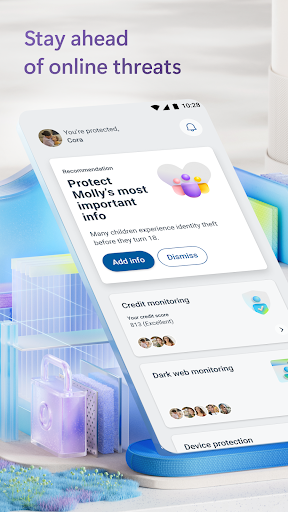
Microsoft Defender for individuals is an all-in-one security app that simplifies device protection. It actively defends your personal identity, privacy, and devices through advanced antivirus scanning, threat monitoring, and proactive alerts. The app is designed to be easy to use, making cybersecurity accessible even for those without technical expertise. When you subscribe to Microsoft 365 Personal or Family, you unlock access to these vital security tools that work seamlessly across multiple devices.
Manage Your Security in One Convenient Place
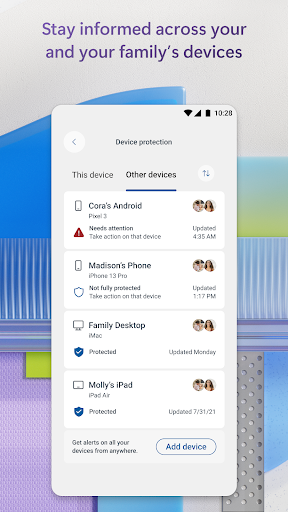
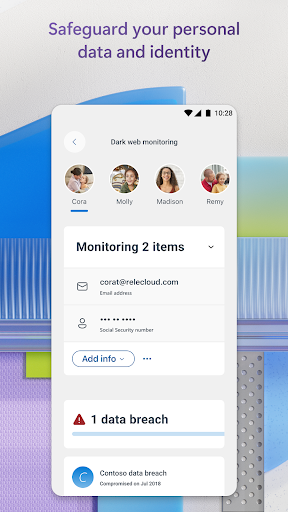
With Microsoft Defender, you can effortlessly check the security status of your family’s devices and personal identities. The app provides timely threat alerts and offers recommended actions to resolve issues swiftly. This centralized approach to security management ensures you’re always aware of potential risks, empowering you to take quick action and maintain a safer digital environment for your loved ones.
Protect Your Family’s Personal Information
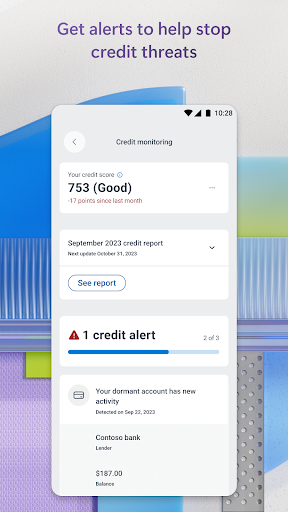
A standout feature is the continuous monitoring of your and your family’s personal identities and credit scores. Microsoft Defender keeps a vigilant eye on your digital footprint and alerts you about any suspicious activity. If identity theft occurs, expert assistance is available around the clock to help restore your identity. Additionally, the app provides identity insurance coverage, up to USD 1 million, helping to offset restoration and recovery costs, including up to USD 100,000 for lost funds.
Trusted Device Protection
Keeping your devices secure against evolving threats is a core aspect of Microsoft Defender. The app alerts you when malicious apps are detected and helps you remove threats efficiently. It also continually scans links before you click on them, offering an extra layer of protection from harmful malicious links and phishing attempts. This proactive approach ensures your mobile devices, PCs, and other platforms remain safeguarded from cyber attacks.
Microsoft Defender for Endpoint: Advanced Enterprise Security
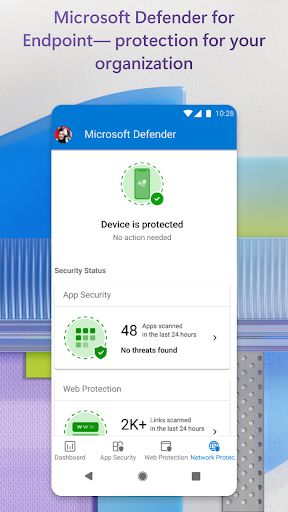
For business users, Microsoft Defender extends its protection capabilities with Microsoft Defender for Endpoint. This cloud-powered solution offers enterprise-grade security to protect against ransomware, file-less malware, and complex cyberattacks across multiple platforms. Its accessibility services automatically block malicious websites accessed via SMS, messaging apps, browsers, or email, enhancing security for corporate environments and remote work setups.
Why Choose Microsoft Defender: Antivirus?
If you're contemplating a switch or seeking to enhance your current security setup, Microsoft Defender stands out for several reasons. Its real-time protection capabilities are always active, ensuring threats are detected and neutralized promptly. The app’s lightweight design means it runs efficiently without slowing down your device, maintaining optimal performance. Its integration with the Microsoft 365 ecosystem makes managing security across devices seamless—perfect for users already invested in Microsoft's productivity tools.
Final Thoughts
In summary, Microsoft Defender: Antivirus is an effective, reliable, and user-friendly security application suitable for both personal use and organizational deployment. With features ranging from active threat monitoring, personal identity protection, to device safeguarding, it provides peace of mind in today’s increasingly digital world. Best of all, it’s free when bundled with a Microsoft 365 subscription, making top-tier security accessible to everyone. Whether you are a casual user or managing a family’s digital safety, Microsoft Defender is a smart choice to keep your devices, data, and identity protected without hassle.
Pros
- Real-time threat detection capabilities.
- Seamless integration with Windows OS.
- Regular updates and support from Microsoft.
- User-friendly interface for easy navigation.
- No additional cost for Windows users.
Cons
- Limited features compared to paid antivirus.
- Occasional false positive detections.
- High system resource utilization.
- Limited cross-platform support.
- Basic features may not satisfy advanced users.











