


Welcome to the Greeting Card Design App: Your Ultimate Tool for Custom Creations
Are you tired of browsing stores for the perfect greeting card or invitation letter, only to find that none quite match your vision? If you've ever felt limited by the lack of good design options or have struggled to craft personalized cards that truly express your sentiments, then the Greeting Card Design app is exactly what you need. Designed to simplify the process of creating beautiful, customized greeting cards and invitations, this app is a must-have for anyone seeking to add a personal touch to their messages without the hassle of complex software or professional design skills.
Extensive Collection of Templates for Every Occasion
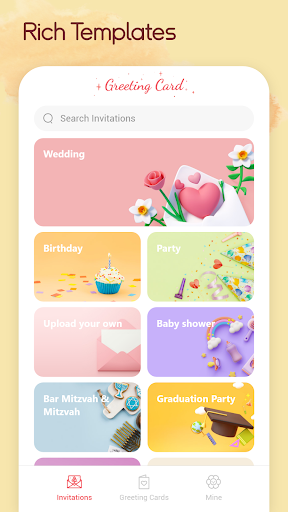
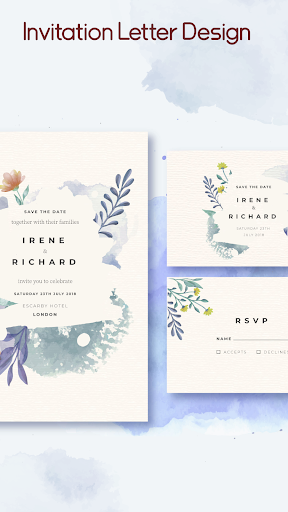
One of the standout features of Greeting Card Design is its vast array of pre-installed templates. No matter what the occasion—be it birthdays, anniversaries, holidays, or special events—the app offers a variety of stylish and modern templates to choose from. These templates are thoughtfully designed to cater to different tastes, ensuring that everyone can find something that resonates with their personal style. This extensive template library eliminates the need to start from scratch, allowing users to craft professional-looking greeting cards swiftly and effortlessly.
Customization Options to Make Your Card Truly Unique
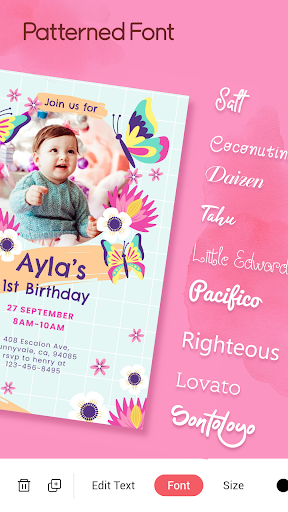
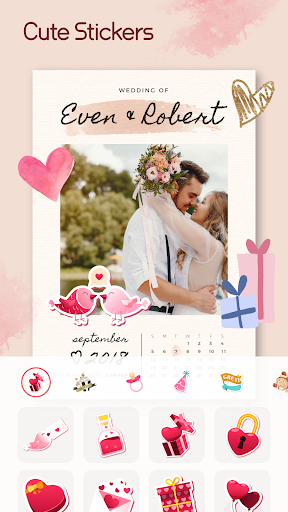
What truly sets Greeting Card Design apart is its comprehensive customization features. Users can modify text content, select from multiple fonts and colors, and even add their own images or stickers to enhance the visual appeal. Whether you want a playful, elegant, or minimalist aesthetic, the app provides the tools to bring your creative ideas to life. Its user-friendly interface ensures that even beginners can navigate effortlessly, adjusting various elements with just a few taps to create personalized greeting cards that stand out.
Easy Sharing and Export Features
Once your masterpiece is complete, sharing your custom greeting card is seamless. The app allows you to send your creations via email, text message, or directly share them on popular social media platforms. Additionally, if you prefer a tangible card, Greeting Card Design offers an option to export your design as a PDF file, perfect for high-quality printing. This flexibility makes it easy to send your personalized greetings to loved ones in the most convenient way, whether digitally or in print.
Additional Features for Convenience and Planning
Another useful aspect of the Greeting Card Design app is its calendar integration. This feature helps you keep track of important dates, such as birthdays and anniversaries, ensuring that you never miss an occasion to send a thoughtful message. The app serves as both a creative tool and a planning assistant, making it easier to stay connected with friends and family throughout the year. Its intuitive interface and helpful features make the process of designing and sharing greeting cards a joyful experience, whether you're preparing last-minute surprises or planning well in advance.
Final Thoughts: A Must-Have for Personal and Effortless Greetings
In summary, Greeting Card Design is an excellent app that simplifies the process of making personalized greeting cards and invitations. With its extensive templates, versatile customization options, and easy sharing features, it empowers users to craft heartfelt messages with minimal effort. Whether you’re a casual user wanting to add a special touch to your greetings or someone who loves to create and share creative designs, this app provides all the tools needed for a delightful experience. Perfect for creating memorable cards for any occasion, Greeting Card Design helps you express yourself and spread joy, one beautifully crafted card at a time.
Pros
- User-friendly interface for easy design
- Wide variety of templates to choose from
- High-quality graphics and text options
- Offers customizability for a personal touch
- Fast export and sharing capabilities
Cons
- Limited free features without a subscription
- Occasional app crashes reported
- Some advertisements can be disruptive
- Requires internet connection for full functionality
- Limited support for advanced editing features











