



Introduction to Goblin Tools
Core Features and Tools
The Goblin Tools app encompasses a variety of innovative features, each designed to enhance productivity and organization. Some of the standout tools include:
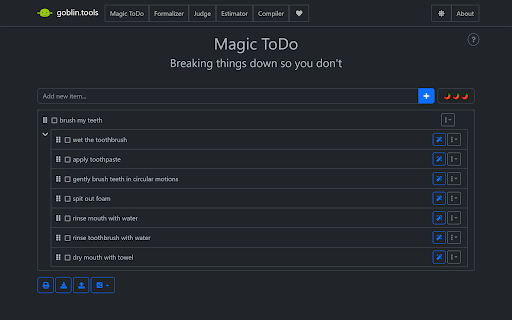
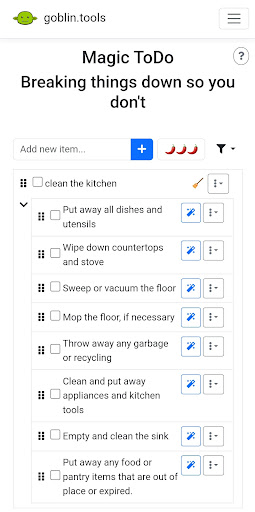
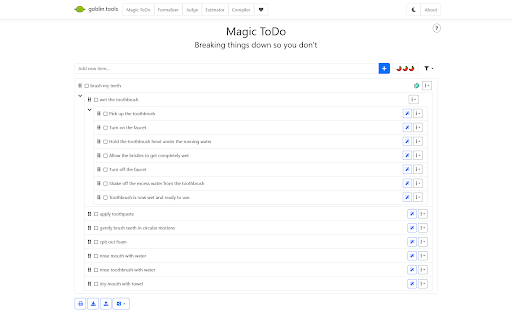
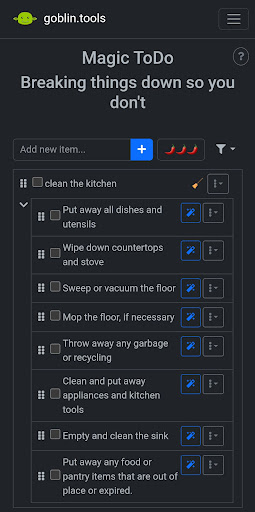
- • Magic Todo list: This feature automatically breaks down complex tasks into clear, actionable steps, helping users manage even the most daunting to-do lists effectively.
- • The Formalizer: Transforms your language into more formal, sociable, or concise versions, making communication smoother in different contexts.
- • The Professor: Explains any topic with detailed examples, making learning new concepts accessible and straightforward.
- • The Judge: Assists in interpreting tones and emotions in communication, supporting better understanding of social cues.
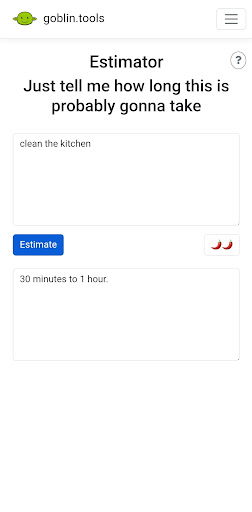
- • The Estimator: Guesses the timeframe required for a specific activity, aiding in realistic planning.
- • The Compiler: Converts large amounts of unorganized thoughts or braindumps into structured, actionable tasks.
- • The Chef: Turns descriptions of available ingredients and tools into actual recipes, inspiring culinary creativity.
And these are just a few of the many tools available, with more to be added in future updates. All tools are designed to be simple yet effective, making daily management easier for users of all backgrounds.
Why Choose Goblin Tools?
If you’re someone looking for a way to make everyday tasks less overwhelming, Goblin Tools could be your new favorite productivity companion. Its intuitive, user-friendly interface requires no technical expertise, enabling even beginners to navigate seamlessly. The app provides a clean layout that emphasizes focus on essential tasks rather than cluttered menus or complicated settings.
One of the most appealing aspects is its ability to help you break down large projects into smaller, manageable steps—turning chaos into clarity. The gentle reminders keep you on track without unnecessary alarms disrupting your flow, promoting a stress-free productivity experience.
Seamless Synchronization and Personal Experience
Another advantage is the cross-device synchronization feature, which ensures your tasks stay updated whether you’re on a smartphone, tablet, or laptop. This flexibility means you can access your productivity tools anytime and anywhere, making it easier to stay organized throughout the day.
Many users, including myself, have found Goblin Tools to be a trusted sidekick in managing daily responsibilities. Whether working on complex projects or simply trying to navigate a busy weekday, this app provides reliable support without unnecessary complexity.
Overall, Goblin Tools combines practicality with a touch of magic, offering an engaging way to boost productivity and reduce stress. Whether you’re a student, professional, or someone seeking better organization, this app might just be the secret weapon you need to conquer your daily challenges effectively.
Pros
- User-friendly interface
- Customizable settings
- Wide range of goblin tools
- Regular updates
- Offline mode available
Cons
- Limited free version
- Requires internet for updates
- Occasional bugs
- Ads in free version
- In-app purchases needed











