

Game Booster Power GFX Lag Fix: Your Ultimate Gaming Sidekick
Are you tired of lag spikes, frame drops, and performance hiccups ruining your intense gaming sessions? If so, Game Booster Power GFX Lag Fix is the perfect tool to elevate your mobile gaming experience. Designed to optimize your device's performance seamlessly, this all-in-one app combines game launching, lag analysis, and graphical optimization features to ensure smoother gameplay. Whether you’re playing demanding games or casual titles, this app aims to boost your device's capabilities swiftly and efficiently.
Key Features of Game Booster Power GFX Lag Fix
This application offers a comprehensive suite of features tailored to meet gamers' needs. It allows you to automatically boost your device by closing background apps that hog memory and CPU resources, freeing up vital system resources for gaming. Its one-touch boost functionality makes it incredibly user-friendly, enabling users to optimize performance instantly.
Game Launcher and Quick Access
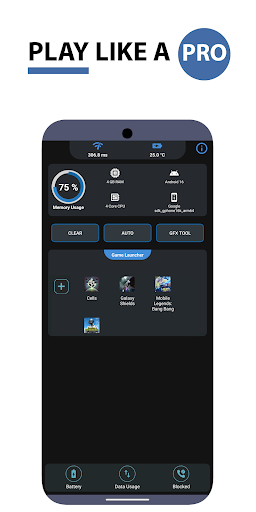
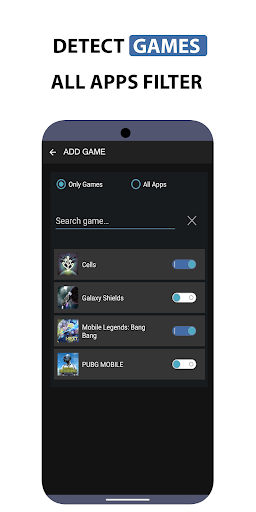
Launch your favorite games directly from a centralized Game Launcher interface, reducing load times and providing quick access to your titles.
Lag Analysis & Network Monitoring
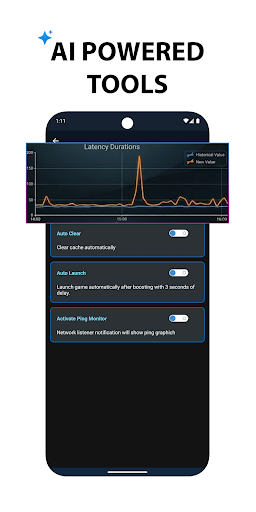
The app features a network listener lag analysis tool that monitors network latency in real-time, helping you identify and troubleshoot internet-related issues that cause lag.
Performance Monitoring & Optimization
Keep track of your device's hardware metrics, such as memory load, battery temperature, and network latency. With these insights, you can fine-tune your gaming environment for peak performance.
GFX Benchmark & Graphics Settings
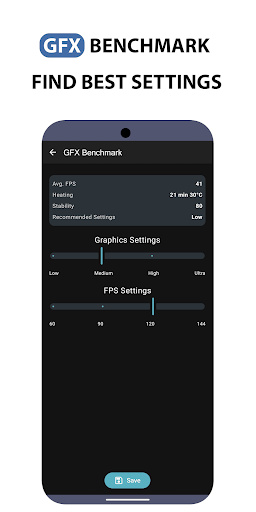
The built-in GFX BenchMark Tool assesses your device's graphics capabilities to recommend the highest possible FPS settings, so your games look great and run smoothly. As technology advances, more games and settings will be added to the app in future updates.
Permissions & Security
The app requests Internet permission for network monitoring and kill background apps permission to optimize performance effectively. Rest assured, it’s designed with user security in mind.
Why Gamers Love Game Booster Power GFX Lag Fix
If you've ever experienced frustrating lag during critical moments in your game, this app could be a game-changer. From the moment you open it, the sleek and intuitive interface makes setup a breeze—even for users unfamiliar with device optimization tools. The easy-to-navigate controls and automated processes ensure that enhancing your gaming performance doesn’t require technical expertise.
Auto-Boost and Real-Time Monitoring
One of the standout features is the auto-boost function, which automatically optimizes your device settings without manual intervention. The real-time performance monitoring feature allows you to watch system metrics live, giving you transparency into how your device handles game load.
Temperature & Performance Management
Gamer safety is also prioritized, with temperature monitoring to prevent overheating during long gaming sessions. The app ensures your device runs within safe thermal limits, thereby extending hardware longevity while maintaining performance.
Real World Results
Does it really make a difference? Many users report that games which once experienced stuttering and lag now run much more smoothly after using this app. While it might not turn your aging device into a gaming beast, it significantly improves gaming performance by maximizing hardware utilization.
Final Verdict: Should You Use Game Booster Power GFX Lag Fix?
If lag spikes and low frame rates have ever marred your gaming fun, Game Booster Power GFX Lag Fix is a highly recommended tool. Its intuitive interface, comprehensive features, and genuine performance boost make it a valuable addition to your gaming toolkit. Whether you’re a casual gamer or a competitive player, optimizing your device's performance can lead to a more immersive and frustration-free gaming experience.
Pros
- Enhances game performance effectively
- User-friendly interface for simple navigation
- Extends device battery life
- Minimizes game lag and stuttering
- Supported by most Android games
Cons
- May not be compatible with all devices
- Includes in-app advertisements
- Limited features in the free version
- Requires internet connectivity for full features
- Can sometimes crash on older devices











