

Introducing Fine Lock: The Ultimate Customization Tool for Samsung Devices
Fine Lock is a dedicated community-driven application designed to enhance the personalization of Samsung smartphones. This app operates independently and has no official affiliation with Samsung Electronics or Samsung Mobile. It serves as a supplementary tool that allows users to access and utilize Good Lock and Galaxy Labs modules more conveniently, especially in regions where these official tools are not readily available or may not function properly.
Designed specifically for Samsung devices running official versions of Android Oreo and One UI, Fine Lock facilitates customization by acting as a launcher for various modules. However, it is important to note that it does not support Samsung devices that operate on AOSP OS builds, such as LineageOS. Users should also be aware of policy restrictions: due to Google Play's guidelines, Fine Lock cannot download any modules directly. Instead, users are encouraged to obtain the latest APK modules from trusted sources like APKMirror or Sammobile.
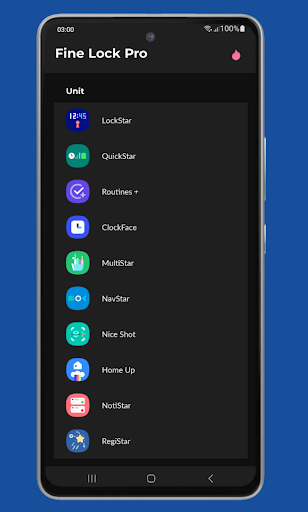
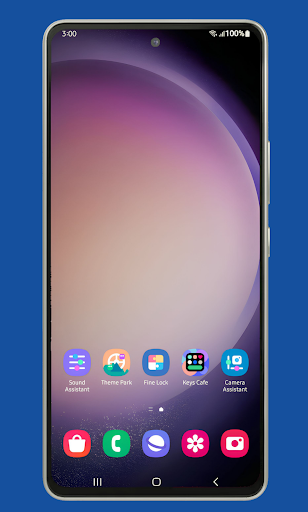
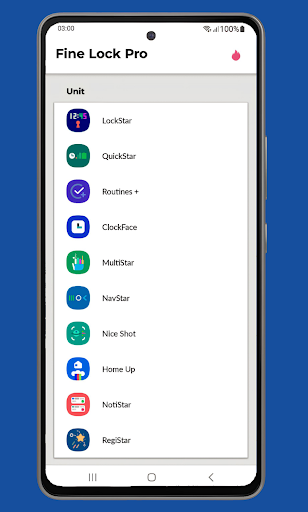
Key features of Fine Lock include module app shortcuts directly on the home screen, background checks for updates, the ability to hide modules that are not installed, and a dynamic wallpaper feature that adapts based on the device's Dark/Night modes. To enjoy these capabilities, your device must run on Android 9 or later with scheduled Dark/Night modes enabled.
Before making any purchase, ensure you have the latest version of Fine Lock installed. If the PRO features are not unlocked after 60 minutes post-purchase, users should contact support with their Order ID, which starts with GPA, found in an email from Google Play. The app is optimized for Samsung devices running official Samsung Android 8 and Android 9+ with One UI, and it may crash or not work properly on devices from other brands or custom ROMs. Users with incompatible devices should uninstall the app.
The app's engaging screenshots are courtesy of marik6it.
Why Fine Lock Reigns Supreme for Samsung Customization
Imagine owning a Samsung device and yearning to customize it beyond the standard settings. Fine Lock serves as your gateway to a new realm of personalization and advanced functionality. If you’re passionate about tweaking every aspect of your smartphone, this app is a must-have addition to your device toolkit.
Let’s explore what makes Fine Lock stand out. This innovative app acts as a bridge to access Samsung’s Good Lock modules, which are secret weapons for tailoring your device’s look and feel. These modules allow extensive customization options—from the lock screen to notification panels—giving you features that many Android enthusiasts dream of. Carefully designed, Fine Lock simplifies the process, making advanced personalization accessible even for users with minimal technical experience.
Getting Started with Fine Lock
Getting started is straightforward. Simply download Fine Lock from the Google Play Store, and you're ready to go. Since it’s a third-party app, you will need to manually install desired Good Lock modules. The app provides direct links, making it easy to find and install official modules from trusted sources like APKMirror or Sammobile. This process ensures you can customize your Samsung device’s UI using modules like Task Changer or LockStar.
Outstanding Features of Fine Lock
One of the most compelling aspects of Fine Lock is its ability to let you selectively activate and customize specific modules. Whether you want to optimize your task manager or overhaul your lock screen aesthetics, the app offers flexible options. For instance, the Task Changer module dramatically reimagines your recent apps menu, while the LockStar module allows you to craft unique lock screen styles. The user interface is intuitive, ensuring that even newcomers can navigate and personalize their devices with ease.
Is Fine Lock Worth It?
If customization is your passion, Fine Lock is worth every penny. It provides a vast array of options leading to an enriched user experience—making your Samsung device truly feel like your own. The ability to change themes, lock screens, and modules frequently keeps your device fresh and exciting. Keep in mind, though, that periodically, the app relies on Samsung’s updates to keep modules functioning well, but the developer actively maintains compatibility with the latest firmware versions.
Final Thoughts
In summary, Fine Lock is a powerful tool that unlocks a new level of personal customization for Samsung users. Whether you want to tweak your lock screen, organize your tasks, or enjoy dynamic wallpapers, this app opens up a universe of possibilities. It’s especially invaluable for those who love to experiment and customize their devices beyond the default settings. If you’re ready to elevate your Samsung experience, giving Fine Lock a try is highly recommended. Your device will thank you for it.
Pros
- Seamless integration with Samsung devices
- User-friendly interface
- Customizable lock screen features
- Supports various widgets
- Fast performance
Cons
- Limited to Samsung devices only
- Paid features can be expensive
- Occasional bugs with updates
- Requires frequent app permissions
- No support for non-Samsung devices











