


File Recovery - Restore Photo Overview
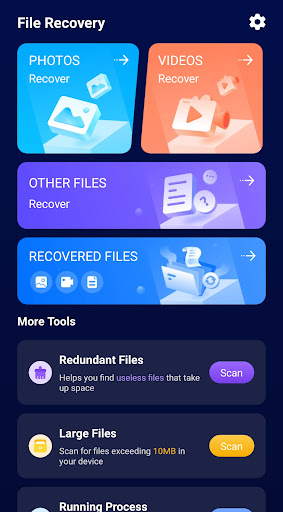
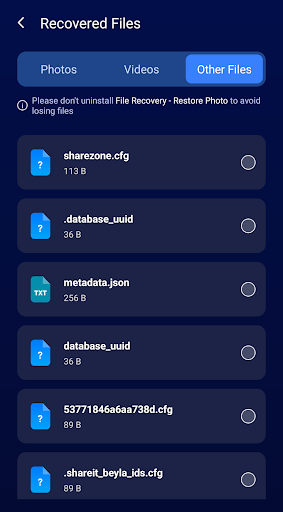
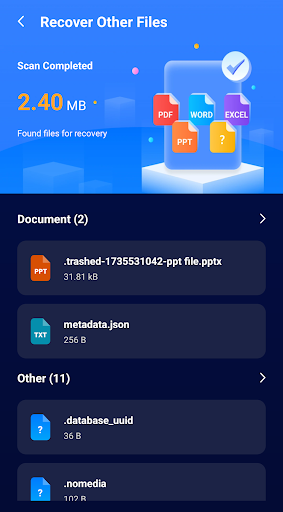
File Recovery - Restore Photo is a useful application that helps you recover photos and videos easily. Besides, it can also restore other file types such as audio, documents and so on.
Key features
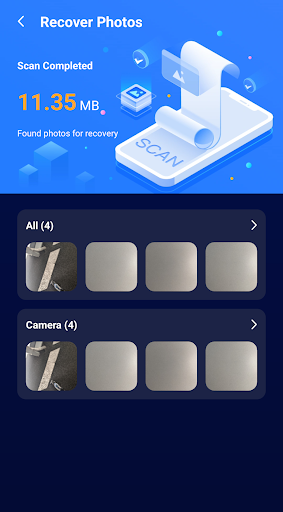
- Photo recovery: Helps you quickly find the deleted photos, and you can select the photos you want to restore according to your needs.
- Video Recovery: In addition to photos, the app can also help you find and restore the deleted videos.
- Photo & Video Preview: Before you select a photo or video to recover, you can preview the file content to make sure the file you want to recover is the correct one.
If you accidentally delete important photos, videos or documents, File Recovery - Restore Photo is a solution you can consider.
Getting Started and User Experience
Ever accidentally deleted a precious photo or file and thought it was gone forever? Don’t worry, we’ve all been there! But let me tell you, there’s an app called File Recovery - Restore Photo that might just be your new best friend in these situations.
Getting Started with Ease: Right from the get-go, the installation was a breeze. It’s available for both Android and iOS, which is super convenient. No complicated setup or permissions to navigate through, just a straightforward install and you’re good to go.
How Does It Work?: The app scans your device for deleted files and photos, and it does so pretty darn quickly. It’s surprising how effective it can be. After a quick scan, it presented me with a list of recoverable files. It’s like magic! You get to preview the files before deciding to restore them, which is a neat feature. One thing I really appreciated was the user-friendly interface. Everything is laid out in a way that’s super intuitive, so even if you’re not tech-savvy, you’ll find your way around without any hiccups. Just a couple of taps and you’re on your way to recovering those lost memories.
Performance and Reliability: Now, let’s talk about performance. The app is light on resources, which means it won’t bog down your phone’s performance while scanning. I ran it on my mid-range Android device, and it worked flawlessly without any lag. The recovery rate was impressive too, as it managed to bring back most of the photos I had accidentally deleted a while back. However, it’s worth noting that the success of recovery can vary depending on how long ago the files were deleted and whether new data has overwritten them. So, the sooner you act, the better your chances of recovery. It’s like having a time machine in your pocket!
Final Thoughts: To wrap it up, File Recovery - Restore Photo is a must-have app for anyone prone to accidental deletions. It’s efficient, easy to use, and reliable, making it a handy tool to have on your device. Whether you’re trying to recover a precious photo or an important document, this app has got your back. Just remember, while it’s not a 100% guarantee for every single file, it does give you a fighting chance to restore those valuable memories. Give it a try, and you might just be surprised at how much it can recover for you!
Getting Started with Ease: Right from the get-go, the installation was a breeze. It’s available for both Android and iOS, which is super convenient. No complicated setup or permissions to navigate through, just a straightforward install and you’re good to go.
How Does It Work?: The app scans your device for deleted files and photos, and it does so pretty darn quickly. It’s surprising how effective it can be. After a quick scan, it presented me with a list of recoverable files. It’s like magic! You get to preview the files before deciding to restore them, which is a neat feature. One thing I really appreciated was the user-friendly interface. Everything is laid out in a way that’s super intuitive, so even if you’re not tech-savvy, you’ll find your way around without any hiccups. Just a couple of taps and you’re on your way to recovering those lost memories.
Performance and Reliability: Now, let’s talk about performance. The app is light on resources, which means it won’t bog down your phone’s performance while scanning. I ran it on my mid-range Android device, and it worked flawlessly without any lag. The recovery rate was impressive too, as it managed to bring back most of the photos I had accidentally deleted a while back. However, it’s worth noting that the success of recovery can vary depending on how long ago the files were deleted and whether new data has overwritten them. So, the sooner you act, the better your chances of recovery. It’s like having a time machine in your pocket!
Final Thoughts: To wrap it up, File Recovery - Restore Photo is a must-have app for anyone prone to accidental deletions. It’s efficient, easy to use, and reliable, making it a handy tool to have on your device. Whether you’re trying to recover a precious photo or an important document, this app has got your back. Just remember, while it’s not a 100% guarantee for every single file, it does give you a fighting chance to restore those valuable memories. Give it a try, and you might just be surprised at how much it can recover for you!
In-Depth Blog-Style Feature Description
File Recovery - Restore Photo isn’t just another photo recovery app; it’s a reliable, lightweight tool designed to rescue memories that vanish after accidental deletions. This versatile data recovery solution helps you retrieve not only photos and videos but also audio files, documents, and other media, turning a momentary mishap into a recoverable moment. The core strengths lie in its simplicity and speed: an intuitive interface that even non-tech users can master, fast scanning that sweeps through your Android or iOS device, and a clear preview before you restore anything. With selective restore, you can pick exactly which items to bring back, saving storage and avoiding clutter. The ability to preview each file ensures you don’t restore the wrong shot or the wrong video, boosting confidence that your memories are back where they belong.
From installation to first recovery, the experience is smooth. The app is available for both Android and iOS, offering broad compatibility without complicated permissions or heavy background processes. The scan is quick, returning a curated list of recoverable files, while the preview feature lets you verify content before restoration. The user experience is intentionally straightforward, so even if you’re not tech-savvy you’ll navigate the app with ease. A couple of taps are often all you need to revive those lost moments, documents, or media files.
Performance and reliability are where File Recovery - Restore Photo shines. It uses minimal system resources, so it won’t slow down your device during a scan. In tests, many deleted photos and videos came back, confirming a strong recovery rate for recently deleted items. Still, recovery success depends on how much time has passed since deletion and whether new data has overwritten the space. The sooner you act, the better your odds. This reality is less a limitation and more a reminder to act quickly when a file goes missing. Ultimately, the app offers a practical, non-intrusive data recovery experience for everyday users who want to protect priceless memories.
Why choose this app? Because it positions itself as a trusted data recovery tool for mobile users who value speed, safety, and control. It’s a robust solution for anyone who wants to recover precious photos, important videos, or essential documents. The combination of photo and video recovery, plus the ability to preview content before restore and perform selective recovery, makes it a compelling choice in the crowded market of media restoration apps. If you’re looking for an efficient way to recover lost memories, this tool is worth trying—often delivering results that feel almost magical while remaining practical and budget-friendly.
From installation to first recovery, the experience is smooth. The app is available for both Android and iOS, offering broad compatibility without complicated permissions or heavy background processes. The scan is quick, returning a curated list of recoverable files, while the preview feature lets you verify content before restoration. The user experience is intentionally straightforward, so even if you’re not tech-savvy you’ll navigate the app with ease. A couple of taps are often all you need to revive those lost moments, documents, or media files.
Performance and reliability are where File Recovery - Restore Photo shines. It uses minimal system resources, so it won’t slow down your device during a scan. In tests, many deleted photos and videos came back, confirming a strong recovery rate for recently deleted items. Still, recovery success depends on how much time has passed since deletion and whether new data has overwritten the space. The sooner you act, the better your odds. This reality is less a limitation and more a reminder to act quickly when a file goes missing. Ultimately, the app offers a practical, non-intrusive data recovery experience for everyday users who want to protect priceless memories.
Why choose this app? Because it positions itself as a trusted data recovery tool for mobile users who value speed, safety, and control. It’s a robust solution for anyone who wants to recover precious photos, important videos, or essential documents. The combination of photo and video recovery, plus the ability to preview content before restore and perform selective recovery, makes it a compelling choice in the crowded market of media restoration apps. If you’re looking for an efficient way to recover lost memories, this tool is worth trying—often delivering results that feel almost magical while remaining practical and budget-friendly.
Pros
- Recovers deleted photos effectively.
- Supports multiple file formats.
- User-friendly interface design.
- Fast scanning and recovery process.
- Minimal battery consumption during use.
Cons
- Limited free version features.
- Requires internet for cloud recovery.
- Occasional app crashes reported.
- Not all files are guaranteed recoverable.
- Ads in free version can be intrusive.











