
Why Choose an Emoji Battery Widget for Your Home Screen?
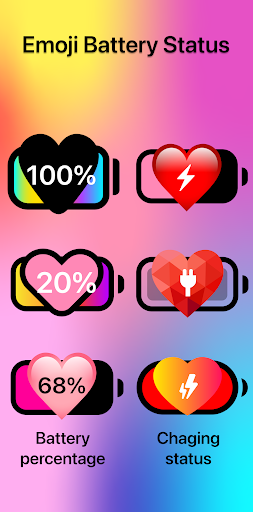
Your phone’s battery status is something you check dozens of times a day. Why not make that quick glance a delightful experience? The Emoji Battery Widget brings a fresh, fun twist to battery monitoring. Instead of a plain, monotonous battery bar, this widget lets you add a beautiful and so cute emoji battery right to your phone’s home screen. Every time you unlock your device, you’ll see a cheerful, expressive emoji that reflects your current battery level – turning a mundane routine into a small moment of joy.
A Truly Adorable Way to Display Your Battery Status
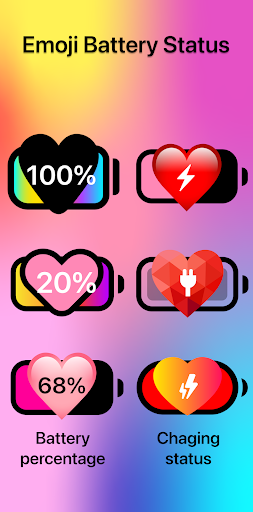
Imagine having a cute emoji battery that changes its expression based on how much power you have left. Whether it’s a smiling face when you’re fully charged, a winking emoji at 50%, or a sleepy face when you’re running low – this widget makes your battery status instantly readable and endlessly charming. It’s more than just a tool; it’s a tiny piece of personality for your phone. The visual appeal makes it perfect for anyone who loves playful phone customization and wants their device to reflect their own vibrant style.
Beyond its irresistible cuteness, the widget is designed to be unobtrusive and informative at a glance. You’ll never have to guess your power level again, because the adorable battery indicator is always right there – clear, visible, and always with a touch of charm.
Key Features of the Emoji Battery Widget
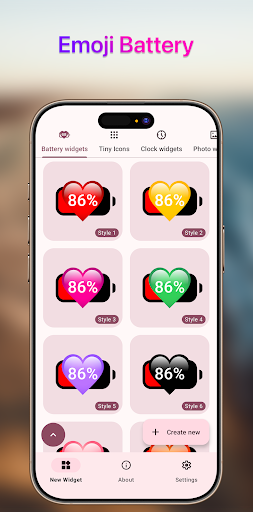
Beautiful and so cute emoji battery – This is the heart of the widget. It comes with a wide array of carefully designed emoji faces and styles, each one bursting with personality. The graphics are crisp, colorful, and optimized for all screen resolutions, ensuring they look stunning on any device.
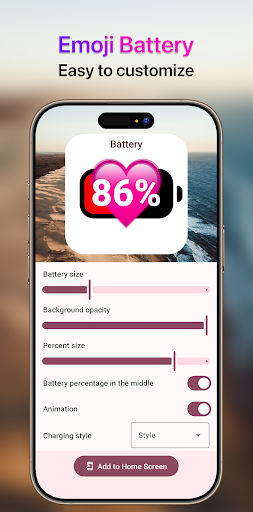
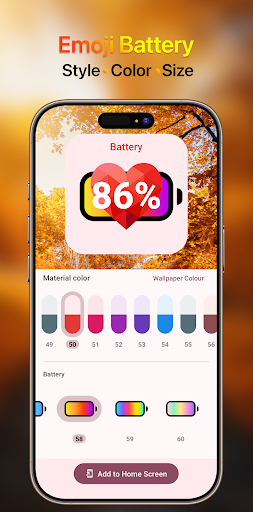
Customize emoji battery – The widget offers deep customization options so you can make it truly yours. With just a few taps, you can adjust the size to fit perfectly on your home screen, whether you prefer a small, discreet icon or a larger, eye-catching display. You can also change the color palette to match your wallpaper, theme, or current mood – from soft pastels to bold, vivid hues. Additionally, you can choose from a variety of styles and animation effects to give your battery monitor a unique personality.
More Than Just a Battery Meter
This widget is a fantastic way to add a layer of fun and functionality to your mobile experience. It’s lightweight, fast, and doesn’t drain your precious battery life – quite the opposite, actually! It helps you stay aware of your power consumption so you can manage it more efficiently. It’s also a great conversation starter; your friends will definitely notice and smile when they see your playful animated battery emoji on your screen.
From a practical perspective, the widget is incredibly easy to set up. Simply download the app, choose your favorite emoji design, and place the widget on your home screen. The process is intuitive, making it accessible for users of all ages. Whether you’re a tech-savvy teen or just someone who appreciates a splash of color on their phone, this widget is tailor-made for you.
Perfect for Personalization Lovers
In a world where our phones are extensions of ourselves, personalization is key. The Emoji Battery Widget allows you to break away from the ordinary and embrace a more expressive, cheerful look. It’s a small change that makes a big difference in how your device feels every day. Plus, with regular updates and new emoji packs on the horizon, you’ll always have fresh ways to keep your home screen exciting.
So, if you’re ready to trade that dull battery bar for something with character, download the Emoji Battery Widget today and give your phone the adorable upgrade it deserves. Your battery status has never looked this good!
Pros
- Adds a fun and expressive way to monitor battery level using emojis
- Offers immediate access to battery status from the home screen
- Provides customization options to select different emoji styles and themes
- Lightweight application that uses minimal system resources
- Compatible with most Android launchers and devices
- User-friendly interface suitable for all age groups
Cons
- Limited to battery display, lacking advanced battery management features
- May not display precise battery percentages on all devices
- Widget updates may sometimes experience delays
- Requires persistent background access, which can slightly impact battery life
- Emoji style may be considered less professional for work settings
- Free version includes advertisements or prompts for in-app purchases











