


Overview of Blurrr-Capcut Pro Video Editor
The Blurrr-Capcut Pro Video Editor is a powerful and versatile video editing software designed to give users complete creative freedom. Whether you're a beginner just starting out or a professional video editor, this app makes it easy to craft stunning, high-quality videos. With its intuitive interface, rich effects, and support for high-definition picture quality, Blurrr is built to cater to all your editing needs.
This app stands out not only for its ease of use but also for its impressive feature set. It offers an extensive library of effects, customizable tools, and advanced editing options that allow users to produce professional-level videos with minimal effort. From dynamic transitions to creative overlays, Blurrr empowers you to bring your ideas to life seamlessly.
Key Features of Blurrr-Capcut Pro Video Editor
Multi-layer Mixing with Free Track Layer
The [FREE TRACK LAYER MIX] feature enables you to blend multiple video, audio, and image layers. This makes it possible to craft complex compositions with diverse visual effects. You can mix different effects, overlays, and filters on the same track, resulting in more vivid and engaging videos that captivate your audience.
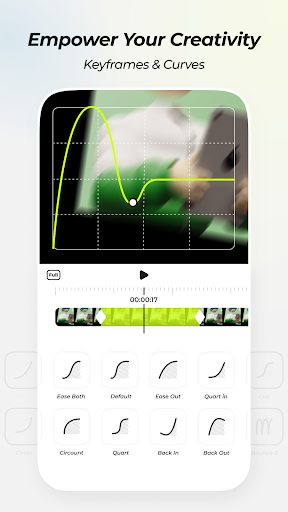
Advanced Animation Controls with Custom Keyframes and Curves
With the [CUSTOM KEYFRAMES and CURVES] function, you have full control over the timing and animation effects in your project. Whether it's creating smooth transitions or dynamic motion, these tools allow you to unleash your creativity and develop professional-looking animations easily.
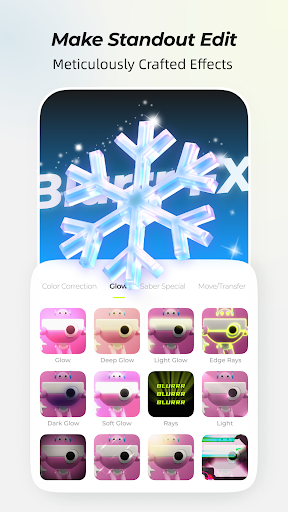
Extensive Collection of Meticulously Crafted Effects
Over 80 effects are available, designed by visual effects experts to enhance your videos. These effects can be layered and combined within a single track, supported by support for multiple filters and layer arrangements. This flexibility helps you craft standout videos that leave a lasting impression.
Enjoyable Velocity and Timing Control
The HIGHLY ENJOYABLE VELOCITY function provides features like variable speed keyframes, time remapping, and linear speed changes. This allows you to synchronize music with visuals or to create dramatic slow motion and fast-forward effects, making your videos rhythmically engaging and lively.
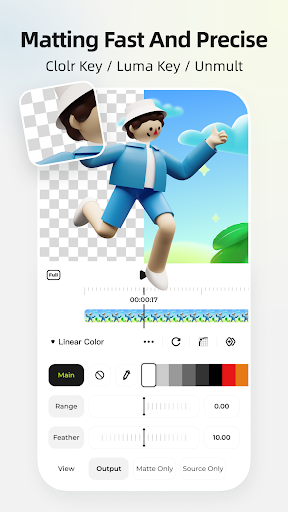
AI-Powered Background Removal with Intelligent Matting
The AI INTELLIGENT MATTING feature eliminates background limitations, offering more creative freedom. Easily remove or replace backgrounds to craft more stunning, professional-looking videos or incorporate complex VFX without extra fuss.
3D & Camera Effects for 3D Visualization
The app supports 3D and camera functions such as 3D tunnels, conveyor belts, cubes, and VFX building. These features lend depth and realism to your videos, making them more immersive and engaging for viewers.
Smooth Playback with AI Frame Interpolation
Using AI intelligent frame interpolation, Blurrr can generate smoother slow-motion effects, enhancing the viewing experience. This technology ensures your videos look fluid and professional, even in complex visual transition scenes.
Precise Control with Null-Objects and Parent-Child Hierarchies
The null-objects and parent-child subsets functions help in managing complex scenes by providing precise control over the position and movement of various elements, resulting in refined and sophisticated video productions.
Performance, Usability, and Final Thoughts
One of Blurrr's highlights is its performance optimization. The app runs smoothly on mid-range devices without lag or crashes, thanks to its well-developed architecture. Its user-friendly interface allows even novice editors to navigate effortlessly, making sophisticated editing accessible to everyone.
With a supportive community on social platforms like Instagram and YouTube, plus access to tutorials and guides, users can quickly learn and experiment with new features. Whether editing for social media platforms like Instagram, YouTube, or TikTok, Blurrr ensures your videos look crisp and professional with high-quality export options.
In summary, Blurrr-Capcut Pro Video Editor is a comprehensive, easy-to-use tool that combines powerful editing capabilities with a sleek interface. Its broad feature set encourages creativity and experimentation, making it a great choice for all levels of video creators looking to elevate their content. Give this app a try and discover how effortlessly you can produce stunning, engaging videos that stand out!
Pros
- User-friendly interface for simple video editing
- Wide selection of filters and effects available
- Options for high-quality video exports
- Fast rendering and exporting speed
- Regular updates introducing new features
Cons
- Limited advanced editing tools
- Occasional crashes on certain devices
- Watermarks on free version exports
- In-app purchases required for premium features
- Some features need a stable internet connection











