




Introduction to BIGVU Teleprompter & Captions
Are you looking for a versatile and professional solution to elevate your video content? The BIGVU Teleprompter & Captions app is a comprehensive tool designed to make video creation effortless and polished. Whether you're a content creator, journalist, influencer, or business professional, this app offers an impressive suite of features to help you deliver your message confidently and engagingly. From AI-powered script writing and automatic captions to real-time face beautification and seamless editing, BIGVU has everything you need to produce high-quality videos that captivate your audience.
Key Features of BIGVU Teleprompter & Captions
Teleprompter for Videos
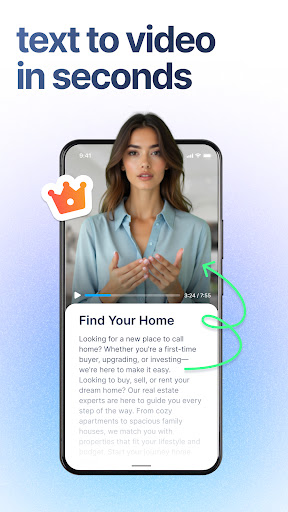
The core feature of BIGVU is its elegant teleprompter designed for perfectly delivered scripts. You can use the floating teleprompter to read your script while maintaining eye contact with your viewers, enhancing trust and authenticity. The app allows you to adjust the speed and size of the text, ensuring you stay on point without rushing or lagging. The scrolling text helps you keep your eyes on the camera, making your delivery more natural and engaging. For those who want to streamline script creation, BIGVU’s AI Magic Writer assists in crafting powerful scripts tailored for teleprompters.
Automatic Subtitles & Captions
Elevate the professionalism of your videos with automatic subtitles. BIGVU automatically adds captions to the lower third of your videos, which can be customized with your brand colors for a cohesive look. These captions not only improve accessibility but also boost viewer engagement, especially since many users watch videos without sound. The auto-captioning feature supports multiple languages, making it suitable for an international audience.
Seamless Video Editing & Integration
The app enables easy trimming and cutting of clips by simply selecting the words in the transcript. You can preview and finalize your edits with an intuitive interface, along with undo and redo options for flexibility. BIGVU seamlessly integrates with platforms like Descript, enhancing your editing workflow. You can also effortlessly resize and crop captions for social media, add your logo and background music using the built-in video editor, making it easy to produce polished content.
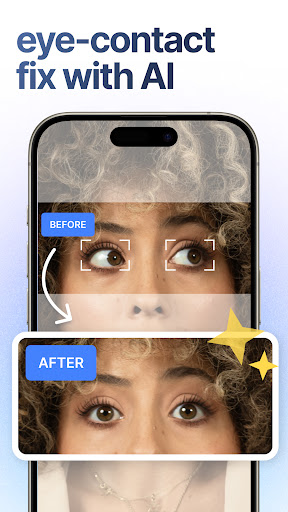
AI Eye Contact & Gaze Optimization
One of the standout features is AI Eye Contact. The app ensures your gaze appears natural throughout your recording, creating a genuine connection with your audience. It automatically adjusts your gaze to simulate direct eye contact, making presentations, tutorials, and personal messages more authentic and engaging.
AI Music Generator & Background Sound
Enhance your videos with custom AI-generated background music. The music generator offers a variety of styles to match the tone of your content, providing a polished and professional feel. You can seamlessly add and integrate this music into your videos, creating a vibrant and engaging atmosphere.
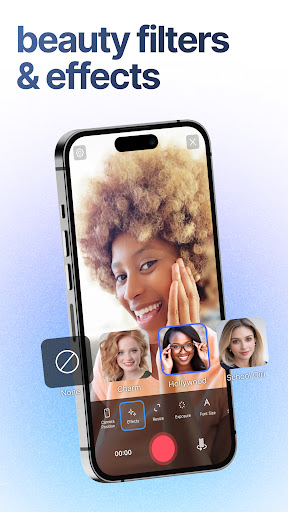
Live Beauty Camera Filters
Look your best on camera with advanced real-time face beautification effects. These include skin smoothing, skin tone enhancement, face morphing, teeth whitening, and soft lighting. You can also add eye makeup and other makeup filters to match the style and theme of your videos, ensuring a professional yet natural appearance.
Benefits of Using BIGVU Teleprompter & Captions
Incorporating BIGVU into your content creation process can dramatically improve the quality and engagement of your videos. The app makes it easier to stay organized, maintain eye contact, and deliver your message with confidence. The automatic captioning and editing tools save time while enhancing accessibility and viewer interaction. Whether you're recording a tutorial, a presentation, or a personal message, BIGVU provides all the essential tools to create captivating and professional videos effortlessly.
Conclusion
In summary, BIGVU Teleprompter & Captions is a powerful and user-friendly app that accelerates your video production workflow while ensuring high-quality results. Its combination of teleprompter functionality, automatic captions, AI-powered script writing, and real-time beautification makes it an indispensable tool for content creators seeking to stand out on social media, YouTube, or any other platform. Whether you're just starting or are a seasoned pro, BIGVU helps you produce engaging, authentic, and professional videos with ease.
Pros
- User-friendly teleprompter interface
- Customizable text for better clarity
- Cloud storage available for scripts
- Easy options for exporting videos
- Supports integration with social media platforms
Cons
- Free version has restricted features
- Application may occasionally crash
- Subscription plans can be expensive
- Needs a reliable internet connection
- Limited options for video editing tools











