



Overview of AirPin PRO - AirPlay & DLNA
AirPin PRO - AirPlay & DLNA is a powerful and versatile screen mirroring and media streaming application designed for Android phones, tablets, smart TVs, set-top boxes, and projectors. This innovative app allows users to effortlessly connect their devices and share media content quickly and seamlessly, transforming any room into a personal media hub.
Key Features of AirPin PRO
Multi-Device Screen Sharing
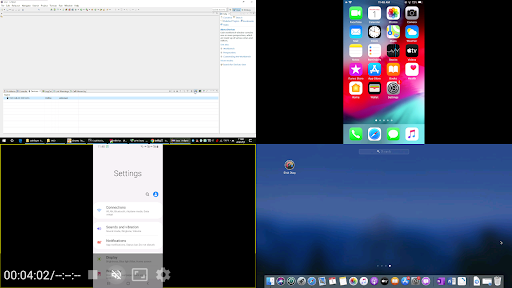
With the Premium PRO version, you can display up to 4 device screens simultaneously, making it ideal for presentations, group sharing, or multi-source media streaming. The standard version, however, supports displaying one device screen at a time, providing flexibility based on your needs.
Cross-Platform Compatibility
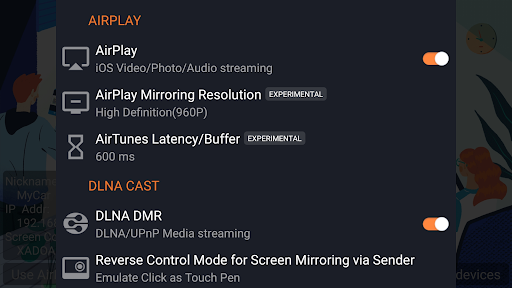
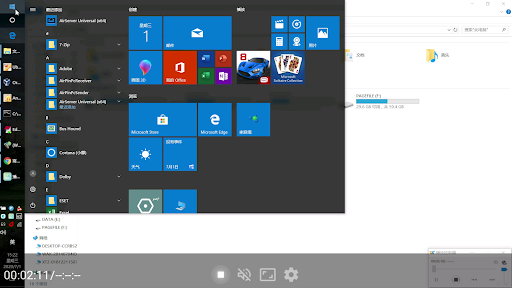
This app is the first Android application supporting both AirPlay and DLNA protocols, originally launched in July 2012. You can effortlessly share your media and screen from your Apple, Windows, and Android devices. Connect your iPhone, iPad, or MacBook via AirPlay to cast videos, music, or mirror your screen to larger displays. For Windows users, installing AirPinPcSender.exe on your PC enables screen sharing and media streaming. Android users can use the AirPinCast app to share content from their Android devices.
Media Sharing & Streaming Capabilities
Supporting a broad range of media formats, AirPin PRO supports AirPlay video and music streaming on all iOS and MacOS versions, including the latest updates. It is also the first app to facilitate YouTube AirPlay streaming and slideshow features for photo sharing via AirPlay. Additionally, it supports password protection for enhanced security.
Media Protocol Support
The app also supports DLNA and UPnP, enabling direct pulling of media from DLNA, NAS, or Samba servers for playback. It can support Windows streaming and mirroring, working smoothly in tandem with the PC client. AndroidDevice streaming is supported through AndroidSender, which offers mirroring and streaming functionalities.
Additional Technical Features
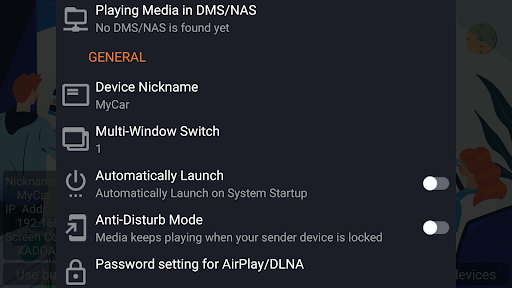
Features include automatic startup and configurable service shutdown, background audio streaming, anti-disturb mode to keep media playing even if the controller exits, support for external players, and continuous bug fixes for improved reliability. Security is bolstered with password protection, and users can enjoy flexible settings to suit their preferences.
Why Choose AirPin PRO - AirPlay & DLNA?
Have you ever wanted a hassle-free way to stream content from your iOS device to your TV? AirPin PRO simplifies this process, providing a seamless experience for streaming and screen sharing across multiple device ecosystems. Whether you own an iPhone, iPad, Android device, or a smart TV, this app makes connecting effortless and reliable.
Performance and User Experience
Performance-wise, AirPin PRO delivers high-quality streaming with minimal lag or buffering, even with high-definition content. It supports 5.1 surround sound, ensuring an immersive viewing experience. Screen mirroring is straightforward, allowing users to display photos, videos, or even games on larger screens. Multitasking is also possible, enabling different content streams on multiple devices simultaneously—ideal for households or small groups.
Ease of Use and Setup
Getting started with AirPin PRO is simple, thanks to its intuitive user interface. Setup can be completed within minutes without additional hardware or complex configurations. The app also offers detailed guides and FAQs, providing excellent support for users encountering any issues. Its seamless integration ensures anyone, regardless of technical skill, can enjoy effortless media streaming and mirroring.
Conclusion
If you're searching for a robust, easy-to-use media casting and screen mirroring app, AirPin PRO - AirPlay & DLNA is a top choice. It combines versatile device compatibility, high-performance streaming, and advanced features like multi-device mirroring and security options. Elevate your media experience and transform your living space into a smart entertainment hub with this innovative app. Enjoy movies, music, photos, and gaming on the big screen easily, smoothly, and securely.
Pros
- Seamlessly streams media across devices
- Supports multiple streaming protocols
- User-friendly interface
- High-quality video and audio output
- Frequent updates and improvements
Cons
- May experience occasional connection drops
- Requires paid version for full features
- Limited customization options
- Some compatibility issues with older devices
- Initial setup can be complex











