

- Name Live Screensaver Creator
- Category Personalization
- Developer Finalhit Ltd.
- Available on PC
- OS Windows 10 version 0.0 or higher
- languages English
Transform Your Desktop with Live Screensaver Creator for Windows
If you're someone who appreciates dynamic, eye-catching visuals on your PC, Live Screensaver Creator for Windows emerges as a versatile tool to turn static images into mesmerizing animated screensavers. Developed by Finalhit Ltd., this application offers a straightforward way to personalize your desktop environment while adding a splash of creativity to your digital space.
A Glimpse into the App's Inner Workings
In a world saturated with static wallpapers and simple screensavers, Live Screensaver Creator strives to stand out by empowering users to craft lively, animated displays effortlessly. The developer, Finalhit Ltd., is known for creating user-friendly multimedia tools, and this app continues that tradition. Its core strengths include an intuitive interface designed for both beginners and enthusiasts, robust animation options that bring your images to life, and seamless integration with Windows for a smooth user experience. Not to forget, it promises a high degree of customization, making each screensaver truly unique to your taste.
Easy and Intuitive Interface – The Canvas of Creativity
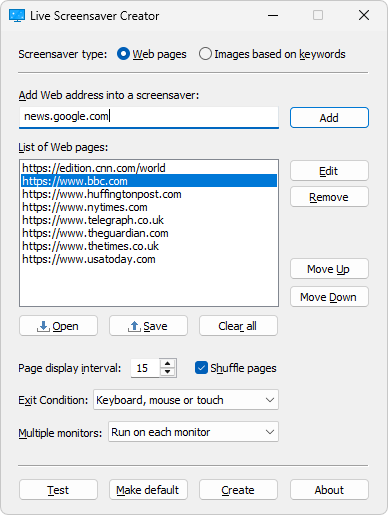
Right upon launch, the app welcomes you with a clean, clear interface that resembles a digital artist's palette. Drag-and-drop functionality simplifies the process, allowing users to import images quickly. The layout is straightforward, with clearly marked options for animation effects, transition durations, and previewing your screensaver before finalizing. Navigating through different features feels natural, even for those new to screensaver creation. The responsiveness is excellent, with smooth transitions and no noticeable lag, ensuring an enjoyable creation process akin to flipping through an interactive album.
Powerful Animation and Customization Tools
The heart of Live Screensaver Creator beats within its animation capabilities. Users can select from a range of effects—fading, zooming, rotation, and even particle effects—to imbue static images with vibrant motion. What sets this apart from similar apps is its layer-based editing system, allowing multiple effects to coexist and be fine-tuned independently. This feature facilitates complex animations that look polished and professional. The app also supports time-based transitions, so screensavers can evolve gradually, keeping viewers captivated.
Beyond animations, the app excels in theme compatibility. Users can import themes or create their own, ensuring that screensavers blend seamlessly with existing desktop aesthetics. This flexibility enables a tailored experience, whether you prefer a minimalistic, nature-inspired, or futuristic look. The inclusion of a live preview mode allows you to see the final result in real time, making adjustments intuitive and hassle-free.
Design, Performance, and Differentiation
The interface's design prioritizes clarity and ease of use, making the creation process almost like assembling a digital collage. The app runs smoothly on moderate systems; transitions are fluid, and rendering times are quick, reducing frustration during larger projects. For users familiar with other personalization tools, Live Screensaver Creator offers a uniquely compelling feature—its emphasis on layered effects combined with broad theme support, providing a higher degree of creative freedom. Unlike many competitors that offer limited effects or rigid themes, this app stands out by supporting diverse customization options and working well with existing Windows themes, creating a cohesive visual experience.
Final Verdict: A Creative Companion for Desktop Personalization
Live Screensaver Creator for Windows is a principled yet powerful tool suitable for hobbyists, digital artists, and everyday users eager to add a bit of life to their screens. Its most impressive features—layered animations and extensive theme compatibility—offer a level of personalization that surpasses many similar applications. The app's user interface is welcoming and straightforward, fostering a smooth learning curve for newcomers while retaining enough depth for seasoned users.
Overall, I recommend this application to anyone looking to craft personalized, animated screensavers without the hassle of complex software. Whether you want subtle motion effects or elaborate visual stories, Live Screensaver Creator provides the tools necessary to bring your creative visions to life. It's a handy, approachable app that transforms the mundane desktop background into an engaging visual experience—definitely worth exploring for those passionate about customizing their digital environments.
Pros
- Customizable live screensavers
- Intuitive user interface
- Wide variety of animation effects
- Supports multiple image formats
- Real-time preview feature
Cons
- Limited free features
- Occasional lag during complex animations
- Minimal documentation for advanced customization
- Limited compatibility with older Windows versions
- Occasional crashes when importing large images











