

Introduction to Gamers GLTool with Game Tuner
If you're passionate about mobile gaming and want to enhance your gaming experience, Gamers GLTool with Game Tuner stands out as a powerful application designed to optimize and boost your device's performance. This app functions as a comprehensive gaming assistant, allowing users to fine-tune various settings for smoother gameplay, reduced lag, and better graphics quality. With its user-friendly interface and wealth of features, Gamers GLTool appeals to both casual gamers and dedicated enthusiasts seeking maximum device efficiency.
Key Features of Gamers GLTool with Game Tuner
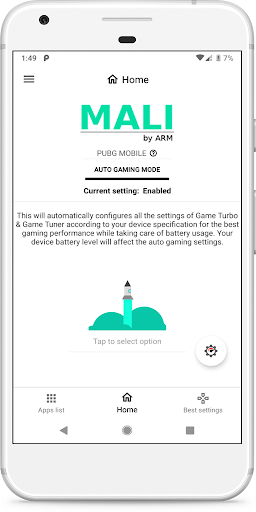
Auto Gaming Mode
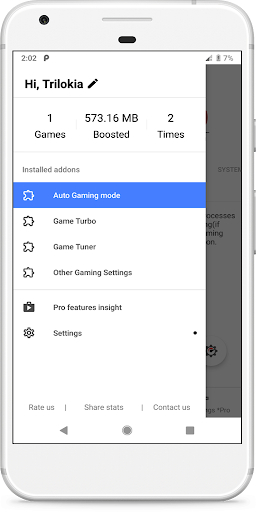
This feature automatically configures optimal settings of Game Turbo and Game Tuner based on your device specifications. This ensures your device is perfectly tuned for gaming without manual adjustments, providing a hassle-free experience for users eager to jump into their favorite games.
Game Turbo
The Game Turbo module includes a System Performance Tuner that allows users to boost CPU and GPU performance, minimizing lag and enhancing frame rates. This feature is especially useful during intense gaming sessions when device resources need to be optimized.
Game Tuner
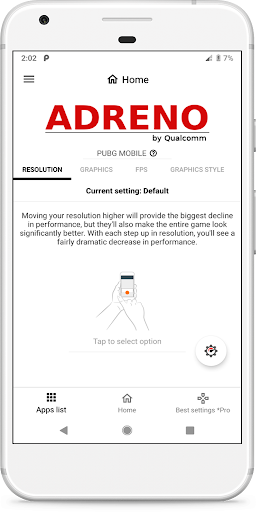
The Game Tuner feature incorporates various tools similar to a GFX Tool. It lets gamers adjust graphics settings on a per-game basis, such as resolution, texture quality, and frame rate, enabling the perfect balance between visual quality and smoothness tailored to each game.
Additional Features
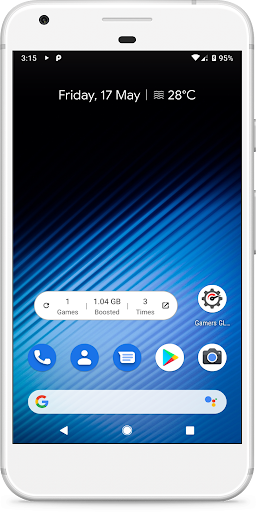
The app offers Other Settings for further customization, Quick Boost to free up memory instantly, Quick Launch to start games faster, a Smart widget for easy access, and many more useful tools to facilitate an enhanced gaming experience. These features collectively ensure seamless and optimized gameplay across a wide variety of devices.
Special Notes
Note that the free version of Gamers GLTool may include limited features and display ads. To unlock all functionalities and enjoy an ad-free experience, users can upgrade to the paid version.
Permissions & Privacy
The app requests permissions such as storage (for modifying graphics settings), internet (for syncing settings from servers), and kill background app (to boost memory). Users are advised to read and accept the Privacy Policy and Terms of Service before using the app to ensure understanding of data handling and privacy practices.
The Benefits of Using Gamers GLTool with Game Tuner
Many gamers find that utilizing Gamers GLTool with Game Tuner significantly improves their mobile gaming experience. The app optimizes device resources to reduce lag, lower overheating issues, and improve frame rates, leading to smoother gameplay and better visual quality. The System Performance Tuner ensures that your device is pushed to perform at its best, while the Graphics Tuner offers granular control over visual settings tailored to each game.
Another major advantage is its network optimization tools like the Ping Booster, which stabilize internet connections during multiplayer matches, reducing latency and enhancing online gaming responsiveness. This makes Gamers GLTool an essential companion for competitive gamers aiming for less lag and more wins.
Additionally, the app's ability to manage device temperature is a notable feature. Unlike typical gaming sessions that can heat up devices unexpectedly, Gamers GLTool helps keep your device cool, enabling longer gaming periods without discomfort or hardware stress.
Overall, Gamers GLTool with Game Tuner provides a comprehensive toolkit designed to maximize performance while maintaining device health. Its easy-to-use interface ensures that users do not need technical expertise to get the most out of the app, making it a must-have for anyone serious about mobile gaming performance enhancement.
Whether you are seeking to improve graphics, boost system performance, or optimize your network connection, this app offers a versatile set of features to elevate your gaming sessions. Discover how Gamers GLTool can transform your mobile gaming experience into a smoother, more responsive, and more enjoyable adventure.
Pros
- Significantly enhances gaming performance.
- Offers customizable options for game tuning.
- Increases device cooling efficiency.
- Features a user-friendly interface.
- Extends battery life during gaming sessions.
Cons
- May not be compatible with all devices.
- Some features may require in-app purchases.
- There are minor bugs in certain game settings.
- Needs regular updates for optimal functionality.
- Can deplete battery quickly if misconfigured.










