

Paint my Room - Try wall color
Visualize and Explore
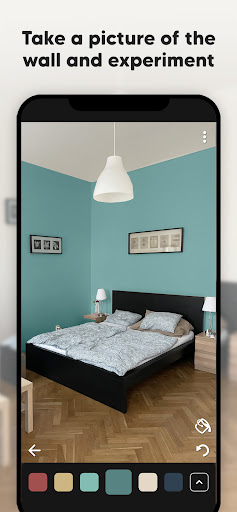
#1 Paint visualizer ⭐⭐⭐⭐⭐ Visualize and Explore Our color visualizer lets you see any paint color on walls or facades instantly. Use your smartphone camera to try colors directly on your wall and view real-time results. Whether updating a living room or revamping your home’s exterior, this feature helps you imagine the change with confidence. Explore ideas and pick your perfect wall paint from an extensive palette from brands like Sherwin-Williams, Akzo Nobel (Dulux, Sikkens, Sadolin, Levis), Nippon Paint, Asian Paints, Kansai Paint, Benjamin Moore, Behr, Jotun, Valspar, Glidden, Crown Paints, Nerolac, Suvinil, Prestige Paints, Jazeera Paints.
Match and Design
Match and Design Match interior colors effortlessly with our advanced paint-match technology. Just snap a photo of your space or an inspiring item, and our app will suggest the closest paint match. Dive into interior design with tools that help you visualize the wall color, changing shades until you find the ideal palette.
Try Paint Testers
Try Paint Testers Before committing, try testers on your wall or the house facade to see how colors behave under different lighting. Locate the closest paint store, such as Home Depot, Leroy Merlin, or Lowe's, and pick up your testers.
Browse Colors - Try all colors
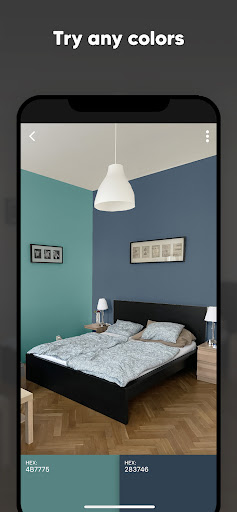
BROWSE COLORS - Try all colors Browse colors right from your phone. Once you’ve found a color, see how it looks in a living room, bedroom, kitchen, bathroom, or exterior space. Change color as many times as you want. Our color visualizer lets you see any paint color on your walls or facade instantly.
Paint Your Room
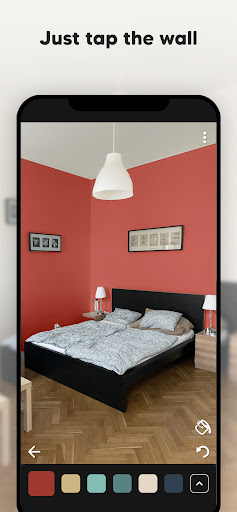
Paint Your Room is an AI-driven paint visualizer with an easy-to-use interface. Paint your room with any color, visualize the transformation in a few taps, and explore options from our extensive color portfolio. Download our app today and start using the “Paint My Room – Try All Colors” feature. Experience the most innovative way to revamp your space, whether indoors or on your home’s exterior. Explore, visualize, and execute your painting projects with an app designed to make every step straightforward and enjoyable. Experience the new standard in home painting—download now and transform your home with just a few taps! Start using our Paint My Room – Try All Colors app. Fantastic and easy to use! Happy painting!
Disclaimer
All product names, logos, brands, trademarks, and registered trademarks that are not owned by us are the property of their respective owners. All company, product, and service names used in this app are for identification purposes only. Use of these names, trademarks, and brands does not imply endorsement. The Paint My Room - Try Wall Color app is ours. We are not affiliated, associated, authorized, endorsed by, or in any way officially connected with any other apps or companies.
User experiences and verdict
Ever wondered how your room would look with a different splash of color? Paint my Room - Try wall color is a savvy app that’s here to revolutionize your home makeover experience. I’ve had a go with it and it’s like having a virtual paintbrush at your fingertips!
Visualize Your Space
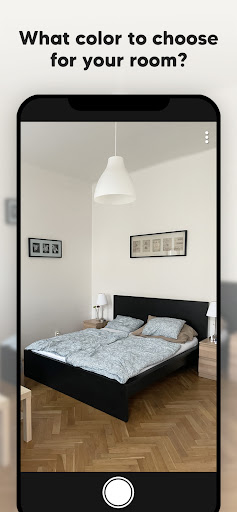
One of the coolest features is the ability to visualize your space with different colors, all without lifting a paintbrush. Snap a picture of your room and try a myriad of hues to see what fits best. It’s nifty and saves you from buyer’s remorse when a swatch looks great but the wall color misses the mark.
Ease of Use
From the moment you open it, the app feels sleek and intuitive. You don’t need to be a design pro—the guided flow helps you through each step. The interface is smooth, loading times are swift, and the app is available on both Android and iOS, so everyone can join the color party.
Color Options and Features
The color library is impressive, with trending shades and exclusive palettes from popular paint brands. It even suggests complementary colors and lets you save favorite color combinations for later comparison.
The Verdict
Is Paint my Room - Try wall color worth a download? Absolutely. It’s user-friendly, feature-rich, and a fun way to bring your interior design ideas to life. It’s great for a full renovation or a quick refresh. Just remember to test colors under real lighting before finalizing. Happy painting!
Pros
- Easy to use interface for quick navigation.
- Visualizes paint colors in real-time.
- Offers a wide range of color choices.
- Adjusts to different room lighting conditions.
- Compatible with most smartphones and tablets.
Cons
- Limited customization options available.
- Requires stable internet for best performance.
- In-app ads can be intrusive.
- Occasional app crashes reported.
- Color accuracy might vary on older devices.











