

NetBenefits - Fidelity at Work Overview
Conveniently manage your workplace benefits from Fidelity—from sending us documents to accessing your retirement savings, stock options, health insurance, HSA and more.
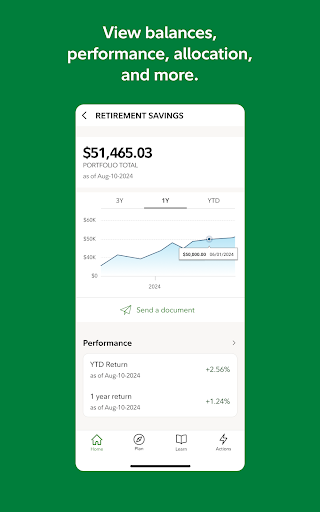
Easily view retirement savings and other benefits: account balances, investments, recent contributions, and account performance.
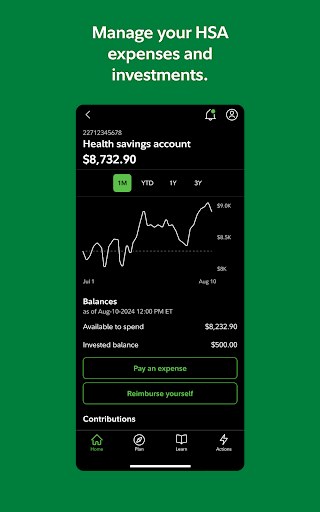
Manage your HSA expenses and investments.
Monitor other accounts, including 529 plans and brokerage accounts.
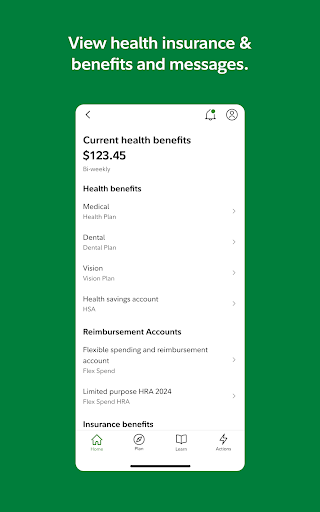
Quickly find health insurance information, such as who’s covered under your plan, provider phone numbers, and your group number.
Access recent payroll statements.
Personalize planning: See how much you may need in retirement and get your Fidelity Retirement Score SM.
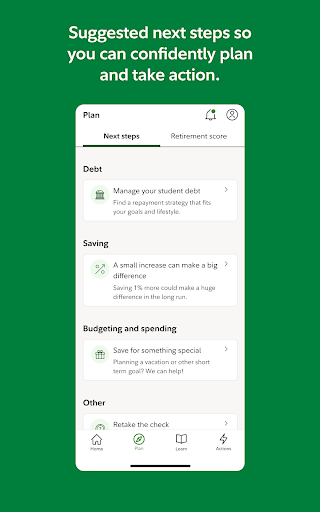
Financial Wellness next steps so you can confidently plan and take action.
Take control of your total well being: Change your contribution rate and investments across 401K, 403B and/or HSA accounts.
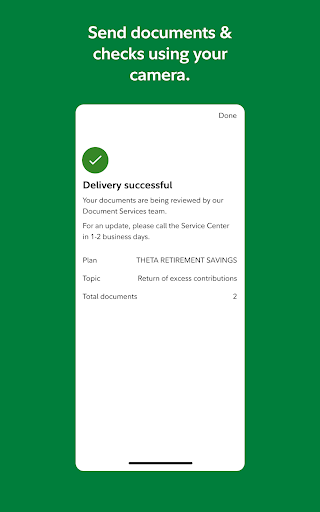
Send us documents and rollover checks using your camera.
Exercise options and accept grants in your stock plans.
Enroll in your health insurance during annual enrollment.
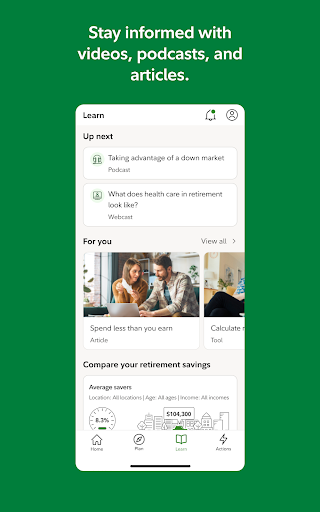
Build confidence through educational materials and tools: Access articles, videos, podcasts, and interactive tools to make informed financial decisions.
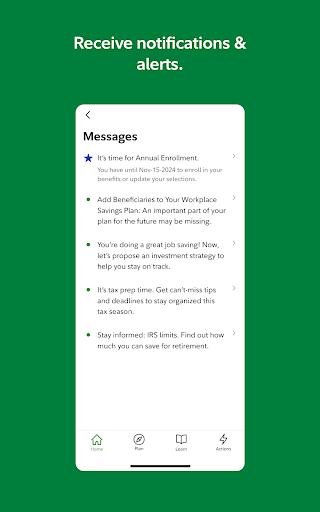
Stay informed: Get important reminders about timely actions to take within your account.
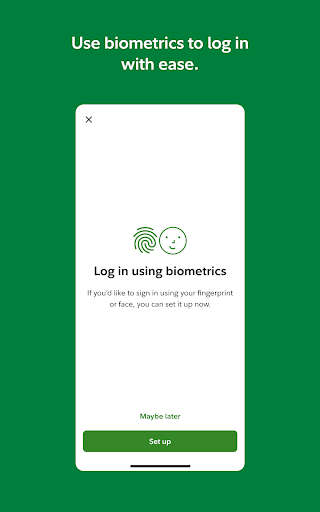
Feel safe and secure: We take your account security seriously and are always researching new ways to protect you. We use a combination of advanced measures such as customer verification and biometrics to help ensure every visit is safe.
Additional information: Available for phones running Android 10.0 or later. The NetBenefits® smartphone app is available to individuals who have one or more workplace benefits provided by Fidelity Investments. Looking for help with accounts beyond your workplace savings and benefits? Check out our companion Fidelity Investments app to explore more ways to save, invest and trade. NetBenefits and the NetBenefits design logo are registered service marks of FMR LLC. The images below are for illustrative purposes only. System availability and response times may vary. Fidelity Brokerage Services LLC, Member NYSE, SIPC © 2025 FMR LLC. All rights reserved. 836410.28.0
Security and Availability
We take your account security seriously and are always researching new ways to protect you. We use a combination of advanced measures such as customer verification and biometrics to help ensure every visit is safe.
Branding and Legal Notes
The NetBenefits and the NetBenefits design logo are registered service marks of FMR LLC. The images below are for illustrative purposes only. System availability and response times may vary.
NetBenefits - Fidelity at Work App: User Experience and Review
Have you ever stumbled upon an app that makes managing your financial future feel like a breeze? That''s exactly what the NetBenefits - Fidelity at Work app aims to do. I recently took it for a spin, and let me tell you, it''s like having a personal financial assistant right in your pocket. If you''re juggling multiple accounts or trying to keep tabs on your retirement savings, this app is definitely worth a look.
Getting Started with Ease
First off, let''s talk about the setup. Downloading and installing the NetBenefits - Fidelity at Work app is as straightforward as it gets. Once you''ve got it on your device, the login process is pretty seamless. If you already have a Fidelity account, you’re halfway there. Just punch in your credentials, and you''re in. If you''re new to Fidelity, setting up an account is a piece of cake, and the app guides you through every step.
Features That Make It Stand Out
Now, onto the good stuff—the features. One thing that really caught my eye was the app''s dashboard. It''s incredibly intuitive, offering a snapshot of your financial health at a glance. Whether you want to check your 401(k) balance, review recent transactions, or get an overview of your investment performance, it''s all there under one roof. The app also provides personalized insights and alerts, which is a huge plus if you''re like me and tend to overlook those important financial milestones. Another feature worth mentioning is the educational resources. The app offers a ton of articles and videos that explain financial concepts in simple terms. Whether you''re a financial newbie or a seasoned investor, there''s always something new to learn. Plus, the app frequently updates its content, so you''re always getting the latest advice and strategies.
User Experience and Navigation
In terms of user experience, the app is quite user-friendly. The navigation is smooth, and I didn''t encounter any annoying glitches or crashes during my time with it. The design is clean and modern, which makes it easy on the eyes. One small gripe I had was with the loading times. Occasionally, it took a few extra seconds to load certain sections, but it''s nothing that would deter me from using the app.
The Verdict
So, what''s my final take on the NetBenefits - Fidelity at Work app? It''s a solid choice for anyone looking to manage their finances more effectively. With its comprehensive features, intuitive interface, and reliable performance, it’s a tool that can genuinely help you stay on top of your financial game. Whether you''re planning for retirement or just trying to keep track of where your money is going, this app has got you covered. If you''re already a Fidelity user, integrating the app into your daily routine will feel like a natural extension of your existing financial management tools. And if you''re new to Fidelity, it might just be the nudge you need to start taking control of your financial future. So why not give it a try? Your future self will thank you!
NetBenefits at Work: A blog-style feature description
Imagine a single pocket-sized companion for your money—that''s the NetBenefits - Fidelity at Work app. This Fidelity Investments creation acts like a personal financial assistant, ready to help you navigate retirement planning, stock options, health insurance, and more from the palm of your hand. Whether you''re juggling a 401(k), a Health Savings Account (HSA), or diverse investment accounts, NetBenefits brings your financial world into clear focus with an experience that''s designed for busy professionals.
The setup is refreshingly simple. If you already hold a Fidelity account, signing in is a breeze, and new users are guided step by step through account creation. The dashboard shines as a central command center, delivering a concise snapshot of your overall financial health. From your most recent contributions to the latest market moves, you see it all at a glance, making retirement planning more approachable than ever. The app also delivers personalized insights and timely alerts, nudging you toward actions that align with your long-term goals—like adjusting contributions or revisiting investment allocations.
Educational resources are another standout feature. A robust library of articles, videos, and interactive tools demystifies complex concepts, helping you grow your financial literacy whether you''re new to investing or looking to deepen your knowledge. The content is refreshed regularly, so you always have access to the latest strategies and guidance for managing money more effectively.
Security is front and center in NetBenefits. Fidelity''s approach combines verification techniques and biometrics to protect your information, providing peace of mind as you manage sensitive financial data on the go. The app is designed to feel safe and trustworthy, which matters when you''re coordinating retirement accounts, healthcare planning, and other essential benefits from a mobile device.
Availability is practical, with support for Android devices (Android 10.0 and later) and seamless integration with Fidelity''s ecosystem. For those who use multiple Fidelity tools, NetBenefits fits naturally as a mobile extension of your larger savings and investing strategy, allowing you to view balances, adjust contributions, and monitor performance wherever you are.
In short, NetBenefits at Work is more than a benefits app; it''s a comprehensive, user-friendly platform for managing day-to-day finances and long-term goals. For current Fidelity customers, it''s a natural extension of your existing toolkit, while newcomers may find it a compelling nudge to start saving, investing, and planning for the future with confidence.
Pros
- Intuitive, easy-to-navigate interface.
- Extensive financial tools and resources.
- Strong multi-factor authentication for security.
- Real-time updates and alerts on your account.
- Tailored retirement planning support.
Cons
- Limited compatibility with non-Fidelity accounts.
- Users report occasional app crashes.
- Advanced features can be daunting for beginners.
- Frequent updates may be needed for best performance.
- Certain features require a stable internet connection.











