

Introducing Hyundai Digital Key
The Hyundai Digital Key is an innovative application designed to transform the way you access and control your Hyundai vehicle. By leveraging advanced smartphone technology, this app allows you to seamlessly lock, unlock, and even start your car without fumbling for traditional keys. The digital key functionality is equipped with features such as creating, sharing, and managing digital keys, making it easier to give trusted friends or family members access to your vehicle securely and conveniently.
Key Features of Hyundai Digital Key
Easy Access and Vehicle Control
With Hyundai Digital Key, you can use your smartphone to quickly lock or unlock your vehicle. When approaching your car, simply tap your smartphone on the door handle—this utilizes NFC technology for swift access. When you’re ready to drive, just place your device on the wireless charging pad to start the engine. This streamlined process eliminates the need for traditional keys, offering effortless convenience for Hyundai owners.
Remote Control Capabilities
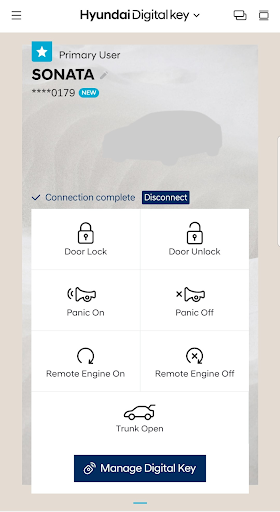
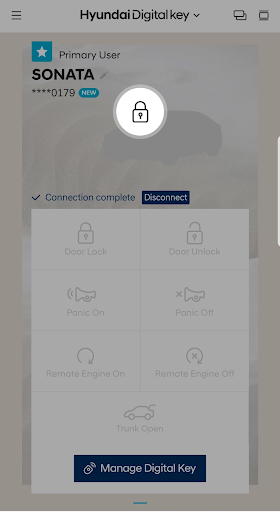
The app also enables remote control of your vehicle via Bluetooth. From inside the app, you can start or stop your engine, lock or unlock doors, activate panic mode, or open the trunk—all from a distance. Whether you're inside your house or away from your vehicle, Hyundai Digital Key ensures your car is always within reach.
Sharing and Managing Digital Keys
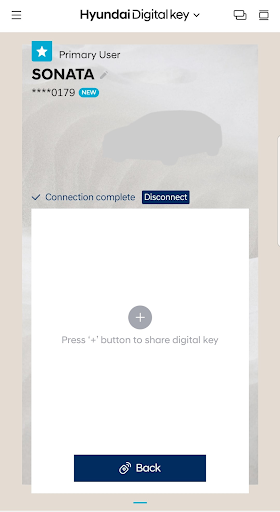
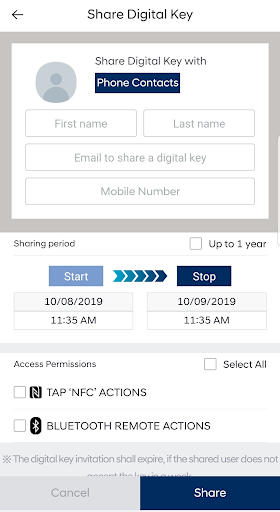
One of the standout features is the ability to create and share digital keys. This feature makes it simple to grant access to trusted friends or family members by sending them a digital key invitation. You can specify permissions and timeframes, providing control over who can access your vehicle and when. Additionally, you have the flexibility to pause or delete shared keys, either through the app or via the MyHyundai.com portal, enhancing security and management.
How Hyundai Digital Key Enhances Your Driving Experience
Simplifying Daily Routines
Imagine no longer digging through your pockets or bag for keys. The Hyundai Digital Key app turns your smartphone into a versatile car key, making your daily routines more efficient. Simply tap your phone on your Hyundai’s NFC reader to unlock, and place it on the wireless charger to start the engine—it's that easy. This seamless integration simplifies parking, shopping trips, and shared vehicle use, making driving more comfortable and less stressful.
Custom User Profiles for Personalized Settings
The app supports customizable driver profiles, enabling your Hyundai to automatically adjust to your preferred seat position, mirror settings, and climate control upon unlocking. If you share the vehicle with others, each user can have their own profile, ensuring a personalized experience every time. This feature provides a near-autonomous level of customization, similar to having your own personal valet.
Security and Safety Considerations
Naturally, security is paramount. Hyundai Digital Key employs NFC technology, known for its robust security features, along with additional authentication measures. Only authorized users can access or control the vehicle, ensuring your car remains protected. While no system is entirely foolproof, Hyundai’s focus on security measures provides peace of mind for users concerned about digital vulnerabilities.
Conclusion: Is Hyundai Digital Key Worth It?
Overall, the Hyundai Digital Key app is a groundbreaking tool that elevates convenience and technology for Hyundai vehicle owners. It streamlines vehicle access, enhances security, and offers flexible sharing options, significantly improving the driving experience. Currently tailored for Android smartphones, future updates may include compatibility for iOS devices, broadening its accessibility. If you're seeking to modernize your driving routine and eliminate the hassle of traditional keys, Hyundai Digital Key is a compelling choice that could very well revolutionize your approach to car ownership.
Pros
- Convenient keyless entry and start
- Easy sharing of keys with family members
- Enhanced security through encryption
- Smooth integration with Hyundai vehicles
- User-customizable settings
Cons
- Applicable only to compatible Hyundai models
- Requires a smartphone for operation
- Potential to deplete phone battery rapidly
- Connectivity issues may occur
- Initial setup process can be complicated











