



Fuelio: Gas Log & Gas Prices App Overview
Fuelio: gas log & gas prices is a comprehensive mobile application designed to help drivers track their mileage, gas consumption, and fuel costs. Whether you want to monitor your car expenses, auto services, fill-ups, or fuel efficiency, Fuelio offers a user-friendly platform to manage all these aspects effortlessly. The app also features a GPS tracker that automatically logs your routes, providing valuable insights into your driving patterns.
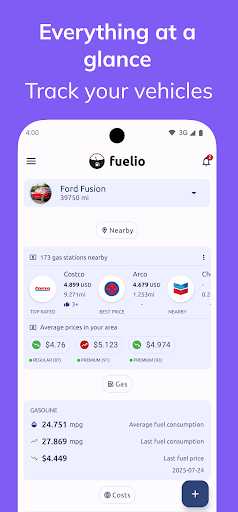
Supporting different fuel types and now bi-fuel vehicles, Fuelio allows you to visualize your fuel fill-ups on Google Maps, making it easier to locate nearby gas stations and compare gas prices. Its crowdsourced gas price feature keeps you updated on the latest fuel rates in your area, helping you save money by choosing the cheapest gas stations.
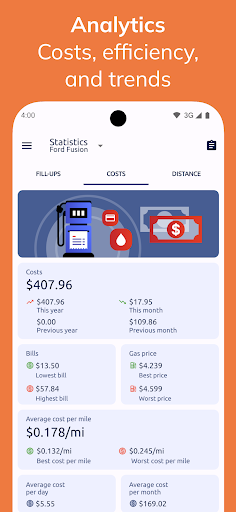
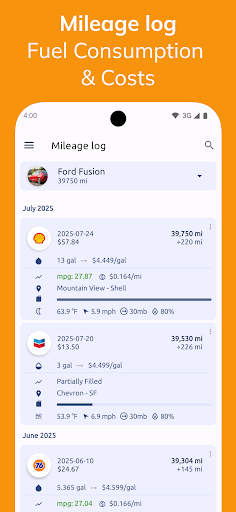
Utilizing a full tank algorithm, Fuelio accurately calculates your fuel consumption between fill-ups, giving precise data on fuel economy and efficiency. Simply input the amount of fuel purchased and your current odometer reading each time you refill, and the app will generate detailed statistics, trends, and visual charts for your driving data. These insights include total and average fill-ups, costs, and mileage, all accessible through a clean and intuitive interface.
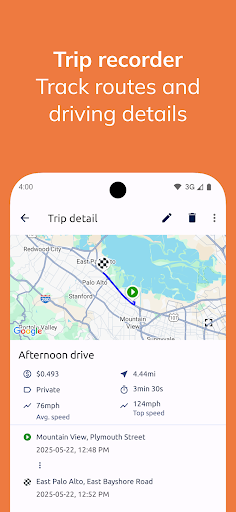
Data is stored locally on your device but can be backed up to the cloud via Dropbox or Google Drive, ensuring your records are safe even if you switch devices or experience data loss. Additionally, Fuelio supports manual and GPS-based trip logging, allowing you to track each journey's duration, distance, and associated costs with map previews. You can save your routes as GPX files for further analysis or sharing.
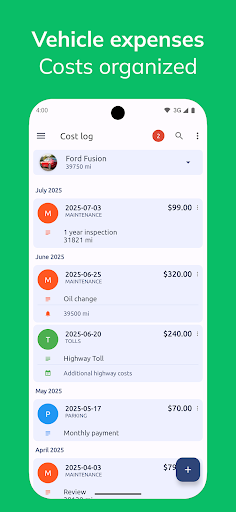
Fuelio offers a rich feature list, including vehicle management—supporting multiple cars and bi-fuel systems—detailed statistics, customizable units (kilometers/miles and liters/us gallons/imperial gallons), import/export options, chart visualizations, backup options, reminders, and shortcuts for faster fill-up entries. The app also provides a costs module for tracking other vehicle expenses like maintenance, insurance, or parking, complete with category-specific statistics and charts. Its reporting feature enables you to generate comprehensive reports for your vehicle expenses, export as text files, and share them easily.
Fuelio: gas log & gas prices is ideal for drivers seeking an efficient way to manage their automotive expenses and optimize fuel efficiency, making it a must-have app for any car owner who wants to save money and stay informed about fuel prices nationwide.
Features and Benefits of Fuelio: Gas Log & Gas Prices
User-Friendly Interface and Setup
Getting started with Fuelio is quick and straightforward. After installing the app, you just need to enter basic vehicle details, and the interface remains clean, simple, and easy to navigate. This means no frustration or complicated setups—just instant access to your driving data and fuel logs.
Accurate Fuel Tracking and Consumption Analysis
One of the app’s core strengths is its ability to record each fuel purchase precisely. By entering the amount of fuel bought and the current odometer reading, Fuelio calculates your fuel economy and consumption patterns automatically. The app tracks partial fill-ups and supports multiple fuel types, including options for bi-fuel systems like gasoline and LPG. Visual charts display your fuel costs, consumption trends, and efficiency over time, helping you identify savings opportunities.
Real-Time Fuel Prices and Location-Based Services
Fuelio keeps you informed with crowd-sourced fuel prices, showing the latest rates at nearby gas stations. With Google Map integration, you can visualize your fill-ups, plan routes, and find the cheapest fuel options in real-time, leading to significant savings during your trips.
Trip Logging and Route Management
The GPS-based trip tracker allows you to log your drives automatically or manually. Each trip can be reviewed with detailed summaries, costs, and map previews. Additionally, your routes can be saved in GPX format for further use or sharing, making it ideal for those who want to analyze driving habits or keep a record of travel history.
Comprehensive Expense Tracking
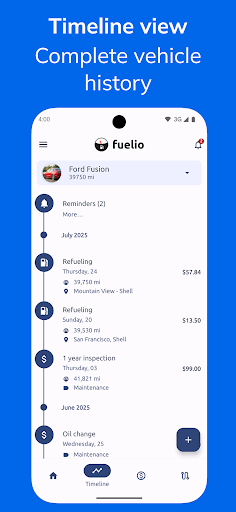
Beyond fuel, Fuelio enables you to monitor other vehicle-related expenses like auto service, maintenance, insurance, or parking. You can create custom categories and view statistics and charts for each expense type, gaining a better understanding of your overall vehicle costs.
Data Management and Cloud Backup
Your driving and expense data are stored locally but can be securely backed up to cloud services such as Dropbox or Google Drive. This ensures your data remains safe and accessible, even if you switch devices or experience technical issues.
Additional Features
- Widgets for quick entries
- Reminders for maintenance or refueling
- Import/Export data features
- Detailed reports for your car expenses
Why Choose Fuelio: Gas Log & Gas Prices?
If you are a daily driver or manage multiple vehicles, Fuelio is an invaluable tool to help optimize your fuel efficiency and reduce costs. With its comprehensive tracking capabilities, insightful statistics, and integrated maps, Fuelio helps you make smarter choices on the road. Plus, its support for bi-fuel vehicles makes it versatile for different car setups, ensuring all your vehicle tracking needs are covered.
Overall, Fuelio: gas log & gas prices combines simplicity with powerful features, allowing you to monitor and analyze your vehicle expenses conveniently. Whether you're looking to save money on fuel, better understand your driving habits, or keep detailed records for maintenance purposes, Fuelio is the perfect companion for every driver focused on efficiency and cost savings.
Pros
- Intuitive interface for effortless navigation.
- Effectively monitors fuel efficiency and expenses.
- Data synchronization across multiple devices.
- Supports various vehicles and currencies.
- Offers detailed analytics and visual graphs.
Cons
- Limited features available in the free version.
- Advertisements can be disruptive at times.
- Some users experience synchronization problems.
- Missing integration with other applications.
- No automatic trip tracking option.










