


Overview of Hush: Android Auto Audio Fix
Driving with Android Auto enhances your in-car infotainment experience, but it isn’t without its quirks. Hush: Android Auto Audio Fix is a cleverly designed application that addresses common audio-related issues faced by many drivers. Whether it’s accidental volume spikes or interruptions caused by notifications, Hush offers a seamless solution to keep your driving sessions smooth and distraction-free.
Main Features of Hush
Fixing Android Auto Audio Interruptions
One of the most frustrating problems occurs when switching from a non-Android Auto app, like YouTube, to an Android Auto-supported app, such as Spotify. In some vehicles, Android Auto automatically resumes the last Android Auto audio app when you adjust the volume, which can be startling if you’re listening to a quiet podcast. Hush resolves this by playing a silent audio track on repeat, effectively preventing Android Auto from switching back to unwanted apps. Once active, Hush acts as the current audio source, allowing you to safely adjust volume levels without interference or sudden changes.
Preventing Sudden Volume Spikes
Imagine cruising down the highway, only to be startled by an abrupt volume increase when a notification pops up—scary and distracting. Hush tackles this annoyance by maintaining consistent volume levels, even during notifications or alerts. This feature ensures a calm, uninterrupted auditory environment, making your driving experience more comfortable and safer.
Ease of Setup and Use
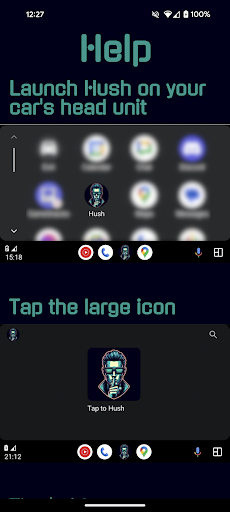
Getting started with Hush is straightforward. The app is available on the Play Store and can be installed in just a few minutes. Its user-friendly setup guides you through the process of linking it properly with Android Auto. Once configured, Hush runs silently in the background, requiring no further input. Its minimalistic interface and automatic operation make it an ideal companion for drivers who prefer hassle-free solutions.
Reliability and Performance
Unlike some similar apps that may crash or cause glitches, Hush boasts high reliability. Users report stable performance with no significant bugs or crashes. Its lightweight design ensures it doesn’t drain your device’s resources, and frequent updates keep the app compatible with the latest versions of Android Auto. The active development team demonstrates a commitment to quality, ensuring you can count on Hush for a dependable driving aid.
Why Choose Hush?
In today’s connected world, notifications and alerts are inevitable, often disturbing the audio environment in your vehicle. Hush: Android Auto Audio Fix provides an effective way to maintain a distraction-free driving experience, which is crucial for safety and enjoyment on the road. By maintaining consistent volume levels and preventing unwanted app resumption, Hush helps you focus on driving without audio surprises. It’s a small addition to your smartphone that offers significant peace of mind.
Conclusion
If you’ve ever been startled by sudden audio interruptions or found it annoying when Android Auto reverts to specific apps unexpectedly, Hush is the perfect solution. Its simple setup, robust performance, and focus on user convenience make it an essential tool for anyone using Android Auto. Improve your driving experience and enjoy seamless audio control with Hush: Android Auto Audio Fix.
Pros
- Improves sound quality for Android Auto.
- Simple to install and set up.
- Works with most Android devices.
- Receives regular updates for better performance.
- Has minimal effect on device battery life.
Cons
- Limited support for users not using Android Auto.
- Requires Android version 8.0 or higher.
- May occasionally interfere with other audio applications.
- Lacks an integrated customer support chat feature.
- Initial configuration can be complicated.











