
BlueDriver OBD2 Scan Tool — Comprehensive App Overview
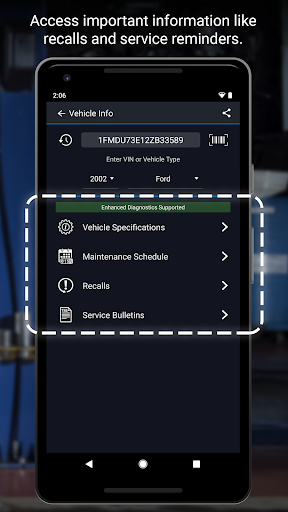
BlueDriver transforms your phone or tablet into a powerful OBD2 scan tool – trusted by over 1 million drivers, from professional mechanics to DIYers. Paired with the BlueDriver Bluetooth Sensor, it lets you read codes, diagnose issues, and fix your car with confidence—no wires, no guesswork. Whether you're checking a check engine light, running a smog test, or diving into enhanced diagnostics like ABS or transmission codes, BlueDriver gives you the tools you need to understand your vehicle and make smarter repair decisions – with clear, easy-to-understand information.
What You Can Do with BlueDriver
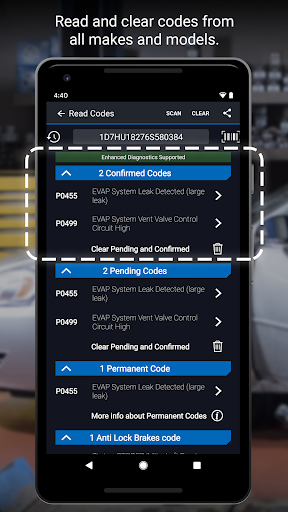
Read and clear trouble codes - including check engine, ABS, airbag, transmission, and more
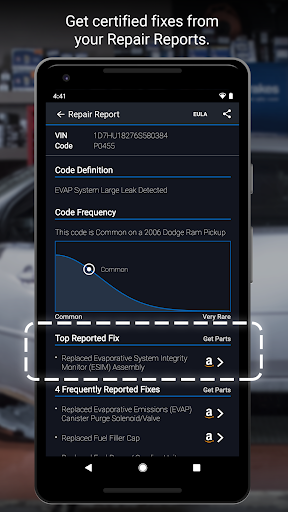
Generate, save, and share professional-grade Repair Reports tailored to your exact vehicle and trouble code
Access Mode 6 on-board monitoring test results
Check smog readiness and freeze frame data
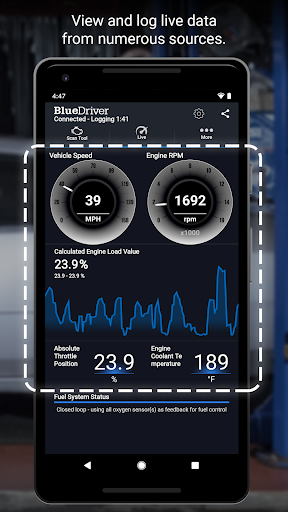
View live data with multi-PID interactive graphing
Scan your vehicle wirelessly with Bluetooth—no cables required
Choose between metric and imperial settings
Get likely fixes for your vehicle’s issues, explained in plain language
Enhanced Diagnostics Coverage
GM, Ford, Chrysler, Toyota, Nissan, Mazda, Mercedes (2005+ models)
Mitsubishi (2008+), Hyundai/Kia (2012+) – available worldwide
BMW/Mini, Honda/Acura, Volkswagen/Audi – available in North America
Subaru – available in the United States
What Makes BlueDriver Different?
No subscription required
Backed by a database of millions real-world fixes
Repair Reports are specific to your vehicle’s year, make, and model
Works globally with the BlueDriver Sensor
App is free to install—just pair with the Sensor to start scanning
You can even preview a Repair Report without a Sensor by entering your VIN and a trouble code.
Account Setup Made Easy
You’ll create a BlueDriver account during setup—it’s quick and easy, and gives you secure access to all your scans, reports, and new features across any device.
Important Info
The BlueDriver Sensor plugs into your vehicle’s data port (found in every car built since 1996). It connects to the app via Bluetooth to deliver full diagnostic functionality. Sensor is sold separately.
BlueDriver OBD2 Scan Tool — Personal Experience and Highlights
Ever had that moment when your car’s check engine light pops on and you’re left guessing what it means? The BlueDriver OBD2 Scan Tool is a game-changer for car lovers and DIY enthusiasts alike. Available for Android and iOS, it pairs seamlessly with the BlueDriver Sensor to deliver in-depth vehicle health insights. It’s like carrying a mechanic in your pocket, with data you can trust.
Why BlueDriver Stands Out
First off, this app works on both major mobile platforms and connects with the sensor to provide a thorough vehicle health snapshot. It’s more than code reading—it’s a comprehensive diagnostic companion with engine and live data visibility, giving you real context about your car’s health.
Easy to Use
Setup is straightforward: plug in the sensor, connect via Bluetooth, and follow clear in-app instructions. Even if you’re not a professional mechanic, BlueDriver walks you through each step and makes complex diagnostics understandable.
Comprehensive Diagnostics
The tool doesn’t stop at reading codes. It offers possible causes and suggests verified fixes, and it maintains a history of your scans to track problem progression over time. Repair Reports draw from a vast database of fixes verified by pros, empowering you with a second opinion when you need one.
Real-Time Data
For deeper insight, BlueDriver streams real-time data—engine RPM, vehicle speed, fuel efficiency, and more—so you can watch how symptoms relate to actual performance. It feels a bit like a car-themed analytics game, but with practical, real-world outcomes.
Bottom Line
BlueDriver isn’t just for seasoned gearheads; beginners can gain confidence and knowledge about their vehicle. It’s a practical tool that helps you understand your car’s health, plan repairs, and potentially save money—embracing the mindset of proactive maintenance.
In-Depth Blog-Style Description for SEO
The BlueDriver OBD2 Scan Tool app combines the power of a wireless OBD2 adapter with a rich diagnostics platform, turning your smartphone or tablet into a portable car scanner. With Bluetooth connectivity to the BlueDriver Sensor, users can read and clear engine codes, monitor ABS and transmission statuses, and generate professional Repair Reports tailored to their exact vehicle. The app supports enhanced diagnostics including Mode 6 on-board monitoring results, smog readiness checks, and freeze-frame data, all presented through an intuitive interface. Real-time data streaming with multi-PID graphs lets you visualize engine performance and trends—perfect for identifying issues early and validating fixes. No ongoing subscription is required, and the repair database spans millions of real-world fixes, ensuring suggested solutions are practical and credible. You can preview Repair Reports by entering a VIN and code, providing a quick preview before a full diagnostic run. Across global regions, the BlueDriver app remains accessible, with wide coverage for major makes such as GM, Ford, Toyota, Honda, VW, BMW, and more. The tool is designed for both casual users and professional technicians, offering a valuable blend of depth, clarity, and user-friendly operation. Whether you want to confirm a failed emission test, monitor live data to optimize fuel economy, or simply understand what the check engine light means, BlueDriver helps you diagnose issues with confidence. It’s a versatile OBD2 scanner app that fits in your pocket and your toolbox, delivering practical insights without the need for a mechanic on standby. For anyone seeking an affordable, reliable route to vehicle diagnostics, repair guidance, and ongoing maintenance insights, this Bluetooth OBD2 adapter plus app pairing stands out as a smart, long-term investment in peace of mind.
Pros
- User-friendly interface for beginners
- Real-time vehicle diagnostics
- Compatible with most car models
- Continuous software updates
- Comprehensive error code info
Cons
- Limited functionality without subscription
- Bluetooth connectivity issues
- App interface can be slow
- Requires permission access
- In-app ads can be intrusive











