


Introduction to Aqara Home
Aqara Home is a comprehensive smart home automation application designed to streamline the management and control of various IoT devices within your household. With Aqara Home, users gain the power to remotely control their Aqara accessories anytime and anywhere, provided there is an internet connection. The app serves as a centralized platform where you can create virtual homes and rooms, and effortlessly assign accessories to specific spaces, enhancing the organization and efficiency of your smart home ecosystem.
Key Features of Aqara Home
Remote Control and Device Management
One of the primary benefits of Aqara Home is the ability to control Aqara accessories remotely. Whether you're at work or traveling, manage your devices with ease. The app allows you to check the status of connected appliances, such as adjusting the brightness of lights or monitoring power consumption. You can also monitor environmental data including temperature, humidity, and air pressure. Additionally, safety functionalities like water leak detection and human movement detection help ensure your home remains secure and efficient.
Automation and Scene Creation
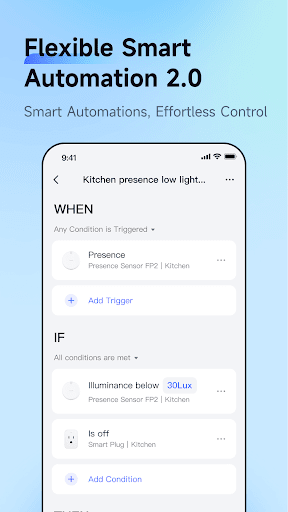
Aqara Home offers powerful automation capabilities that help personalize your smart home experience. Users can create Automations to trigger specific actions based on certain conditions—for example, setting a timer to turn off a smart plug connected device or using a Door and Window Sensor to automatically turn on lights when the door opens. Moreover, the app supports Scenes, which enable you to control multiple accessories simultaneously. An example might be activating a Scene that turns on several lights and fans with a single tap, perfect for creating the ideal atmosphere for relaxation or entertainment.
Supported Aqara Accessories
Aqara Home is compatible with a variety of accessories, making it a versatile solution for smart home enthusiasts. Supported devices include:
- Aqara Hub
- Smart Plug
- Wireless Remote Switch
- LED Light Bulb
- Door and Window Sensor
- Motion Sensor
- Temperature and Humidity Sensor
- Vibration Sensor
- Water Leak Sensor
Personal Impressions and User Experience
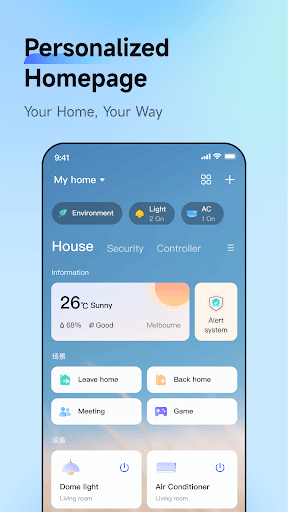
Using the Aqara Home app, I found the experience to be seamless and user-friendly. The interface is clean and intuitive, making it accessible even for those new to smart home technology. The dashboard provides a quick overview of all connected devices, their statuses, and offers seamless control with just a few taps. Setting up devices was straightforward, thanks to clear instructions that guided me effortlessly through pairing each accessory, from motion sensors to smart bulbs. The app's integration with other smart ecosystems like Apple HomeKit and Google Assistant adds flexibility, allowing a more unified smart home experience.
Automation and Security Features
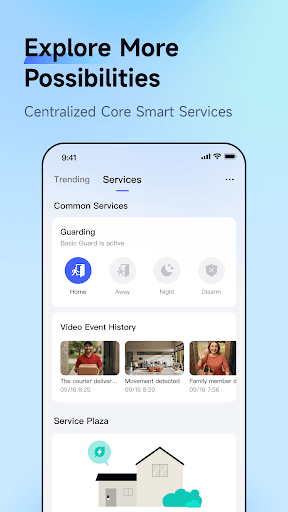
One of the most impressive aspects of Aqara Home is its automation engine. Creating personalized scenes and automations is simple and highly customizable, enabling my home to react intelligently to various stimuli. For example, I set up routines where lights turn on automatically when I enter a room or the thermostat adjusts based on time. The app also provides security features such as notifications and alerts for unusual activities, which add an extra layer of home security. This peace of mind is especially valuable when I am away from home for extended periods.
User Experience & Final Thoughts
Throughout my use of Aqara Home, responsiveness has been excellent, with minimal lag or crashes, reflecting a reliable and robust user experience. Navigating through different settings is intuitive, and meaningful data visualizations, such as energy usage charts, enhance the usability. Occasionally, minor delays occurred, but they did not significantly impact the overall experience. In conclusion, Aqara Home is an excellent choice for anyone seeking to manage their smart home effortlessly. Its rich features, ease of use, and compatibility with major smart platforms make it a smart addition for modern households. If you're looking for a smart home app that combines simplicity with powerful automation, Aqara Home is definitely worth exploring.
Pros
- Intuitive user interface
- Wide compatibility across devices
- Dependable automation functionalities
- Simple setup process
- Secure data management
Cons
- Limited integration with third-party services
- Occasional connectivity problems
- No desktop version available
- Necessitates a stable internet connection
- Limited customer support options











