
TQL Carrier Dashboard
When your office is behind the wheel of a truck, finding your next load should be easy and convenient. Why? Because your time is money and hauling loads is your business. Choose to rely on a provider that lets you focus on the road and manage your business, all through a free trucking app. Access the loads you want through a free load board, all with the touch of a button. Rest easier knowing you can always depend on live support from a team of TQL experts – 24/7/365. As one of the largest freight brokerages in North America, TQL has invested heavily in technology designed for today’s professional truck driver. TQL Carrier Dashboard, is available to all TQL-approved contract carriers to search, quote, and instantly book loads, plus submit check calls and paperwork on every load. Streamlining daily tasks from your phone has never been easier.
Benefits for carriers
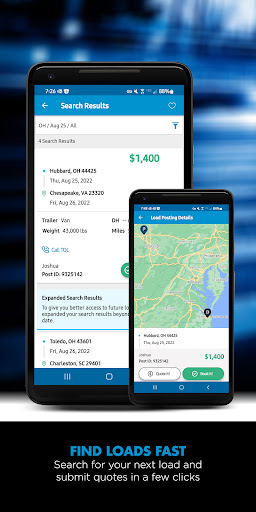
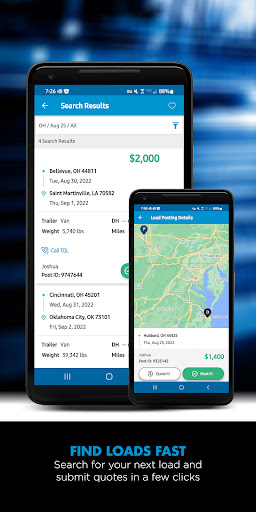
Access to TQL’s free load board with 65,000+ available loads every week
Unlimited load board searches and the ability to submit quotes on the loads you want
Instant load booking on select load postings with Book it Now
Submit quotes on the loads you want
Ability to dispatch yourself, no phone call required
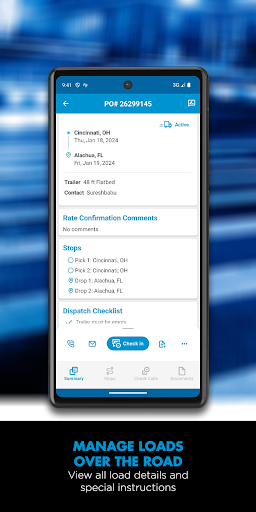
View booked shipment details, including addresses, directions, and load numbers
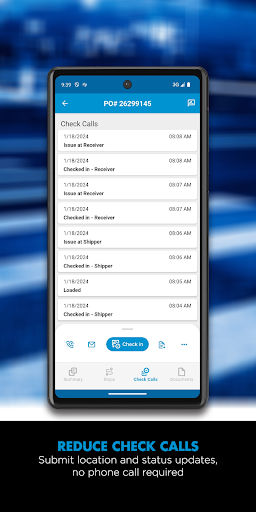
Reduced check calls by submitting location and status updates
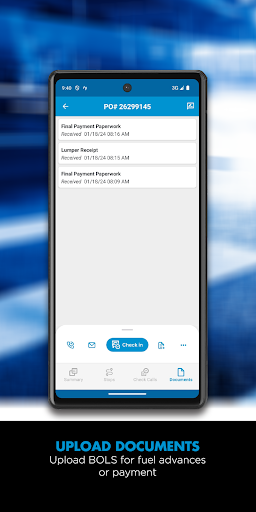
Faster payment processing with uploaded documents using your phone’s camera
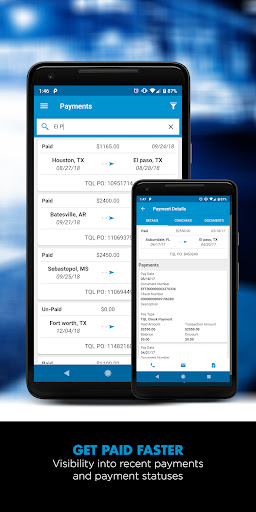
View payment history for completed loads
The option to post your truck and let the right load find you
Custom filters to set your load and lane search preferences
Conveniently find loads back home from your current location
Bilingual customer service
When it comes to hauling and managing your freight, trust the technology and industry-leading customer support from TQL. We want to be your first choice when it comes to booking your next full truckload. If you are new to TQL, begin the process of becoming a carrier today. Learn more about carrier registration on the TQL site and explore opportunities to grow your business with TQL’s carrier network.
Carrier Dashboard — User Experience
The User Interface: A Breath of Fresh Air
The TQL Carrier Dashboard greets you with a clean, sleek design that’s visually appealing and highly functional. It’s like walking into a room that’s been Marie Kondo-ed to perfection. Everything you need is right where it should be, and navigating the app feels as intuitive as scrolling through your favorite social media feed.
Functionality: More Than Just Bells and Whistles
One of the standout features of this app is how seamlessly it integrates all the essentials for carriers. Whether you’re a seasoned trucker or just starting out, the app’s got your back. You can easily check loads, track shipments, and manage your schedule with just a few taps. It’s like having a personal assistant who knows the ins and outs of logistics. And the real kicker? The real-time updates. Imagine you’re on the road, and a delay pops up. Instead of scrambling around, the app provides instant updates to keep you in the loop. It’s like having a GPS that not only guides you but also gives you a heads-up on road conditions ahead.
Performance: Smooth Sailing All the Way
Now, imagine using an app that runs as smoothly as a well-tuned engine, with no hiccups during your testing period. The TQL Carrier Dashboard delivers reliable performance and doesn’t drain your device’s battery, so you can stay on the road longer without worrying about power drain.
Ending Thoughts: A Must-Have for Carriers
In the logistics game, this dashboard is a practical blend of functionality, reliability, and user-friendliness. It’s like a Swiss Army knife for the modern carrier—compact, versatile, and ready to tackle everyday tasks on the move. Whether you’re hauling freight across the country or just managing a fleet, this app is designed to simplify operations and make life on the road a little easier.
TQL Carrier Dashboard: Blog-Style Feature Description
From the driver’s seat to the dispatch desk, the TQL Carrier Dashboard is designed to save time, reduce hassle, and improve cash flow for trucking teams. The free load board puts 65,000+ weekly opportunities at your fingertips, with unlimited search and instant booking options for select postings. If you dread the back-and-forth of check calls, you’ll appreciate the ability to submit location updates and documentation directly from your phone, accelerating payment cycles and cutting admin work. Real-time updates give you a clearer picture of route status, so you can plan ahead and stay compliant with delivery windows. The platform’s intuitive interface makes it easy to search by lane or equipment type, apply custom filters, and monitor booked shipments with complete details like addresses and directions. Plus, bilingual customer support ensures language doesn’t become a barrier when you’re on tight deadlines. Traffic, weather, and delay alerts arrive in-app, helping you make smarter routing decisions. The result is less downtime, more miles, and a stronger bottom line for carrier partners of all sizes. Whether you’re a solo operator or managing a small fleet, TQL Carrier Dashboard helps you work smarter, not harder, on the road. The app’s mobile-first design means you can stay productive wherever your truck takes you, and the integrated document capture feature keeps paperwork moving forward, not gathering dust.
With the TQL Carrier Dashboard, you’re tapping into a freight brokerage technology ecosystem that prioritizes efficiency and reliability. The free load board opens doors to a broad network of loads, while instant booking on eligible postings helps you lock in capacity without delay. Submitting quotes and dispatching yourself reduces reliance on phone calls, which translates to fewer interruptions during peak driving hours. Real-time status updates and route alerts act like a forward-facing navigator—empowering you to anticipate challenges and adjust on the fly. And because the system supports document uploads via your phone’s camera, you can speed up settlements and keep your cash flow healthy. For carriers of all sizes, from solo operators to growing fleets, the dashboard delivers value by streamlining operations, cutting administrative tasks, and keeping you connected to a supportive, bilingual support team whenever you need it. If you’re considering a carrier program with a major freight broker, the TQL Carrier Dashboard stands out as a practical, scalable choice that aligns with today’s on-the-road logistics reality.
Pros
- User-friendly interface for quick navigation
- Real-time updates on shipment statuses
- Customizable dashboard for personalized views
- Comprehensive load tracking features
- Efficient load booking process
Cons
- Requires stable internet for optimal performance
- Limited offline functionalities
- Occasional notification delays
- High data usage with continuous tracking
- Initial setup can be time-consuming











