

Overview of the Maps Driving Directions App
Are you searching for an efficient way to navigate with Maps Driving Directions? Whether you need to find current location traffic on maps or get driving directions without an internet connection, this app is your ultimate travel companion. It offers a comprehensive set of features designed to make your navigation seamless and reliable, whether you're driving, biking, or walking. With real-time traffic updates, offline maps, and details like latitude and longitude of your location, this app simplifies all aspects of travel and exploration.
Key Features of Maps Driving Directions
User-Friendly Interface and Easy Navigation
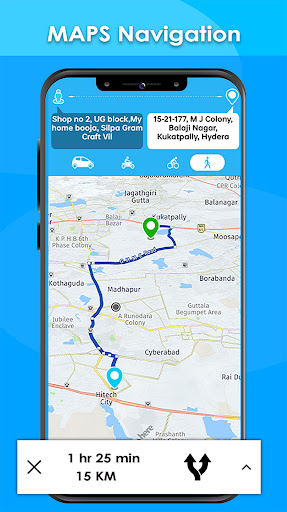
Getting started with Maps Driving Directions is straightforward. The app boasts a clean, intuitive interface that allows even non-tech-savvy users to navigate effortlessly. Upon opening, you'll see a map view centered on your current location. Simply enter your desired destination, and the app instantly provides multiple route options to choose from. The seamless layout ensures quick access to all core features, making your journey hassle-free.
Real-Time Traffic and Route Optimization
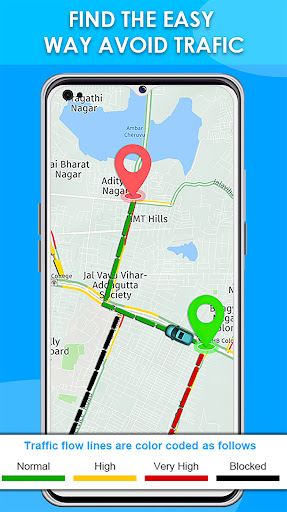
One of the standout features is the traffic map finder, which displays real-time traffic conditions on the world map. Different routes are highlighted with various colors indicating traffic congestion levels, helping you pick the fastest path. By receiving live traffic updates, you can avoid jams, save time, and make informed decisions during your journey—especially vital during rush hours or unexpected roadblocks.
Voice-Guided Navigation and Route Planning
Navigate confidently with voice-guided turn-by-turn directions. This feature ensures your focus remains on the road, reducing distractions. The app also allows you to find directions home from any location, supporting safe and efficient travel. Whether you’re en route to work or a new destination, the app provides clear, spoken instructions for a stress-free experience.
Offline Maps and Global Coverage
Planning to visit remote areas or places with poor network connectivity? No worries—our offline maps feature lets you download maps of countries worldwide, including detailed India map and village map sections. Once downloaded, you can access navigation, find latitude and longitude of your location, and search for places—all without an internet connection.
Find Nearby Places and Explore
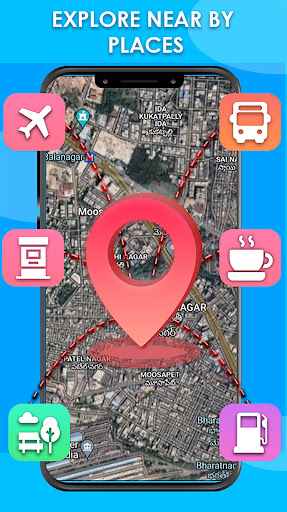
With the nearby places finder, discovering new spots around you has never been easier. Search for restaurants, gas stations, ATMs, banks, amusement parks, and more. Whether you're on a road trip or exploring a new city, this feature helps you locate essential services and exciting attractions nearby.
Weather Integration for Better Planning
Stay informed with real-time weather updates. Check weather forecasts for today, tomorrow, next week, or even for the next 15 days. This integration helps you plan your trips better and avoid weather-related disruptions, contributing to safer travels.
How It Enhances Your Travel Experience
The Maps Driving Directions app acts like your personal navigator, guiding you through unfamiliar streets with ease. Its ability to provide fastest route finder, live navigation, and multiple route options ensures you always pick the best path to your destination. Whether you're commuting, on a road trip, or exploring new cities, the app's reliable updates prevent delays and optimize your journey.
Advantages for Frequent Travelers and Tourists
Frequent travelers benefit greatly from features like offline maps and multi-language support, making international journeys more manageable. The app’s capacity to share live location enables safe coordination with friends and family, especially during long trips. Additionally, detailed map navigation home options simplify daily commutes and help you reach any place with confidence.
Why Choose Maps Driving Directions?
This app combines essential navigation features into one comprehensive package. It’s ideal for everyone—from daily commuters to adventure seekers—and ensures you have accurate, real-time data at your fingertips. With its user-friendly design, offline capabilities, and extensive map coverage, Maps Driving Directions is truly the most complete travel companion you can rely on.
Conclusion
Download the Maps Driving Directions app now and elevate your navigation experience. Enjoy offline access, real-time traffic alerts, weather updates, and the convenience of finding the best routes each time you travel. Whether you're exploring a new city, heading home, or discovering nearby attractions, this app provides all the driving directions and map features you need for smooth, efficient journeys. Stay ahead of traffic, explore with confidence, and navigate the world effortlessly with your personal GPS in your pocket.
Pros
- User-friendly interface
- Real-time traffic updates
- Offline map availability
- Multiple route options
- Voice-guided navigation
Cons
- Consumes high battery
- Requires internet for updates
- Ads in free version
- Occasional GPS lag
- Limited customization options










