
Explore the Features of the Tesla App
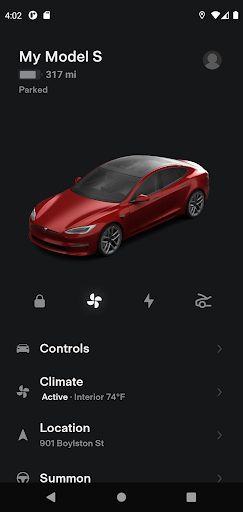
The Tesla app provides Tesla owners with seamless, real-time communication with their vehicles and Powerwalls. Whether you want to monitor your car's charging status or control various vehicle functions remotely, this innovative application brings a suite of features right to your fingertips. Designed for convenience and effortless control, the Tesla app enhances your driving experience and helps optimize energy management at home and on the road.
Remote Vehicle Control and Monitoring
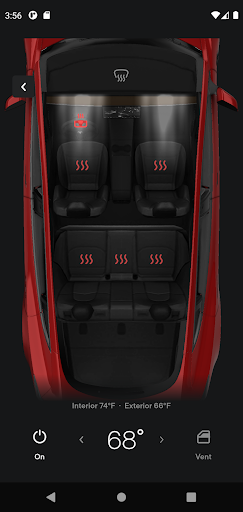
With the Tesla app, you can check the charging progress of your vehicle in real time, giving you instant updates on your car's battery status. Need to start or stop charging? It’s just a tap away. Before heading out, you can heat or cool your car remotely—perfect for chilly mornings or hot days—ensuring your Tesla is comfortable from the moment you step inside. The app also allows you to lock or unlock your vehicle from afar, providing peace of mind and security. If you need to find your Tesla, use the app's location feature for directions or to track its current movement. Additionally, you can send an address from your favorite navigation apps directly to your vehicle, making trip planning effortless.
Convenient Driver and Passenger Features
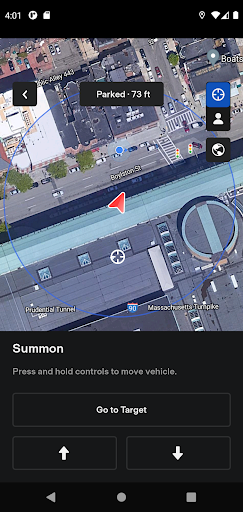
Passengers can enjoy quick access to media controls, enhancing their in-car entertainment experience. When your vehicle is parked, easily locate it by flashing lights or honking the horn through the app, which is especially useful in crowded parking lots. For a more luxurious touch, you can vent or close the panoramic roof remotely, adjusting your cabin environment to your liking. For Tesla vehicles equipped with Autopilot, the app offers advanced features such as Summon, which enables your car to exit a garage or tight parking space autonomously, simplifying parking in challenging environments.
Software and Powerwall Integration
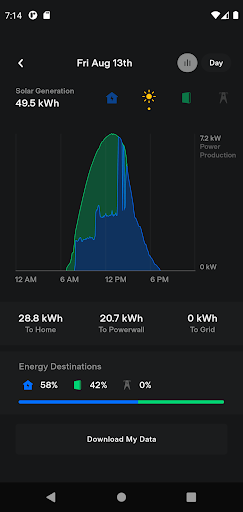
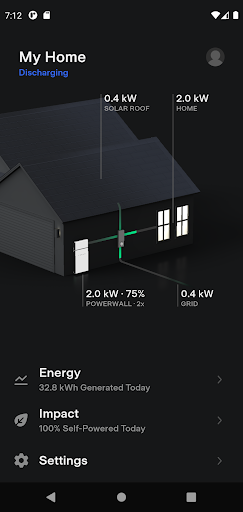
The Tesla app enables you to update your vehicle's software from anywhere, ensuring you always have the latest features and improvements. For Powerwall owners, the app offers comprehensive energy management capabilities: monitor how much solar energy is stored, used within your home, or exported to the grid. You can also download detailed data on solar production and battery usage, empowering you to optimize your energy consumption and savings. Note that Powerwall features in the app require Powerwall 2, making it a vital tool for home energy enthusiasts.
Why Tesla's App Is a Game-Changer in Automotive Technology
Tesla continues to redefine innovation with its cutting-edge automotive solutions, and the Tesla app exemplifies this progress. Available on both Android and iOS devices, the app’s sleek and modern interface mirrors the style of Tesla’s highly acclaimed vehicles. Its intuitive design makes it easy for owners to access critical vehicle controls and information instantly. Whether you need to check battery levels, locate your parked vehicle, or manage energy usage at home, the Tesla app consolidates all essential functions into a single, user-friendly platform.
Enhanced Control and Connectivity
One of the standout features is remote control of vehicle functions. Imagine pre-cooling your Tesla on a scorching summer day or warming it up during a chilly winter morning, all before you even step outside. Charge management is equally straightforward: locate nearby charging stations with real-time availability updates, perfect for long trips or daily commutes. The app also syncs with your calendar to suggest efficient routes, making navigation seamless and personalized. This level of connectivity transforms your Tesla into a highly integrated part of your daily life.
Final Thoughts
After exploring the Tesla app’s capabilities, it’s clear that it’s more than just a remote control—it's a comprehensive personal assistant for your vehicle and energy needs. From monitoring vehicle health to controlling climate and energy management, the app delivers convenience and innovation at your fingertips. Whether you’re a dedicated Tesla owner or a tech enthusiast interested in automotive advancements, the Tesla app offers a compelling glimpse into the future of smart driving. Download it today and experience the intersection of cutting-edge technology and automotive excellence—your Tesla awaits at your command.
Pros
- Innovative autopilot feature
- High-performance electric vehicle
- Over-the-air software updates
- Spacious and modern interior
- Extensive Supercharger network
Cons
- Expensive initial cost
- Limited service centers
- Long charging times
- Occasional software glitches
- High repair costs











