

Overview of Microsoft Family Safety
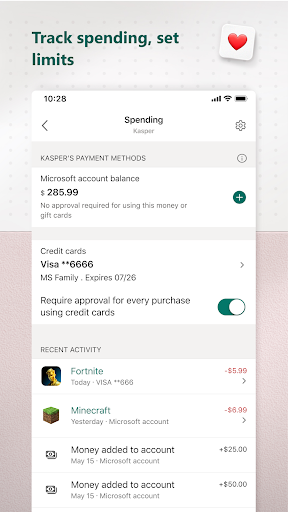
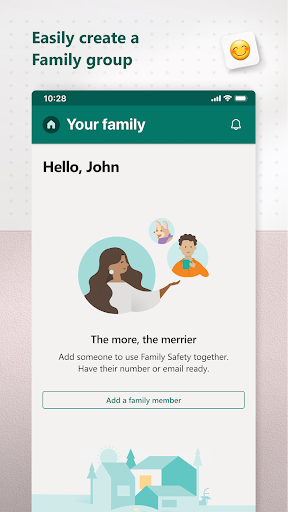
Microsoft Family Safety is a comprehensive app designed to help families create a safer and more balanced digital environment for their loved ones. With its suite of monitoring and protection features, this app empowers parents to oversee their children's online activities while providing kids with a secure space to explore and learn. As modern families navigate the complexities of digital life, Microsoft Family Safety offers peace of mind by combining parental control tools with activity tracking and location sharing.
Main Features of Microsoft Family Safety
Helping Families Stay Safe Online
In today’s digital age, the internet can sometimes feel like the wild west, especially for children. Microsoft Family Safety acts like a trusted sheriff, enabling parents to set boundaries and protect their kids. It allows users to establish pa нед control settings that filter inappropriate content and restrict access to certain apps and websites. Additionally, parents can set browsing limits by enabling web filters for kid-friendly sites on Microsoft Edge, ensuring safe surfing experiences.
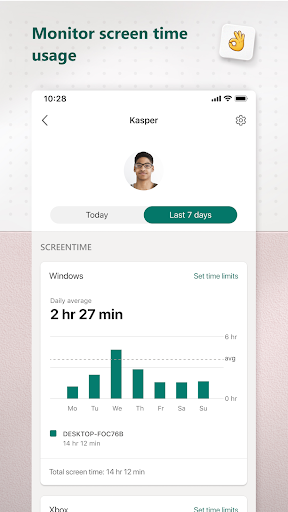
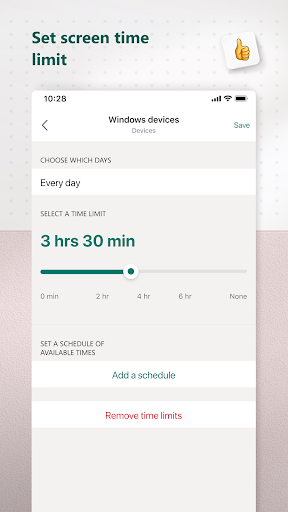
A standout feature is the ability to limit screen time across multiple devices including Xbox, Windows, and Android. Parents can set time limits for specific apps and games, preventing kids from excessive usage. They also receive notifications if their child requests additional screen time, making the app feel like the boss of digital boundaries without the hassle.
Location Sharing & Tracking
Ever wish you had a digital crystal ball to see where your family members are? With Microsoft Family Safety, you can share real-time locations with your loved ones, offering peace of mind especially for parents of teenagers. The app provides insights into where family members are at any given moment, which can be a valuable tool for safety and coordination.
Beyond location tracking, the app includes driving safety features. These provide detailed reports on driving habits, such as top speed and phone usage while driving. Think of it as a co-pilot that keeps an eye on safe driving behaviors, promoting responsible habits behind the wheel.
Promoting Healthy Digital Habits
Creating healthy digital habits is crucial in our tech-driven world. Microsoft Family Safety helps parents enforce responsible usage by implementing content filters that block inappropriate websites and games. The app's activity reporting feature offers a clear view of online behavior, allowing families to initiate meaningful conversations about digital activity and online safety.
Designed with user-friendliness in mind, these features can be managed easily across devices, whether on a smartphone, tablet, or PC. This cross-device synchronization ensures parents stay informed and in control regardless of where they are or which device their children are using.
Privacy & Permissions
Your privacy is a top priority for Microsoft. The app works diligently to protect personal data by not selling or sharing location information with third parties like insurance companies or data brokers. Families are provided with transparent options regarding how data, including app usage and interaction info, is collected and used.
With user consent, Microsoft Family Safety may collect interaction data using permissions related to accessibility, app usage, and device management. This enables monitoring of app activity, automatic app exits, or blocking of unauthorized apps, all while respecting privacy rights.
Disclaimers & Legal Information
This app is supplied by either Microsoft or a third-party publisher and is subject to separate privacy policies and terms of service. Data shared through the app may be stored and processed in various countries, including the United States, depending on where Microsoft or the service providers operate.
Final Thoughts
Microsoft Family Safety is a powerful and versatile tool for any family aiming to manage their digital lives responsibly. It offers a balanced mix of parental controls, activity monitoring, location sharing, and content filtering to foster a safe online environment. Whether you're a tech-savvy parent seeking detailed control or a family looking to promote healthier screen habits, this app provides all the essential features you need.
With its user-friendly interface, cross-device compatibility, and commitment to privacy, Microsoft Family Safety stands out as an invaluable resource for navigating the challenges of digital parenting in the modern age. Give it a try and help your family stay safe and responsible online while embracing the benefits of technology.
Pros
- Comprehensive parental control features.
- Allows location sharing among family members.
- Enables setting screen time limits on devices.
- Provides activity reports for monitoring purposes.
- Compatible across different platforms.
Cons
- Fewer features available on iOS compared to Android.
- Requires a Microsoft account for all users.
- Setup process can be complicated for users who are not tech-savvy.
- Some functionalities are only accessible through paid plans.
- Occasional issues with data synchronization.











