

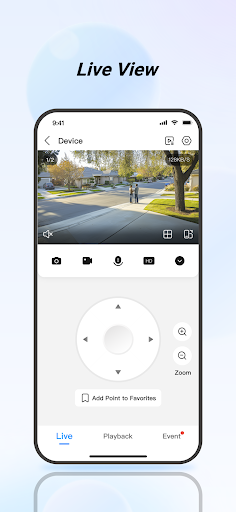
Overview of the DMSS App
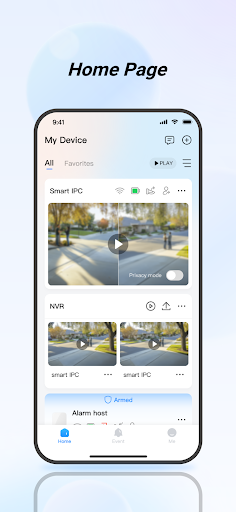
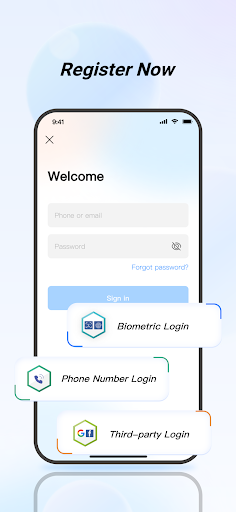
The DMSS app is a comprehensive security management tool designed to enhance your home or business security efficiency. With its user-friendly interface and robust features, DMSS allows users to monitor surveillance cameras in real-time, review historical footage, and receive instant alerts for any suspicious activity. Compatible with Android 5.0 or above and iOS devices, DMSS integrates multiple security functions into a single app, making security management more streamlined and accessible. Whether you're at home or on the go, DMSS provides a reliable solution to keep your property safe and under control.
Main Features of DMSS
Real-time Live View
With DMSS, you can enjoy real-time live streaming from all your connected security devices. Whether you're at work, running errands, or relaxing at home, the app lets you view live surveillance videos anytime, anywhere. The smooth transmission over Wi-Fi or cellular networks ensures you're always connected to your security environment, providing peace of mind and instant visibility into your premises.
Video Playback
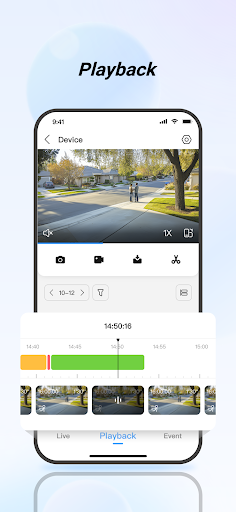
The app includes a video playback feature, enabling you to quickly locate specific events by date or category. This functionality is ideal for reviewing footage after an incident, helping you identify what happened and when. The intuitive interface allows effortless navigation through your stored videos, making security review fast and easy.
Instant Alarm Notifications
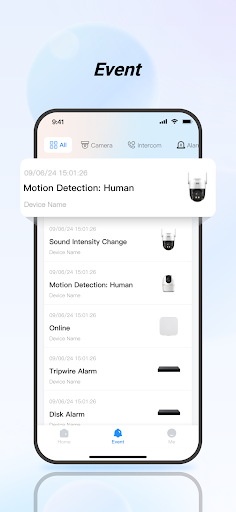
One of DMSS's standout features is its instant alarm notifications. You can subscribe to different alarm events such as motion detection, intrusion, or fire alerts. When an event occurs, the app immediately pushes a notification to your device, ensuring you’re promptly informed of potential security threats no matter where you are.
Device Sharing
DMSS supports device sharing, allowing you to share access with family members or trusted individuals. You can assign different permissions, such as view-only or control rights, to ensure everyone can participate in security monitoring without compromising system integrity.
Alarm Hub Integration
The app supports adding various peripheral accessories to an alarm hub. This setup offers warnings for threats like theft, water damage, fire, or intrusion. In response to these scenarios, DMSS can trigger alarms and send of danger notifications immediately, effectively acting as the central command for your security peripherals.
Visual Intercom
The visual intercom feature facilitates video calls between your device and connected intercom units. This function allows direct communication, as well as control actions like locking or unlocking doors remotely, enhancing household or business access management.
Access Control
DMSS enables seamless access control management by connecting compatible devices. You can monitor door status, review unlock records, and perform remote unlocking, providing flexible and secure access management from anywhere.
Personal Experience and User Benefits
Many users find DMSS to be a game changer in digital security management. Its intuitive interface not only simplifies setup but also makes daily operations hassle-free. The app’s real-time streaming and quick notification system keep users alert to any suspicious activity, whether they’re at home or away. The recording and playback functions further enhance security by allowing users to review footage at their convenience. Additionally, DWSS supports cloud storage, addressing concerns about local storage limitations.
Conclusion
Overall, DMSS offers an all-in-one security management solution that combines ease of use with powerful features. From live monitoring and instant alerts to device sharing and access control, the app makes protecting your property straightforward and effective. Its compatibility with multiple devices and integration capabilities ensure it can adapt to diverse security needs. If you’re seeking a reliable app to enhance your home or business security system, DMSS is definitely worth exploring. With its comprehensive features, managing security has never been easier or more efficient.
Pros
- User-friendly interface improves navigation.
- Supports high-quality video streaming.
- Allows customizable alert notifications.
- Compatible with various camera brands.
- Provides secure remote device access.
Cons
- Occasional connectivity problems encountered.
- Limited availability of customer support.
- In-app purchases required for premium features.
- Setup process may be challenging for non-technical users.
- Battery tends to drain during extended use.











