

Introducing the Cync App: Your Ultimate Smart Home Control Solution
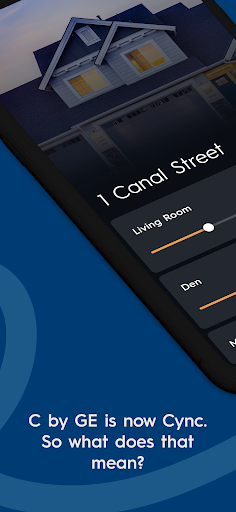
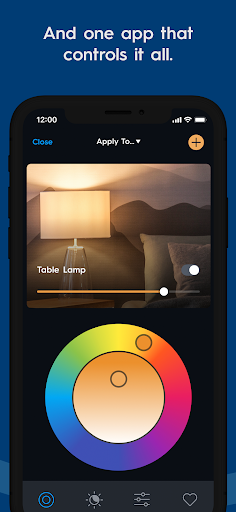
The Cync app, formerly known as C by GE, offers an innovative way to manage your smart home devices seamlessly. Powered by Savant, this all-new application provides a user-friendly interface combined with advanced features that enhance your smart home experience. Whether you're looking to control lighting, security, or appliances, the Cync app simplifies the process, making home automation accessible and enjoyable for everyone.
Key Features of the Cync App
Enhanced Personalization
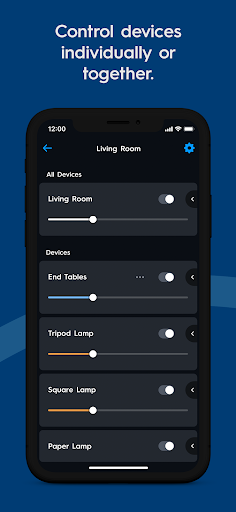
The app allows you to add photos of your devices and rooms, helping you identify and manage your smart home products more easily. The dynamic home screen adapts to prioritize your most-used devices, ensuring quick access when you need it most.
Dark Theme Option
For late-night convenience, the app features a dark theme that reduces eye strain and makes viewing easier in low-light conditions.
Patented TrueImage Technology
With TrueImage, you can take pictures of your lights and experiment with colors and brightness directly from your smartphone—whether you're in another room or away from home.
Advanced Color Control
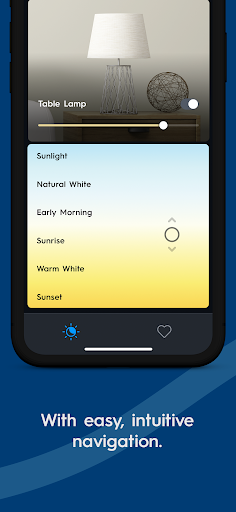
Customize your lighting by adding RGB values to match your decor or using the double color wheel to find the perfect hue for any space.
Grouping Devices Within Rooms
The app allows you to add devices to groups within a room, such as “Island Fixtures” in the Kitchen, enabling more granular control without cluttering your setup.
Improved Stability and Speed
Enjoy faster connections and more reliable performance, ensuring your smart devices respond promptly and consistently.
What Can You Do with the Cync App?
- Schedule Lights: Automate your lighting to turn on or off at specific times, creating the perfect ambiance or simulating occupancy during vacations.
- Change Space Colors: Alter your room’s colors without painting, simply by adjusting smart bulbs' colors through the app.
- Create Profiles: Share control with family members or friends through multiple profiles, making device management collaborative and hassle-free.
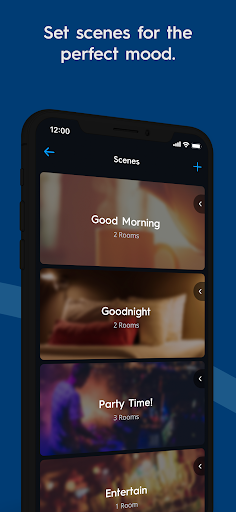
- Set Scenes: Prepare customized scenes for different activities, such as a sleeping scene with dimmed lights and relaxed ambiance at a single tap.
- Surveillance & Security: Connect an Indoor Smart Camera to monitor your home remotely in HD video with two-way audio, ensuring your family and pets are safe.
- Outdoor Control: Power outdoor holiday displays or water features effortlessly using the Outdoor Smart Plug.
Voice Compatibility
Seamlessly integrate with voice assistants like Amazon Alexa and Google Assistant. Control your lights, devices, and scenes with just your voice—no hub required.
New Cync Products for a Smarter Home
Outdoor Smart Plug
Extend your smart control outdoors with this all-weather device, perfect for activating outdoor string lights or water features with a simple command.
Indoor Smart Camera
Keep an eye on your home remotely with HD video and 2-way audio. Monitor your kids, pets, or property from anywhere for added peace of mind.
Getting Started and User Experience
Setting up the Cync app is straightforward. The intuitive interface and step-by-step guidance make the process easy—even for those new to smart home technology. Compatible with both Amazon Alexa and Google Assistant, it creates a cohesive ecosystem that connects all your devices effortlessly.
Why Choose the Cync App?
With an extensive suite of features, quick response times, and reliable connectivity, the Cync app stands out as a top choice for both beginners and smart home aficionados. Its user-centric design, coupled with powerful automation options like scheduling, scene creation, and device grouping, truly enhances daily living. Whether automating routine tasks or managing security, this app provides the convenience and control you desire—making your home smarter, safer, and more comfortable.
Pros
- User-friendly interface for easy navigation.
- Supports a wide variety of smart home integrations.
- Offers energy-saving features.
- Allows customization of lighting scenes.
- Can be controlled remotely via mobile app.
Cons
- Limited compatibility with devices outside of GE ecosystem.
- Reports of occasional connectivity problems.
- Requires a subscription for access to premium features.
- Setup process can be challenging for new users.
- Limited options for customer support.











