

Introduction to the CloudEdge App
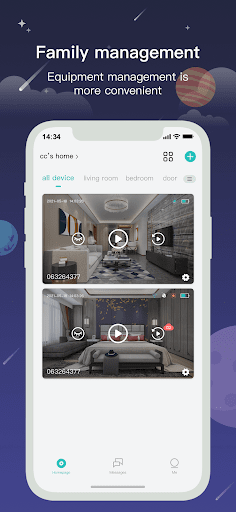
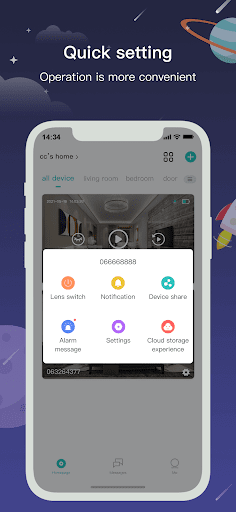
Let’s explore CloudEdge, an innovative security application that has rapidly gained popularity among users seeking effective and user-friendly home security solutions. Designed to provide peace of mind, CloudEdge offers a seamless experience for monitoring your property and protecting your loved ones. Whether you're at home or away, this app ensures you stay connected with real-time updates and powerful features that simplify security management.
Key Features of CloudEdge
Instant Alerts and Safety Notifications
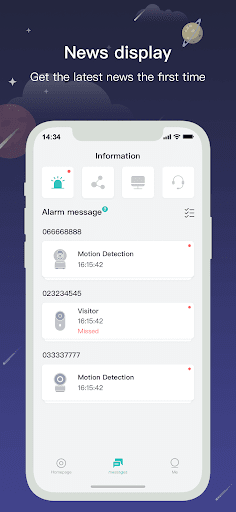
One of the standout functions of CloudEdge is its ability to send instant push notifications whenever motion is detected. This means that as soon as an intruder or any moving object is spotted by your connected cameras, you instantly receive an alert on your device. This quick notification mechanism allows you to react promptly and take appropriate safety measures. Whether it’s alerting family members or initiating other security protocols, these real-time alarm system messages help you stay ahead of potential threats. With CloudEdge, your family and enterprise security are always within reach, no matter where you are.
Core Functionalities
The main functions that make CloudEdge a reliable security app include:
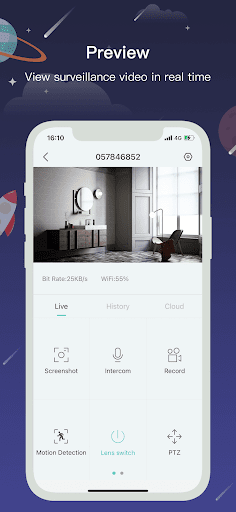
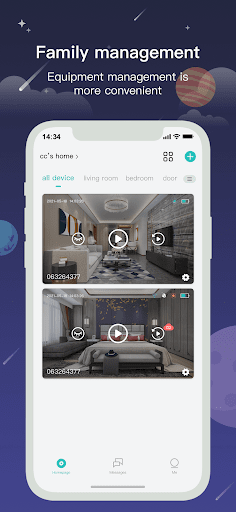
- Real video playing: Watch live feeds from your security cameras with high-quality visuals.
- Playback image checking: Review historical footage to investigate past events.
- Time & message reminding: Schedule alerts and reminders to keep your security routine organized.
- Share the video image content: Easily share footage with family, friends, or authorities when needed.
Why Choose CloudEdge?
If you are looking for a home security app that combines ease of use with robust features, CloudEdge is an excellent choice. The setup process is straightforward, guided by clear instructions that eliminate the need for technical expertise. Even beginners or non-tech-savvy users will find it manageable to install and configure. Once configured, the intuitive interface arranges all essential options neatly, avoiding clutter and confusion.
Enhanced Security with Real-Time Notifications
The application excels at providing real-time alerts that act as virtual security guards. These instant notifications alert you immediately if any suspicious activity occurs near your property, giving you the chance to respond swiftly. The app's superior video quality ensures you receive crisp, detailed views of visitors or intruders, making it easier to identify anyone on your premises.
Two-Way Audio and Seamless Integration
Another compelling feature is the two-way audio, enabling real-time communication through your security cameras. This function allows you to chat with visitors, delivery personnel, or even deter intruders directly from your smartphone. Additionally, CloudEdge integrates smoothly with other smart home devices, including smart locks and additional cameras. This interoperability creates a comprehensive security network, enhancing your overall home automation experience.
Cloud Storage for Peace of Mind
The optional cloud storage feature offers secure storage for your video footage. Instead of relying solely on local memory, which can fill up or succumb to damage, cloud storage keeps your data safe and accessible anytime. This ensures that your security recordings are protected and available for review whenever needed, further strengthening your overall security setup.
Final Thoughts
In today’s world, security is more important than ever. CloudEdge stands out as a reliable, user-friendly app that provides comprehensive security features without the complexity other apps often entail. Its seamless integration with smart devices, instant alert system, high-quality video feeds, and cloud storage options make it a must-have tool for safeguarding your home or business. If you want to upgrade your security system with minimal hassle and maximum protection, give CloudEdge a try. Once you start using this versatile app, you'll likely wonder how you ever managed without it.
Pros
- User-friendly interface.
- Excellent video streaming quality.
- Customizable alerts and notifications.
- Compatible with multiple devices.
- Data secured with encryption.
Cons
- Limited options for cloud storage.
- Subscription required for premium features.
- Occasional connectivity problems.
- Customer support is somewhat limited.
- Battery life can be enhanced.











