






Introduction to Bark - Parental Controls
In today's digital age, ensuring the safety of children online has become more complex than ever. Bark provides families with powerful tools to navigate the online world confidently. Designed to help parents monitor, manage, and filter their child's digital activities, Bark - Parental Controls aims to give peace of mind while fostering healthy online habits. Whether it's protecting against cyberbullying, inappropriate content, or online predators, Bark offers a comprehensive solution to keep children safe in a connected world.
Key Features of Bark - Parental Controls
Content Monitoring
Bark's core service involves monitoring your child’s text messages, emails, YouTube activity, and over 30 social media and app platforms. It intelligently scans for signs of cyberbullying, suicidal ideation, adult content, sexual predators, profanity, threats of violence, and other online risks. The system is designed to notify parents only when potential issues arise, ensuring privacy while maintaining constant vigilance. This targeted approach helps parents stay informed about online dangers without intrusive oversight.
Screen Time Management
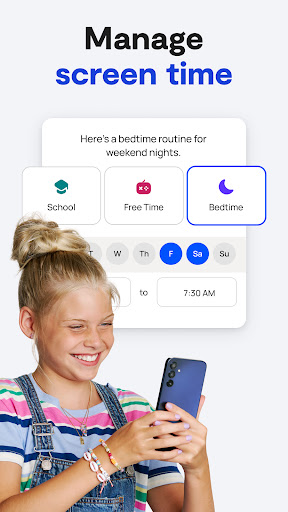
Managing digital habits is crucial for a balanced lifestyle. Bark allows families to set healthy screen time limits and create customizable schedules for device connectivity. Parents can specify when their children can access the internet via cellular data or Wi-Fi, promoting healthy routines and preventing excessive device use. This feature is particularly useful for establishing boundaries around gaming, social media, and late-night browsing.
.Web Filtering
The web filtering tool enables parents to control which websites their children can visit. You can allow or block specific sites, and categorize web content into groups like streaming services, online gaming, sexual content, and more. This granular control ensures children can safely explore age-appropriate content while avoiding harmful online material.
Bark Home
For broader protection across all devices connected to your home Wi-Fi, Bark offers a product called Bark Home. This small device connects to your router and, when paired with the Bark app, manages screen time, website access, and app filtering on all Wi-Fi-enabled devices like smart TVs, gaming consoles, laptops, and tablets. A subscription is required to activate Bark Home’s full capabilities, providing comprehensive family protection in the digital household.
Pricing
Remarkably affordable, Bark's subscriptions cater to different family needs. The full Bark package, which includes content monitoring, screen time management, and web filtering, is priced at $14/month or $99 annually. For families requiring basic controls, Bark Jr offers screen time management and web filtering for just $5/month or $49 annually.
Setup and Installation
Getting started with Bark is simple. After downloading the Bark app for parents and guardians, you need to install the Bark for Kids app on your child's device to enable monitoring and additional controls. The process is straightforward and guided, making it accessible even for those without technical expertise. Once set up, parents can effortlessly link their child’s devices and begin managing online safety features.
Why Choose Bark - Parental Controls?
If you're searching for a reliable online safety solution, Bark stands out as a comprehensive tool that combines ease of use with advanced monitoring technology. It strikes a balance between respecting your child's privacy and maintaining a vigilant watch against online threats. By providing alerts only when necessary and allowing customization of notifications, Bark ensures parents stay informed without feeling overwhelmed. Its focus on protecting children online while promoting responsible digital usage makes Bark a trusted partner in modern parenting.
Conclusion
In conclusion, Bark - Parental Controls is an essential app for families seeking to foster a safe online environment for their children. Its features, including content monitoring, screen time management, and web filtering, are designed to provide peace of mind effortlessly. With an affordable pricing plan and straightforward setup, Bark helps parents navigate the challenges of digital parenting efficiently. Embrace Bark and help your children develop healthy, responsible online habits in today’s connected world.
Pros
- Comprehensive web filtering options
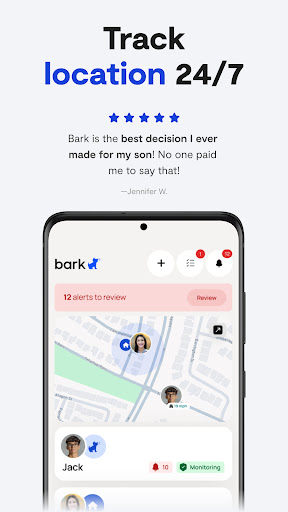
- Real-time location tracking
- Screen time management
- Customizable restrictions
- User-friendly interface
Cons
- Limited free version features
- Requires internet connection
- May slow down device
- Complex setup for beginners
- Limited customer support











