Discover the Power of PS Remote Play
Are you a dedicated PlayStation fan who wishes to access your favorite games beyond the confines of your living room? PS Remote Play offers a seamless solution that brings your PS5™ or PS4™ console right to your mobile device or PC. This innovative app allows gamers to stream their PlayStation games anywhere, at any time, as long as they have a reliable internet connection. Whether you're relaxed at home, traveling, or on the go, PS Remote Play transforms your gaming experience by providing maximum flexibility and convenience.
Key Features of PS Remote Play
With PS Remote Play, you can enjoy a variety of features designed to enhance your gaming sessions:
Display Your PS Screen Anywhere
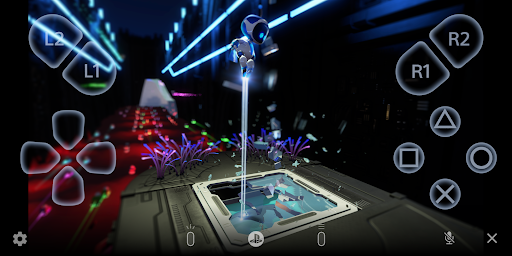
Easily stream your PlayStation®5 or PlayStation®4 screen onto your mobile device. This allows you to keep playing your favorite titles whether you're in another room or away from your console.
Use Your Controller of Choice
Connect and control your games using familiar controllers. If your device runs on Android 10 or later, you can use the DUALSHOCK®4 wireless controller. For Android 12 or later, the DualSense™ controller is compatible, and on Android 14 or later, you can enjoy the advanced features of the DualSense Edge™ controller.
Accessory Compatibility
For Android smartphones with USB Type-C ports and Android 10 or later, the Backbone One PlayStation® Edition offers an ergonomic gaming experience.
Enhanced Communication & Text Input
Join voice chats using your mobile device’s microphone and easily enter text on your PS4 or PS5 using your device’s keyboard, making multiplayer sessions more interactive.
Requirements for Optimal Use
To get started with PS Remote Play, ensure you have:
- A mobile device with Android 9 or later installed.
- A PS5 or PS4 console with the latest system software.
- A PlayStation Network account.
- A fast and stable internet connection to minimize lag and ensure smooth gameplay.
Using Your Gaming Controllers Effectively
Depending on your device’s Android version, you can connect various controllers:
- DUALSHOCK 4 wireless controller on Android 10 or later.
- DualSense™ wireless controller on Android 12 or later.
- DualSense Edge™ wireless controller on Android 14 or later.
- The Backbone One PlayStation® Edition on USB Type-C Android smartphones with Android 10 or later.
Note: Some controllers may vibrate differently compared to playing directly on your PS5 or PS4 console. Also, the app’s performance may vary depending on your mobile device’s hardware, and there might be some input lag or minor issues with certain games or unverified devices.
Limitations and Compatibility
While PS Remote Play offers impressive flexibility, be aware that:
- The app may not function correctly on unverified or incompatible devices.
- Some games might not support remote play or may have limited features when streamed.
- Your gaming experience heavily depends on your internet connection quality, especially for mobile data usage where data charges could apply.
Embrace Gaming Freedom Anywhere
Imagine enjoying your PlayStation games while on vacation, visiting friends, or simply relaxing in bed—PS Remote Play makes this possible. It acts like a portable console, allowing you to stream high-quality gameplay directly to your device wherever you are. The setup process is user-friendly, with clear instructions guiding you through enabling remote play on your console, downloading the app, and connecting controllers.
Transform Your Gaming Routine
The beauty of PS Remote Play lies in its ability to maximize your gaming flexibility. No longer constrained by your TV, you can enjoy uninterrupted gameplay with friends, experiment with different gaming locations, or squeeze gaming sessions into your busy schedule. Plus, impress your friends when you casually show them your gaming prowess on your mobile device, showcasing the true power of modern gaming technology. Remember, a steady internet connection and a charged device are your keys to an epic gaming experience anytime, anywhere.
Pros
- Seamless streaming from PS4/PS5.
- Compatible with iOS and Android devices.
- Supports wireless controller usage.
- Delivers high-quality game resolution.
- Simple and easy setup process.
Cons
- Requires a stable high-speed internet connection.
- Limited to PlayStation consoles only.
- Consumes significant mobile data usage.
- Experience controller lag on older devices.
- Not all games are supported.