

Discover the Benefits of the Campus Parent App
Are you a parent or guardian seeking an efficient way to stay updated on your child's school activities? Look no further than Campus Parent. This innovative application provides real-time access to essential school data, allowing you to monitor your student's academic progress, attendance, schedules, and important announcements effortlessly. With Campus Parent, managing your child's education becomes more streamlined, giving you peace of mind and enabling you to be an active participant in their learning journey.
How to Get Started with Campus Parent
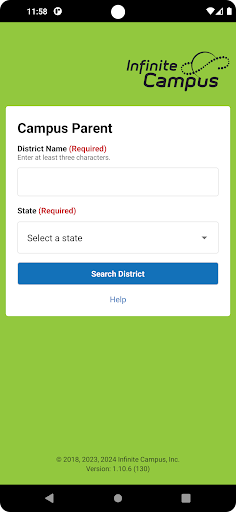
Setting up Campus Parent is simple and quick. The app is available on both Android and iOS platforms. To begin, download the app from your device's app store. Once installed, search for your district name and state. After selecting your district, you will need to enter your username and password, which are provided by your school or district. The registration process is straightforward, and linking your account to the school's database takes just a few moments. This seamless setup makes it easy for parents to start tracking their child's school activities immediately.
Key Features that Enhance Parental Involvement
Real-Time Access to Academic Information
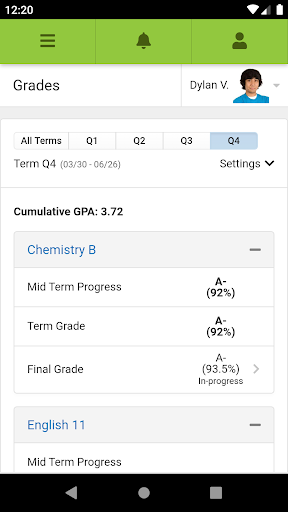
One of the most powerful features of Campus Parent is the ability to view grades and assignments in real-time. Parents no longer need to wait until report card day to find out how their child is performing. The app provides instant updates, giving you up-to-date insight into your child's academic progress. It also sends notifications for upcoming assignments, tests, and important deadlines, ensuring you're always in the loop without the need for constant checking.
Attendance Tracking and School Calendar
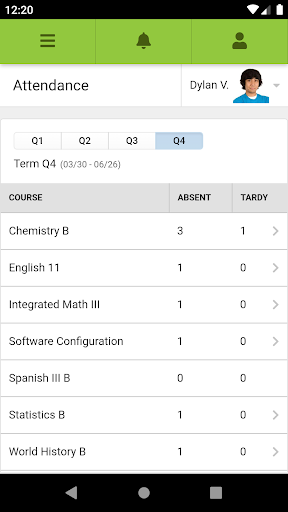
Keep track of your child's attendance through the app’s dedicated attendance tracker. This feature reassures parents by confirming their child's presence in classes. Additionally, the integrated school calendar consolidates key dates such as holidays, parent-teacher conferences, and school events, helping you plan your schedule effectively around school commitments.
Direct Communication with Educators
Communication is vital in supporting student success. Campus Parent offers a messaging feature that allows parents to contact teachers and school administrators directly from the app. Whether you have quick questions about an assignment or need clarification on your child's progress, the prompt messaging system ensures fast and convenient communication. Teachers can also send out announcements or updates, keeping you informed without sifting through emails or paper notes.
Ensuring Privacy and Compatibility
It's important to note that for privacy reasons, Infinite Campus does not maintain individual login information. Instead, your school or district provides the necessary credentials. To use Campus Parent, your school district must utilize the Infinite Campus student information system, and your account must be active. This setup guarantees that your child's data remains secure while providing you access to vital school information.
Why Parents Love Campus Parent
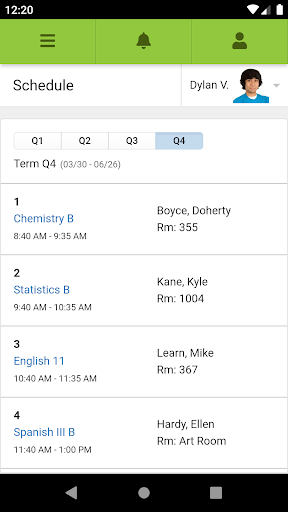
Overall, Campus Parent is a game-changer for busy parents wanting to stay actively involved in their child's education. Its user-friendly interface and comprehensive features make it easy to monitor grades, attendance, schedules, and communicate with educators. By providing real-time updates and seamless connectivity, Campus Parent reduces the need for endless questions and last-minute surprises, fostering a more engaged and informed parenting experience. If you haven't already tried the app, it's highly recommended for any parent looking to support their child's academic success while maintaining a manageable, stress-free approach to school involvement.
Pros
- Intuitive user interface facilitates easy navigation.
- Provides real-time updates on student progress.
- Secure login ensures data privacy.
- Supports multiple languages to improve accessibility.
- Allows customizable notifications for important alerts.
Cons
- Limited offline capabilities restrict usability without internet.
- Users have experienced occasional login difficulties.
- The interface may be overwhelming for new users.
- Limited options for customizing parent preferences.
- Depends on a stable internet connection for optimal performance.











