Explore the Nostalgic World of NES.emu (NES Emulator)
Are you craving the timeless charm of classic NES games? NES.emu is a powerful yet user-friendly NES emulator that transports you back to the golden age of 8-bit gaming, all from the convenience of your smartphone. Designed to support a wide range of devices, this open-source emulator offers a smooth and immersive experience, whether you’re revisiting old favorites or discovering vintage titles for the first time.
Advanced Features of NES.emu
This emulator is built on an advanced open-source core based on FCEUX, tailored to deliver minimal audio and video latency. Its minimalist user interface ensures straightforward navigation, making it accessible even for newcomers to retro gaming. Designed with versatility in mind, NES.emu supports everything from original Xperia Play devices to modern smartphones like the Nvidia Shield and Google Pixel phones, offering a seamless gaming experience across platforms.
Supported File Formats and Emulation Capabilities
NES.emu supports a variety of ROM formats, including .nes and .unf files, which can be compressed with ZIP, RAR, or 7Z archives for convenience. The emulator also emulates the Famicom Disk System via .fds files, allowing users to relive those classic floppy disk games by selecting the appropriate BIOS in the settings. Additionally, it features support for the VS UniSystem mode, where players can insert coins and compete like in authentic arcade setups.
Cheat Support and Customization
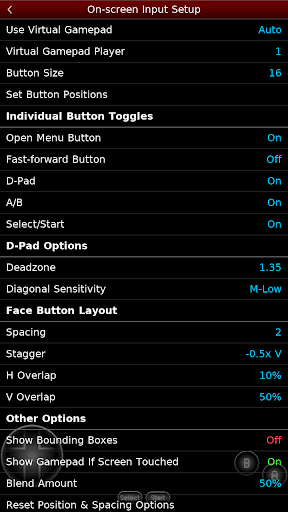
Gamers can enhance their experience with FCEU-compatible cheat files (.cht extension), which can be edited directly within the app. For those who enjoy aiming with light guns, NES.emu offers Zapper/Gun support, including touch-based aiming—tap to fire, or hold outside the display to simulate shooting away from the TV. The emulator also provides configurable on-screen controls and full support for external controllers via Bluetooth or USB, compatible with any HID device such as Xbox or PS4 controllers.
File Management and Compatibility
All ROMs are user-supplied; the app does not include any game files. It seamlessly integrates with Android's storage access framework, allowing you to open ROMs stored on internal memory, SD cards, or USB drives. This flexibility makes managing your game library straightforward and convenient.
Enhancing Your Retro Gaming Experience
With NES.emu, reliving the magic of classic NES titles becomes effortless. The app’s clean and intuitive interface makes setup quick and simple—just load your ROMs, customize controls to your liking, and start playing. Whether you prefer using on-screen buttons or external gamepads, NES.emu adapts to your setup for a personalized gaming session.
Save and Load Game States
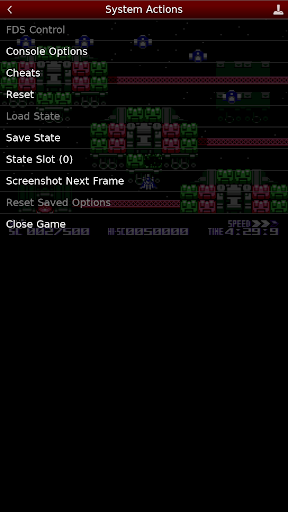
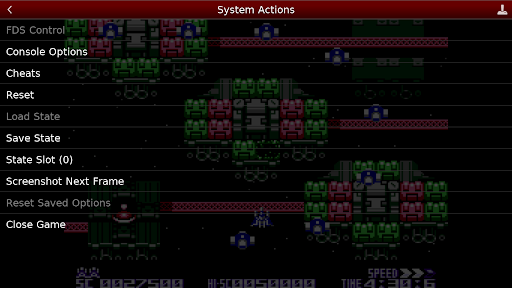
Remember those days of leaving your console on to preserve your progress? Now, with save and load states, you can save your game at any point and resume instantly, ensuring you don’t miss out on any gaming moments. This feature is particularly useful for challenging levels or when you only have a few minutes to play.
Perfect for Retro Gaming Enthusiasts
Whether you’re revisiting childhood favorites like Super Mario Bros and The Legend of Zelda or exploring classic titles for the first time, NES.emu offers an authentic and engaging experience. Its robust support for multiple file formats, cheat options, and input customization places it among the best retro game emulators on mobile platforms. Get ready to immerse yourself in a pixelated universe filled with adventure, challenge, and nostalgia.
Join the Community and Stay Updated
While the app is free of charge, you can follow the development progress and updates via GitHub or the official website. Contributing feedback or reporting issues helps improve the emulator, ensuring it remains compatible with a wide range of devices and continues enhancing your retro gaming experience.
Pros
- Highly customizable controls.
- Supports a variety of ROM formats.
- Provides fast and smooth gameplay.
- Free from ads and in-app purchases.
- Operates offline without issues.
Cons
- Limited to NES games only.
- Does not support multiplayer features.
- Requires users to provide their own ROM files.
- Occasional occurrence of bugs.
- User interface appears outdated.