





New York Post for Phone — A Fresh, Fast, Feature-Rilled News App
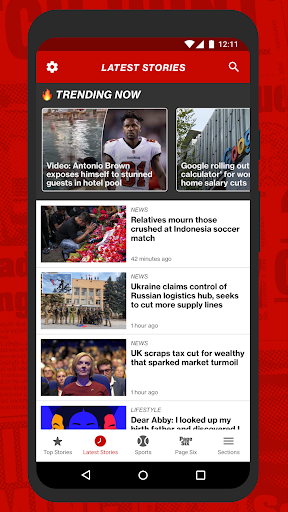
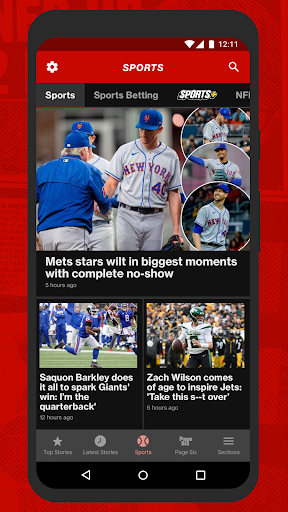
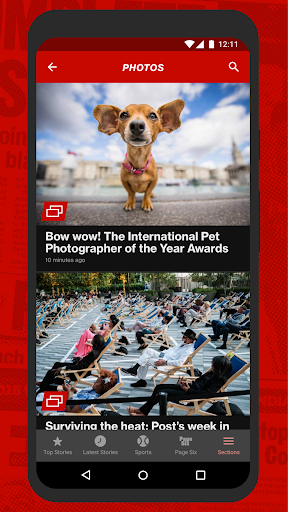
The New York Post app for Android and iOS brings the newsroom to your pocket with a clean, intuitive interface and a broad, reliable stream of coverage. It delivers breaking news, exclusive gossip, sharp business reporting, opinionated columns, and top-tier sports coverage in a format designed for quick reads on the go. The app streams you major stories in a highly visual package, with rich photos and videos that enhance every article. Whether you’re commuting, traveling, or just craving a quick briefing, this mobile news companion keeps you current with a tap. The experience is crafted to feel native on any device, with a focus on speed, clarity, and easy navigation between sections.
Version 4: A Better Reading Experience
The latest update upgrades performance and depth. Version 4 introduces a dedicated Top Stories tab that curates the most important articles you need to read now, selected by editors and refreshed frequently. The Latest Stories tab brings you every new piece as soon as it’s published, so you never miss a beat. You can jump straight to favored sections like Sports, Page Six, News, Metro, Trending, and more. Updates are available around the clock, ensuring you’re always in the loop with breaking news, exclusive gossip, insightful business reporting, opinionated takes, and comprehensive sports coverage. The update also expands multimedia, delivering more photos and video than ever before for a more engaging reading experience.
Key Features for Mobile Readers
Complete access to stories from all sections News, Metro, Sports, Business, Opinion, Entertainment, Fashion, Living, Media, Tech, Real Estate, and Page Six, The Post’s legendary gossip section
Enriched multimedia experience with hi-res photos, engaging galleries and thousands of video clips
Push notifications for breaking news, with your choice of categories
Greatly improved speed and performance
Dark mode
Offline access to all recently-downloaded content
Save articles to read later
Adjustable text size for an optimal reading experience
Designed to look great on any model of phone, with a UI that adapts to your device
Why It Stands Out on Android and iOS
The app merges breadth of coverage with a smooth, commuter-friendly experience. Navigation feels effortless whether you’re skimming the Trending section for a quick pulse check or diving into in-depth pieces on politics, entertainment, or business. Multimedia is a core strength, with high-quality photos, polished galleries, and a library of video clips that enrich stories without slowing you down. Notifications keep you informed without overwhelming you, and offline reading makes subway rides or travel painless. The inclusive gossip content from Page Six adds a compelling edge for fans of entertainment and pop culture, while the solid sports section keeps you up to date on scores, highlights, and analysis. All of this is wrapped in a design that preserves readability and speed, so you stay informed anywhere, anytime.
Experience and SEO-Vocused Design Notes
This description highlights the app’s mobile-first approach, emphasizing fast load times, rich media, and a well-organized front page with top stories and latest stories. By focusing on terms like New York Post app, Android version, iOS compatibility, Top Stories, Latest Stories, push notifications, offline reading, dark mode, and Page Six gossip, the text supports search visibility for readers seeking a reliable mobile news source. Whether you search for the NY Post app on Android or iOS, you’ll find this feature set appealing to news junkies and casual readers alike.
User Experience Snapshot
The New York Post for Phone feels like having a compact newsroom in your pocket. Its design is clean, intuitive, and responsive, which translates to quick article loads and smooth transitions between sections. The ability to tailor what you see—by selecting categories for notifications or adjusting text size—makes it easier to stay informed on your terms. For readers who value a mix of hard news, gossip, business insights, and sports coverage, the app offers a balanced, appealing package that keeps you engaged without feeling cluttered. In short, it’s a dependable companion for staying current in a fast-paced world.
Pros
- Intuitive, easy-to-navigate interface.
- Broad selection of news categories.
- Real-time updates and notifications for breaking news.
- High-quality multimedia content available.
- Customizable reading preferences.
Cons
- Ads can be intrusive at times.
- Limited offline reading capabilities.
- Some features require an account.
- Occasional crashes have been reported.
- No dark mode option.