
Discover the Features of the MyTSA App: Your Ultimate Airport Companion
The MyTSA app has garnered prestigious recognition, being named the Best Government Mobile App by the American Council for Technology and Industry Advisory Council, and earning a spot among the Top 15 Government IT Innovators recognized by TSA. Designed to streamline your airport experience, this innovative mobile application provides 24/7 access to vital information that travelers frequently seek from the Transportation Security Administration. Whether you're a seasoned traveler or a casual flyer, MyTSA aims to make your journey smoother, more predictable, and less stressful.
What Does MyTSA Offer?
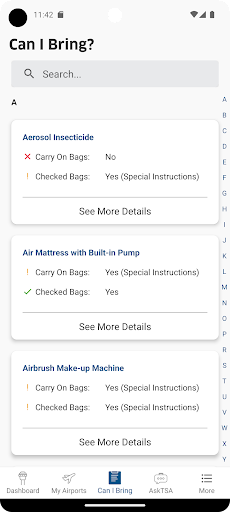
At its core, MyTSA delivers real-time updates and helpful tools that empower travelers to plan better and stay informed. One of its standout features is the ability to quickly search for items allowed through security. Ever wondered if that bottle of shampoo or snack can pass through TSA checkpoints? With MyTSA, a simple search clears up these doubts instantly, helping you avoid the awkward moment of having to discard items at the checkpoint. This focus on providing practical, up-to-date information has established MyTSA as an invaluable resource for efficient airport processing.
Key Features of MyTSA
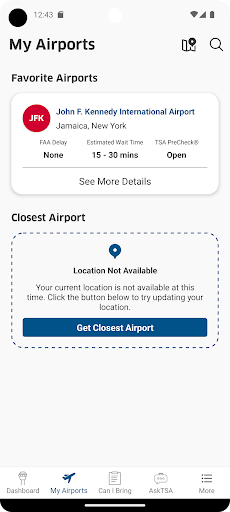
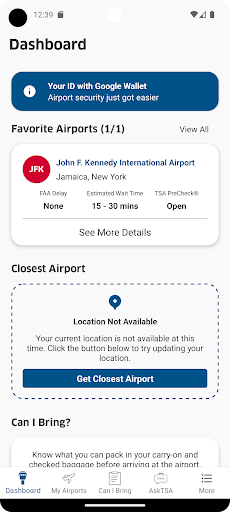
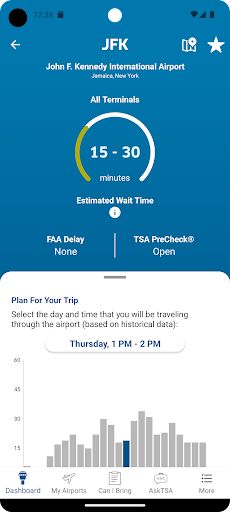
- Real-time Security Wait Times: Access crowd-sourced data about TSA checkpoint wait times at airports across the country. This feature helps travelers plan their arrival time and avoid long lines, saving valuable time.
- Historical Airport Traffic: Check how busy an airport might be on your specific travel date and time, enabling better trip planning and reducing waiting around.
- Airport Status & Delays: Stay informed about delays, closures, and other important updates that could impact your travel schedule.
- Weather Conditions: Current weather updates at your favorite airports ensure you're prepared for any weather-related disruptions.
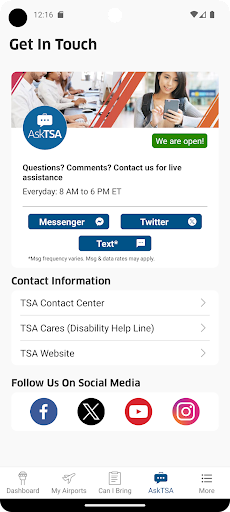
- Live Assistance via AskTSA: Need personalized help? The app integrates with social media channels like AskTSA, allowing you to request live assistance during your travel process.
- TSA PreCheck® Support: Discover which airports and airlines support TSA PreCheck® and learn how to sign up for expedited screening.
- Check-In Quick Tips: Access TSA guidelines to prepare effectively and get through security checkpoints faster.
Why Use MyTSA? The Benefits for Travelers
Travel can often be unpredictable, but with MyTSA, you gain a trusty travel partner that provides practical solutions. The app helps you avoid unnecessary stress by offering real-time data on security lines, airport delays, and crowd levels—transforming your travel experience from frantic to relaxed. The crowdsourced wait time feature is especially beneficial during peak hours, giving you an approximate idea of how long your wait might be — but it’s always a good idea to verify with airport staff for the most accurate info.
Ease of Use and Accessibility
Designed with user-friendliness in mind, the MyTSA app boasts a clean, straightforward interface. Navigating between features — whether checking wait times, airport status, or TSA PreCheck details — is quick and intuitive. Even those who are less comfortable with technology will find the app accessible, making it an essential tool for modern travelers seeking efficiency and peace of mind.
Final Thoughts: Is MyTSA Right for You?
In today’s fast-paced world of travel, unpredictability is often unavoidable. However, appreciating the practical benefits of the MyTSA app can significantly reduce your airport stress. While it might not offer all the bells and whistles of high-end travel apps, its core functions focus on delivering essential, real-time information — from wait times to airport delays — that travelers need most. Best of all, it is a free tool, accessible on your mobile device, and designed to support your journey at every step. Download MyTSA for a more informed, smooth, and worry-free flying experience on your next trip.
Pros
- Real-time airport security wait times
- Flight delay information
- Airport amenities guide
- TSA PreCheck availability
- User-friendly interface
Cons
- Limited airport coverage
- Occasional data inaccuracies
- Requires internet connection
- No offline mode
- Ads can be intrusive