Introduction to Howbout: The Social Calendar Made for Friends
Imagine a shared calendar designed specifically for friends that makes planning fun and effortless. That’s Howbout: the innovative social calendar app that transforms traditional scheduling into a lively, collaborative experience. Whether you're organizing a weekend outing or coordinating a weekly meetup, Howbout combines the convenience of a calendar with social networking features to keep everyone in the loop. With its sleek interface and powerful functionalities, this app has become a must-have for groups seeking seamless coordination without the chaos of endless messaging.
Having gained popularity on platforms like TikTok and featured by major outlets such as Apple, Business Insider, BBC, MailOnline, and TechCrunch, Howbout is more than just a calendar—it's a social hub built for real-time interaction, making it easy to plan, share, and stay connected with friends.
Core Features of Howbout
Shared Calendar
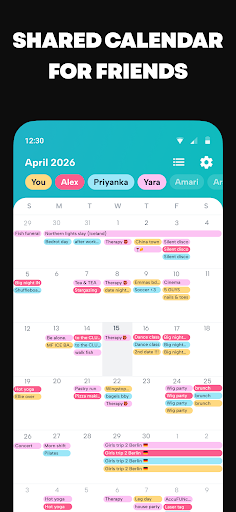
Easily create shared calendars and group planners to keep track of what everyone is up to. This feature fosters collaboration by allowing group members to see each other's schedules at a glance, eliminating the need for confusing group chats about availability.
Color-Coded Events
Personalize your planning experience by assigning colors to your events and shared calendars. This visual organization helps you quickly identify who is doing what, making your calendar more intuitive and fun to browse.
Planning and Invitations
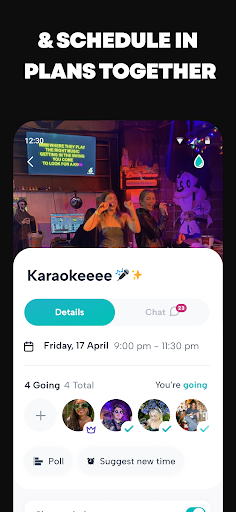
Move beyond basic messaging—create detailed events, add notes, set reminders, include descriptions, locations, alerts, polls, memos, countdowns, and even fun header images or GIFs. Easily invite friends via links and keep all event details in one place, ensuring everyone’s on the same page.
Availability Sharing
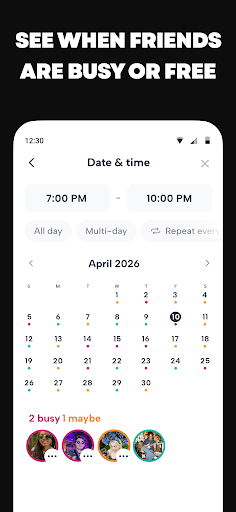
See when friends are free or busy by sharing your availability. This makes finding the perfect time for group hangouts or special occasions a breeze, reducing the endless back-and-forth usually involved in coordinating plans.
Customization and Personalization
Express yourself by adding a profile picture, selecting colors that match your style, and tailoring your Howbout setup to reflect your personality.
Privacy and Control
Decide who can see what by customizing sharing and privacy settings for individual events, groups, or friends. Maintain control over your information and ensure your privacy is protected.
Communication and Social Interaction
Built-in Group Chat and DMs
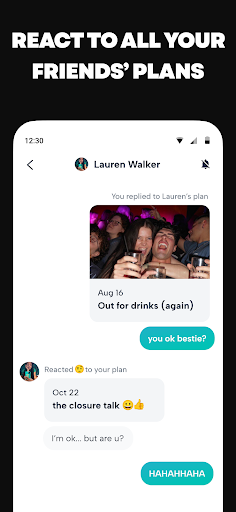
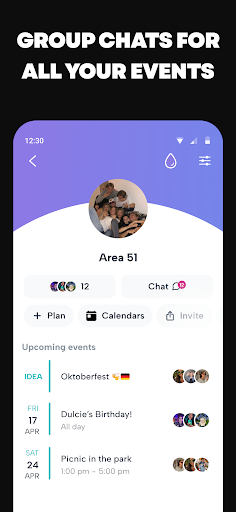
Each group or event comes with a dedicated chat, making it simple to discuss plans, share updates, or send quick messages—all within the app. Personal direct messages (DMs) are also available for private conversations.
Notifications and Activity Feed
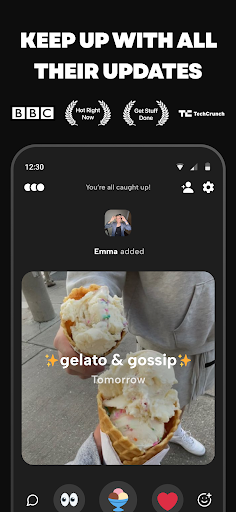
Stay informed with notifications about your friends’ activity, new events, reactions, and updates. The friends-only activity feed provides a fun way to browse your friends’ latest plans and adventures—perfect for casual snooping or catching up.
Reacts and Engagement
Show support or excitement by sending reactions to friends’ updates, plans, or events. This social feature adds an interactive layer, making planning more engaging and personal.
Seamless Calendar Integrations and Customizations
Sync with Other Calendars
Already using other calendar apps? No problem! Howbout allows you to sync with Google Calendar, Apple Calendar, Microsoft Outlook Calendar, and even subscribe to specialized calendars such as sports schedules or moon phases. Integrate your work, school, or personal calendars effortlessly.
Calendar Widgets
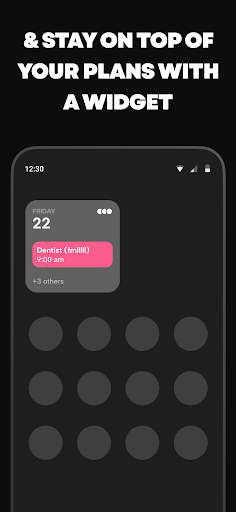
Stay on top of your schedule with handy widgets that display your daily plans right on your home screen. No need to open the app—simply check your widget for a quick overview.
Media Sharing and Invitations
Enhance your events by sharing pictures and videos directly within calendar entries, chats, or group messages. Planning becomes more lively when everyone can contribute fun media updates.
Sending invites is straightforward—just share a link and invite anyone to join your plans effortlessly, making coordination with new friends or acquaintances easy and quick.
Final Thoughts on Howbout
If you’re tired of chaotic group chats and scattered planning, Howbout offers a sleek, social solution to streamline your scheduling needs. Combining the clarity of a calendar with the social interaction of a network, it’s perfect for friends, family, or any group wanting to stay connected and organized.
Designed for both Android and iOS, this app makes planning enjoyable and hassle-free. With features like shared calendars, customization, notifications, media sharing, and integrations, Howbout redefines how you manage your social life.
So, why not give Howbout a try? Download it today, gather your friends, and turn planning into part of the fun!
Pros
- Seamless event scheduling
- Integrated chat feature
- User-friendly interface
- Cross-platform availability
- Customizable notifications
Cons
- Limited integration with other apps
- Occasional syncing issues
- Requires internet connection
- No offline mode
- Limited color-coding options