FreeStyle LibreLink - US App Overview
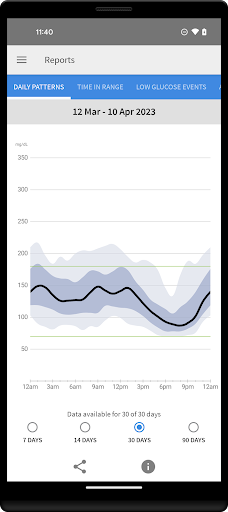
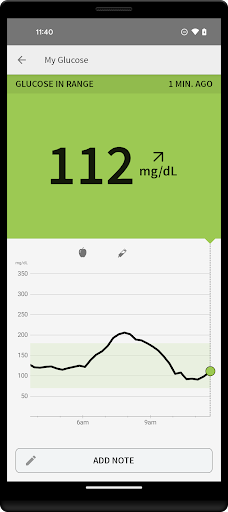
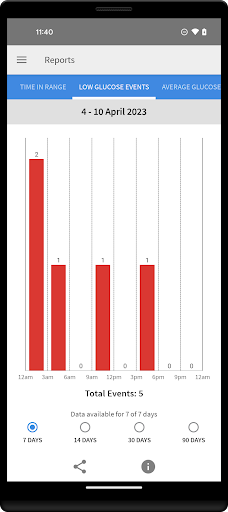
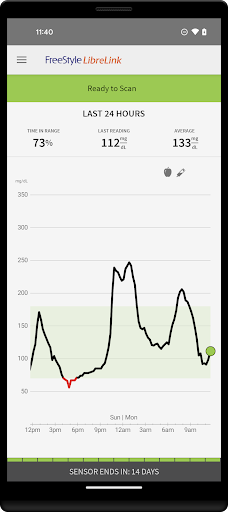
The FreeStyle LibreLink app lets you monitor your glucose directly from your smartphone. By holding your phone near your FreeStyle Libre Sensor, you can check your glucose without fingerpricks. The app works with both 10-day and 14-day sensors, giving you flexible options for how you monitor your glucose. You can use LibreLink to view your current glucose reading, see the trend arrow, and look back at your glucose history. You can add notes to track meals, insulin use, and exercise. The app also generates glucose reports, including the Ambulatory Glucose Profile, and can connect you with healthcare professionals through LibreView to share data securely.
Smartphone Compatibility
Compatibility can vary by device and operating system. Check which phones are supported for LibreLink to ensure the best experience on your iOS or Android device.
Using Your App and Reader with the Same Sensor
If you want to use both the FreeStyle Libre Reader and the LibreLink app with the same sensor, start the sensor with the Reader first and then scan with your phone. Data from the app and the reader don’t automatically sync with each other. For a complete view of your data, scan with each device as recommended and ensure you periodically upload data to LibreView so you can review a full report.
App Information
LibreLink is intended for measuring glucose levels when used with a sensor. For detailed usage, refer to the in-app User’s Manual. If you need a printed manual, it can be obtained through official channels. The app requires registration with LibreView and is designed for users managing diabetes with sensor-based monitoring. The sensor housing and related brand marks are trademarks. Before using the app, review labeling and the interactive tutorial available within the app to learn how to operate the system.
FreeStyle LibreLink - US App Experience: A Personal Review
Getting Started with Ease
Setting up the FreeStyle LibreLink - US app is straightforward. Download it from the app store, follow the on-screen instructions, and you’re ready to go. The interface is user-friendly and intuitive, which matters when you’re balancing diabetes care with daily life.
Scan and Go
One of the standout features is the ability to scan your glucose sensor with your phone. Yes, you can skip finger pricks and test strips. A quick scan gives you your glucose reading in an instant. It feels almost like magic and is a real game-changer for anyone tired of traditional methods.
Data at Your Fingertips
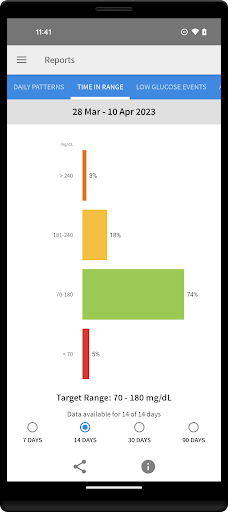
The app doesn’t stop at giving you a single number. It compiles your data into clear graphs and charts, helping you track glucose trends over time. Whether you’re tech-savvy or not, the layout is straightforward and easy to understand without needing a degree in data analysis.
Share Your Progress
You can share your glucose data with your healthcare provider or family members. This transparency can be incredibly helpful during appointments or simply keeping loved ones in the loop. The added accountability can be a strong motivator to stay on top of health goals.
Alerts and Reminders
Personalizable alerts help you remember to check your levels, which is especially useful during busy days. It’s like having a gentle nudge to stay on track without constant monitoring.
Final Thoughts
Overall, the FreeStyle LibreLink - US app is a solid tool for anyone managing diabetes. It’s easy to use, packed with practical features, and can streamline your daily routine. If you’re looking to simplify glucose monitoring and improve data visibility, this app is worth checking out and trying for yourself. Happy scanning!
Pros
- User-friendly interface for easy navigation.
- Quick access to glucose monitoring data.
- Seamless integration with Libre sensors.
- Customizable alerts for glucose levels.
- Share data easily with healthcare providers.
Cons
- Requires compatible smartphone for use.
- Limited sensor compatibility.
- May drain phone battery quickly.
- Data accuracy depends on sensor placement.
- Subscription required for full features.